17
EN
Select “AUTO” mode to deactivate using the menu (ref. subsection “Activate
a forcing”).
3-8 Options
This enables various clock parameters to be set.
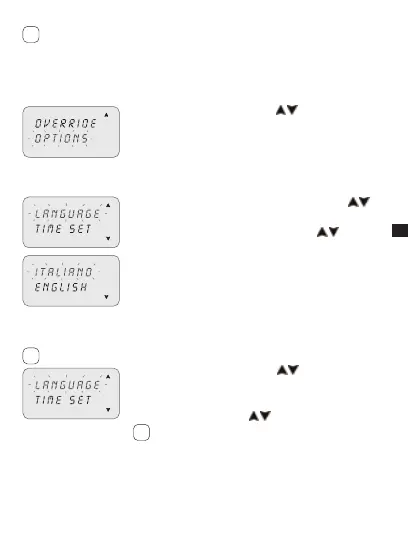
Select “OPTIONS” using keys 1. .
Press2. OK to confirm.
The sub-menus follow.»
3-8-1 Languages
This enables the desired interface language to be set.
Select the “LANGUAGE” sub-menu using keys 1. .
Press2. OK to confirm.
Select the desired language using keys 3.
.
Press4. OK to confirm.
3-8-2 Date/Time
This enables the date and time of the equipment to be set.
If the equipment is reset the date must be set again.
Select “TIME SET”1. using keys .
Press2. OK to confirm.
Set YEAR, MONTH, DAY, HOUR, MINUTES, 3.
respectively, using keys
.
Single pressure of keys moves field by minutes.
Prolonged pressure of keys moves field by hours
Press4. OK to confirm.
Date and time are set.»
Followed by “SUM/WIN” setting.»
i
i
i



 To Next Page