19
EN
It is necessary to set the correct number of hours with respect to the Frankfurt
position.
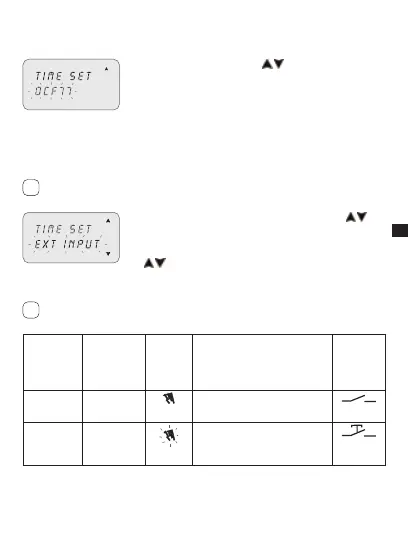
Select “DCF77” using keys 1. .
Press2. OK to confirm.
Set the T ZONE number as described in the previous 3.
operations from 4 to 5.
3-8-3 External input
This enables manual ON and OFF forcing functions to be executed from a remote
position, (ref. section 3), by means of buttons or switches.
Function not available for the SYNCHRO models (the “EXT INPUT” item is not
available in the “OPTIONS” menu).
Select the “EXT INPUT” sub-menu using keys 1. .
Press2. OK to confirm.
Select switching type (ref. table below) using keys 3.
.
Press4. OK to confirm.
In order to deactivate settings made, repeat actions from 1 to 2.
Press OK to confirm “DEACTIVAT” selection.s
Display
selection
Channel C1
or C2 (twin
channel)
Symbol Function External
control
Perm On
off
Permanent forcing of channel
on ON or OFF.
temp
-
Temporary forcing of the chan-
nel until the next switching of a
program set previously.
i
i



 To Next Page