Pos: 26 /DinA 4 - Anleitungen Online/Ueberschrif ten/2./Bedi enaktionen @ 20\mod_1323 262294281_1 5.docx @ 111911 @ 2 @ 1
4.2 Control actions
Pos: 27 /DinA 4 - Anleitungen Online/Ueberschrif ten/3./Sprec h- und Vide overbindung @ 20\mod_132326 2368700_15.doc x @ 111927 @ 3 @ 1
4.2.1 Incoming call / In a call
Pos: 28 /DinA 4 - Anleitungen Online/Inhalt/KN X/DoorEntry/8 3220-AP-xxx/Sprech- und Videover bindung - 832 20-AP-xxx @ 20\mod_13232 62341852_15.d ocx @ 111919 @ @ 1
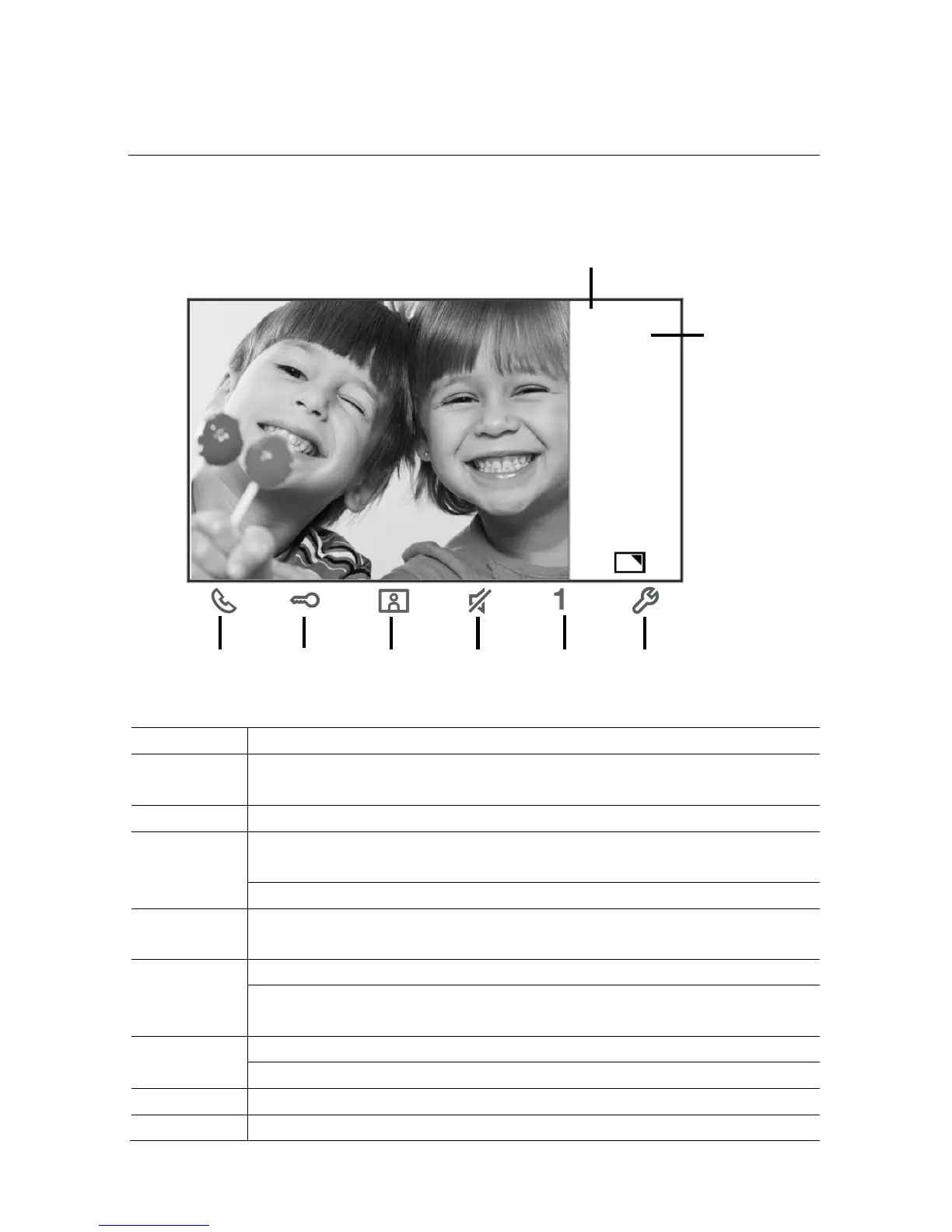
Fig.
Incoming call / in a call
During calls, the following functions are available:
Press this button to accept the incoming call; In a call, press this button to
end the call.
Press this button to open the door where the call is from.
Press this button to survey the analog camera of the outdoor station if
Hold this button to take a snapshot.
Press this button to mute the ringtone of an incoming call; in a call, press
this button to mute the microphone.
Press this button to activate the function of the programmable button.
If the function "release 2nd-lock" or "control switch actuator" is assigned to
The programmable button, press this button to activate the function.
Press this button to enable or disable the full-screen function.
Hold this button to enter the brightness and volume setttings menu.
Time left of the connection.
Number of outdoor stations
Pos: 29 /Busc h-Jaeger (Ne ustruktur)/Modul- Struktur/Onlin e-Dokumentati on/Steuermodul e - Online-D okumentation (--> F ür all e Dokument e <--)/+++++++ +++++ Seitenumbruch +++ +++++++ ++ @ 9\mod _126889866809 3_0.docx @ 5 2149 @ @ 1














 To Next Page