Pos: 30 /DinA 4 - Anleitungen Online/Ueberschrif ten/3./Tuer oeffnen @ 20\mod_132326 3277453_15.doc x @ 111935 @ 3 @ 1
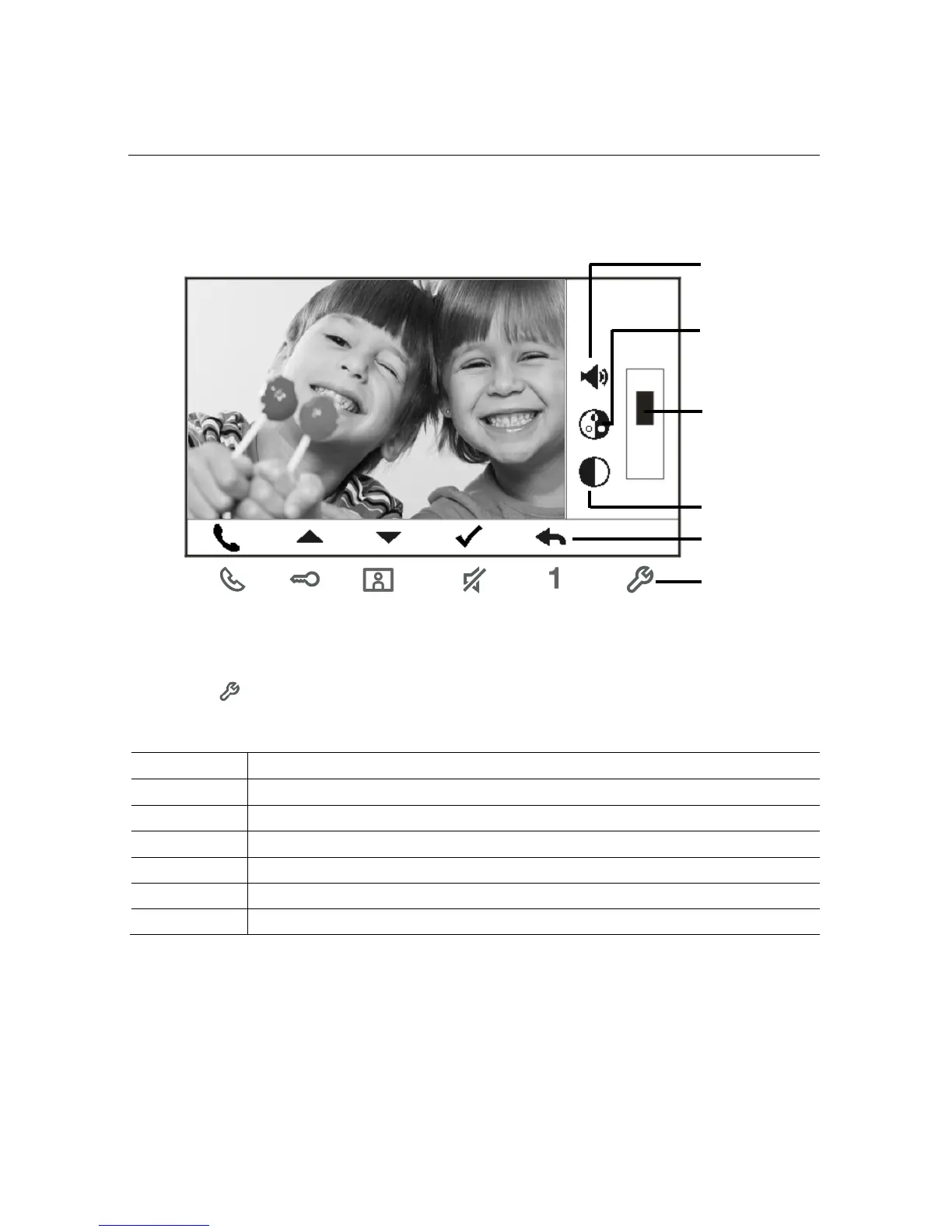
4.2.2 Display & volume settings during calling
Pos: 31 /DinA 4 - Anleitungen Online/Inhalt/KN X/DoorEntry/8 3220-AP-xxx/Tuer oeffn en - 83220- AP-xxx @ 20\mod_ 13232679584 79_15.docx @ 112109 @ @ 1
Fig.
Display & volume settings during calling
Hold button for 3s to enter the display & volume setttings menu during a call or
conversation, the following functions are available.
Navigation buttons ( up / down / confirm / cancel, etc)
Press the navigation buttons as needed.
Speech volume(only can be adjusted during conversation)
Pos: 32 /Busc h-Jaeger (Ne ustruktur)/Modul- Struktur/Onlin e-Dokumentati on/Steuermodul e - Online-D okumentation (--> F ür all e Dokument e <--)/+++++++ +++++ Seitenumbruch +++ +++++++ ++ @ 9\mod _126889866809 3_0.docx @ 5 2149 @ @ 1














 To Next Page