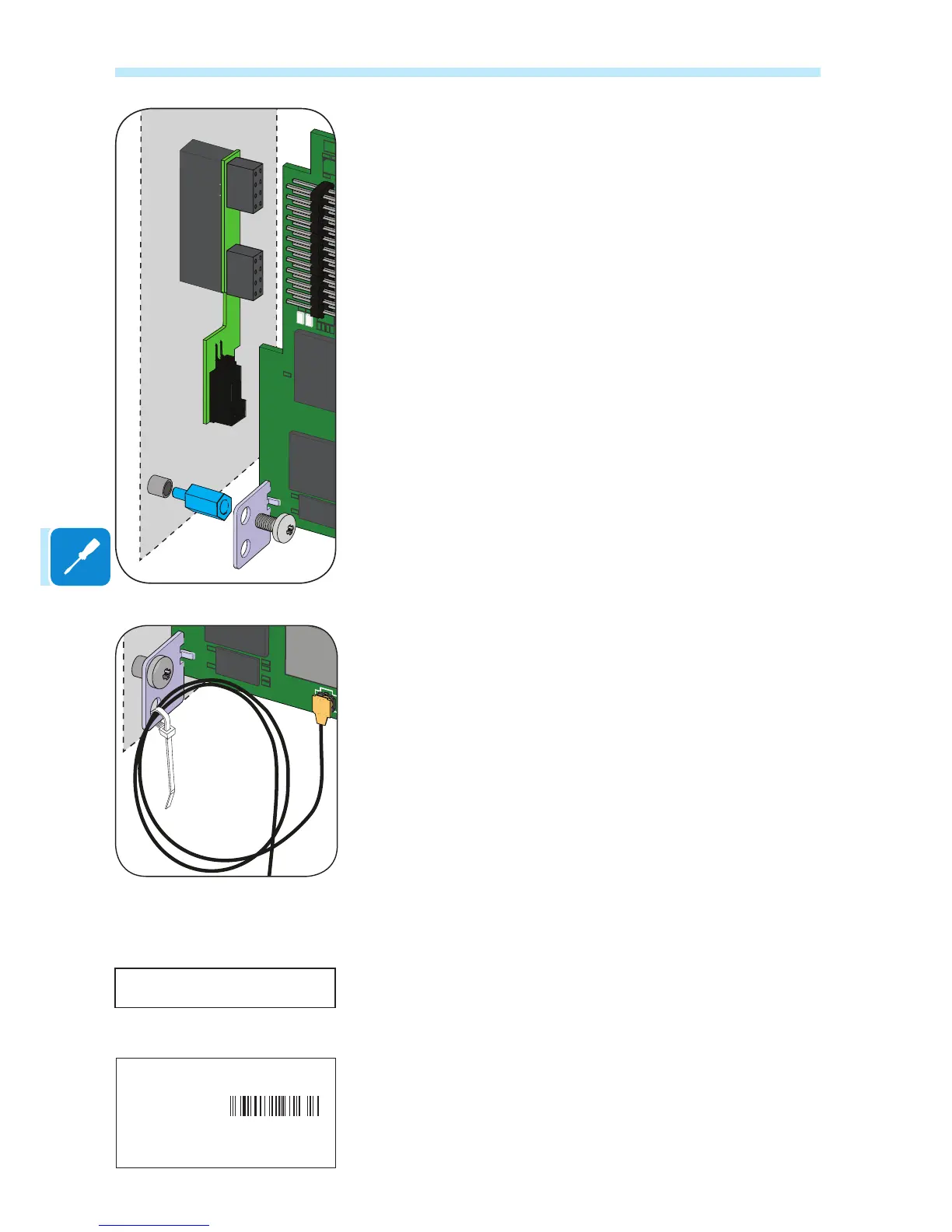
Note for installation on inverters equipped with Arc Fault device
In inverters with the ARC FAULT device installed, an additional board is
already connected to the expansion slot to which the VSN300 board is
to be connected.
In this case, use the spacer supplied with the assembly kit to allow
mechanical fastening using the screw of the inverter board.
The second hole on the bracket can be used to secure any excess
antenna connection cable, using the strap supplied.
Make sure that the antenna cable does not touch live parts during
operation
Once installation has been completed, close the inverter cover and apply
the following labels:
FCC label: This label is supplied with the VSN300 Wi Logger Card and
must be positioned where it is clearly visible on the outside of the inverter
in which the board is installed. The FCC label contains the FCC ID of the
VSN300 Wi Logger Card.
Identication label: This adhesive label is necessary so that all the
identication data of the board is available and should be placed in a
dedicated area inside the quick installation guide supplied with the
product.
Contains FCC ID: X6W-3N16E
ABB
VSN300 WIFI LOGGER CARD
SN: YYWWSSSSSS
MAC: XX:XX:XX:XX:XX:XX
PRODUCT KEY: XXXX - XXXX - XXXX - XXXX


 To Next Page