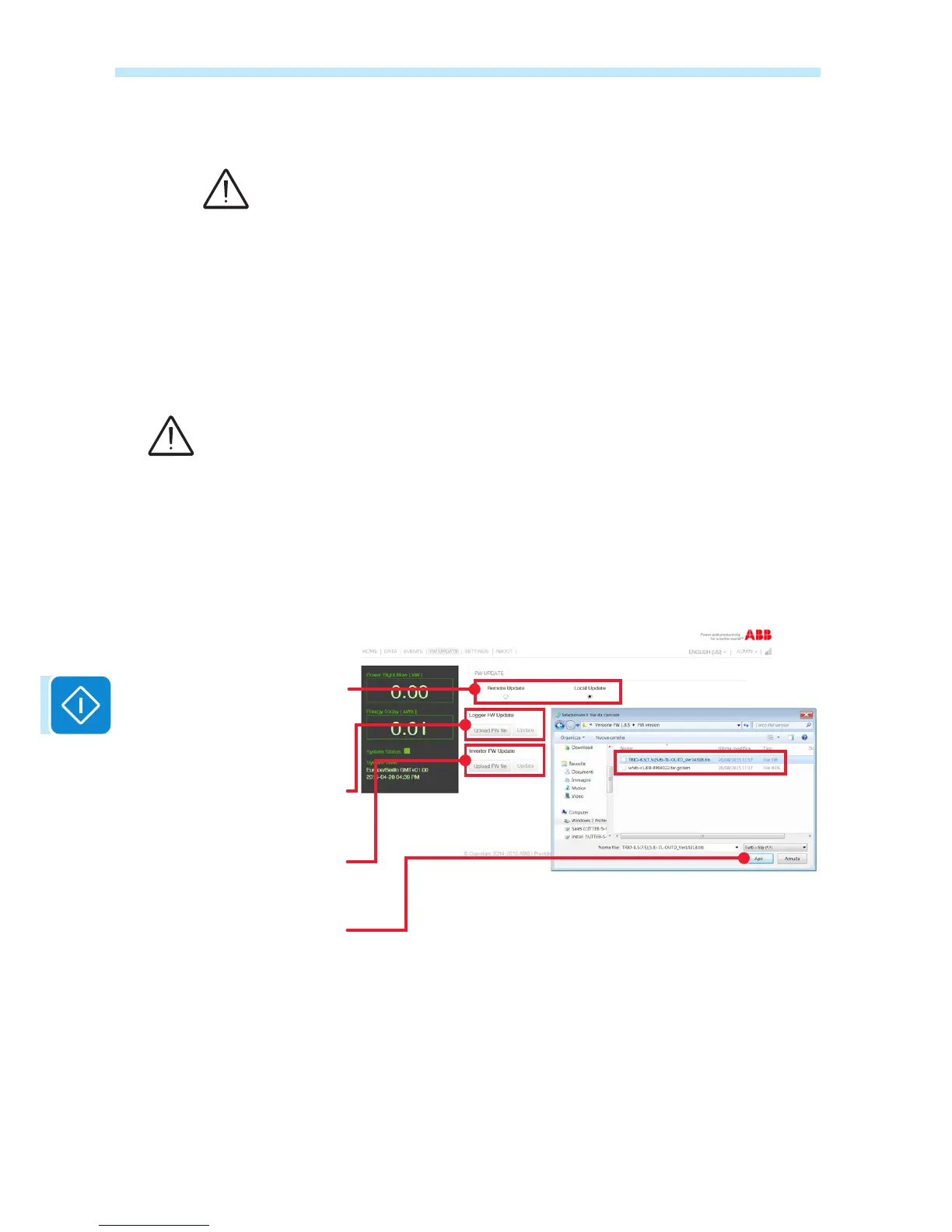
Local update
As an alternative to the procedure using the Internet, or for boards
congured in «AP Mode», the board or the inverter can be updated via
an upload from a local device.
To upload the .tib or .ben le of the Firmware click on «Upload FW le».
Once the user has reached the local folder containing the .tib or .ben le,
select this le and start transferring it into the memory of the VSN300
board by clicking on «OPEN».
If the transfer fails, the message «File Upload failed» will appear below
«Upload FW le».
The le upload can fail for a number of different reasons, usually due to the Wi-Fi network
connection. Make sure that the device used for the upload is quite close to the router or the
inverter and that the Wi-Fi signal is not too weak. Also ensure that the le you are attempting
to transfer is the le which has been ofcially released by ABB and that it is not corrupted. The
«UPDATE» key is disabled until the le has been transferred completely. If an error continues
to appear, contact ABB technical department for further information.
Once the upload has been completed successfully, the update stage can
be launched, i.e. the new FW can be installed by clicking on «UPDATE».
Choose from Firmware update via
access to the ABB remote servers
or by loading into the internal
memory of the local device
Upload from the local device
and update the Firmware of the
VSN300 board
Upload from the local device
and update the Firmware of the
inverter
Upload the le containing the
updated Firmware from the local
device and start the transfer
Files with the .tib or .ben extension
must be loaded into a local folder
on the Wi-Fi device which the
user is using to navigate the user
interface pages of the VSN300
board


 To Next Page