Software setup
Different devices can be used to start the setup procedure for the boards,
provided they have a Wi-Fi connection.
Switch on the inverter and physically connect the AC and DC grid. The
VSN300 Wi Logger Card switches on automatically and after 60 seconds
its own Access Point will be activated. This Access Point is identied by
the device selected for the setup (tablet, smartphone or PC).
The screens shown below refer to a tablet with an Android operating system. Screens on
other devices or operating systems may differ.
The rst setup of the screen can also be carried out using a smartphone
or tablet on which the Plant Viewer for Mobile App has been installed. For
further information, refer to the documentation available on http://www.
abb.com/solarinverters.
Connection to the home Wi-Fi network
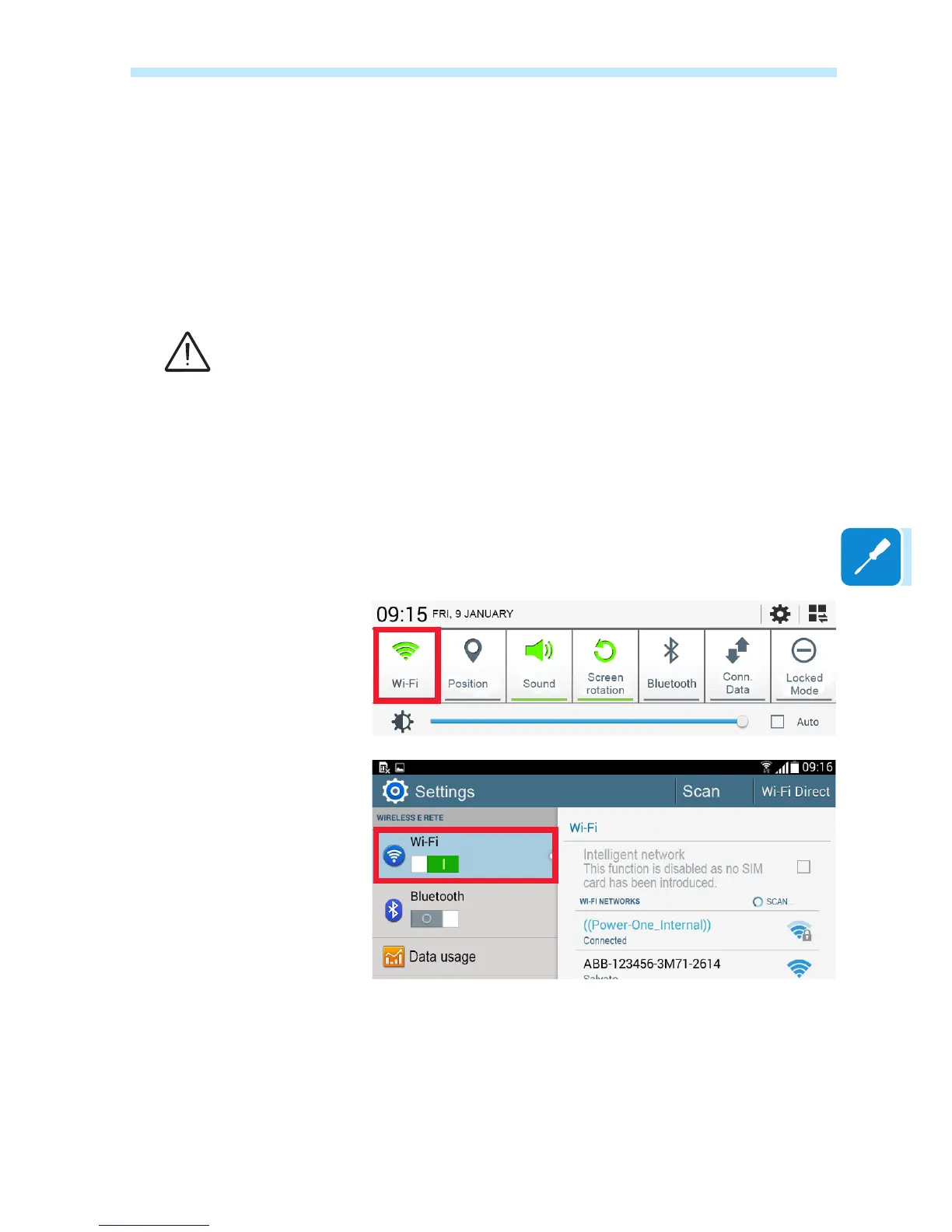
Enable Wi-Fi on the device which is being used for the board setup
(tablet, smartphone or PC) and connect it to the Access Point created
by the board.
A network with the name ABB-SSSSSS-PPPP-WWYY should appear in
the list of networks, where:
SSSSSS = Inverter serial number
PPPP = Inverter part number
WW= Inverter week of production
YY= Inverter year of production
Once the network has been created by the inverter, start the connection


 To Next Page