2-14 Chapter 2
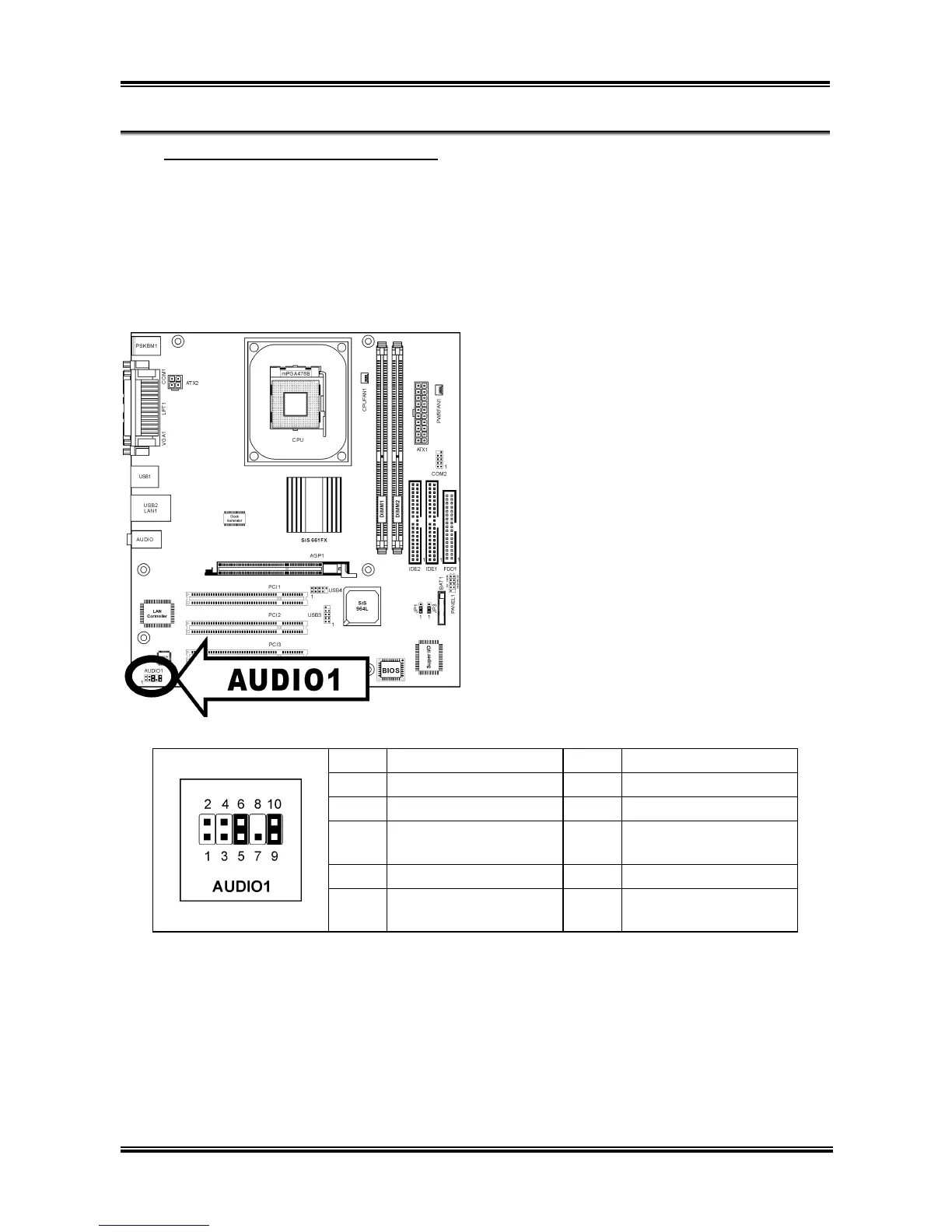
(12). Front Panel Audio Connection Header
When using computer cases with audio connectors at front panel, you can change the Line-Out and
Mic-In connectors from rear edge I/O port array to the front edge I/O port array for easier access.
• To use the audio connector at front panel, remove all the jumpers on this header, and then connect
to front panel by the extension cable provided with the chassis.
• To use the audio connector at rear panel, disconnect the extension cable, attach the jumpers back at
pin 5-6, and pin 9-10 (default setting).
Pin Pin Assignment Pin Pin Assignment
1 Audio Mic. 2 Ground
3 Audio Mic. Bias 4 VCC
5
Speaker Out Right
Channel
6
Speaker Out Right
Channel Return
7 X 8 NC
9
Speaker Out Left
Channel
10
Speaker Out Left
Channel Return
SG-72



 To Next Page