Installing the Motherboard 2-9
User’s Manual
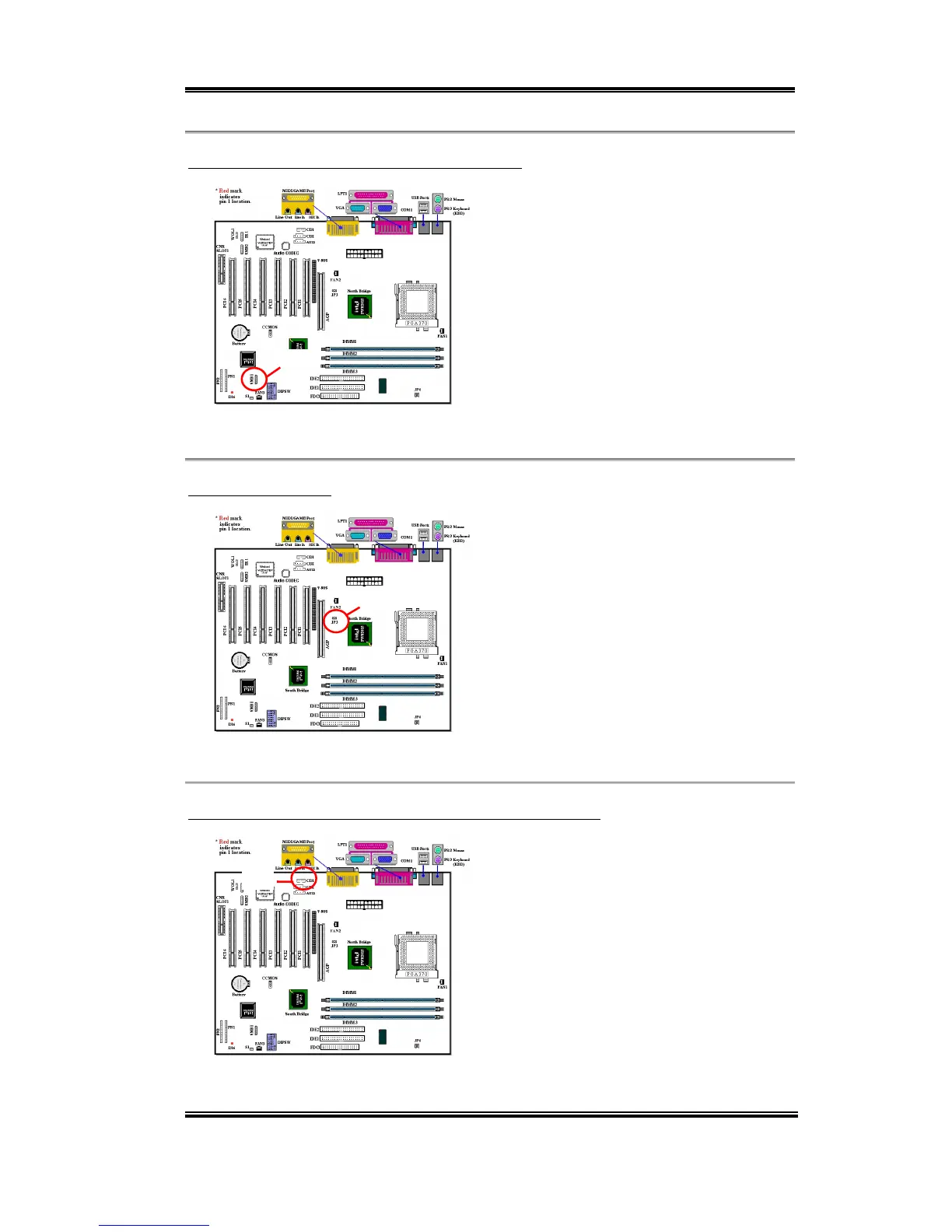
SMB1
RT2
CD1
(5) SMB1: System Management Bus Connector
This connector is reserved for system
management bus (SM bus). The SM bus is a
specific implementation of an I
2
C bus. I
2
C is
a multi-master bus, which means that
multiple chips can be connected to the same
bus and each one can act as a master by
initiating a data transfer. If more than one
master simultaneously tries to control the
bus, an arbitration procedure decides which
master gets priority.
Note: Watch the pin position and the orientation
(6) RT2 Thermister:
The RT2 is a thermistor used to detect the
system environmental temperature. It may
also be called a system temperature detector.
You can attach one end of the two-threaded
thermal cable that comes with the
motherboard to the RT2 header, then tape
the other end of the thermal cable on the
CPU’s heat sink. Generally speaking, the
location you tape the thermistor should be as
near the CPU chipset as possible and avoid having it near the CPU fan.
(7) CDIN1: Internal CD-ROM Drive Audio Cable Header
This header is for the internal CD-ROM
drive audio cable connection. Please check
your audio cable attached with the CD-
ROM drive to see which type of connector
you have and then plug it into this header.



 To Next Page