30
3.5.3 Check Measured Values & Figures detected by UPS
3.5.3.1 If you would like to check the measured values & figures detected by the
UPS, please use scroll up
and scroll down key pads. When you use
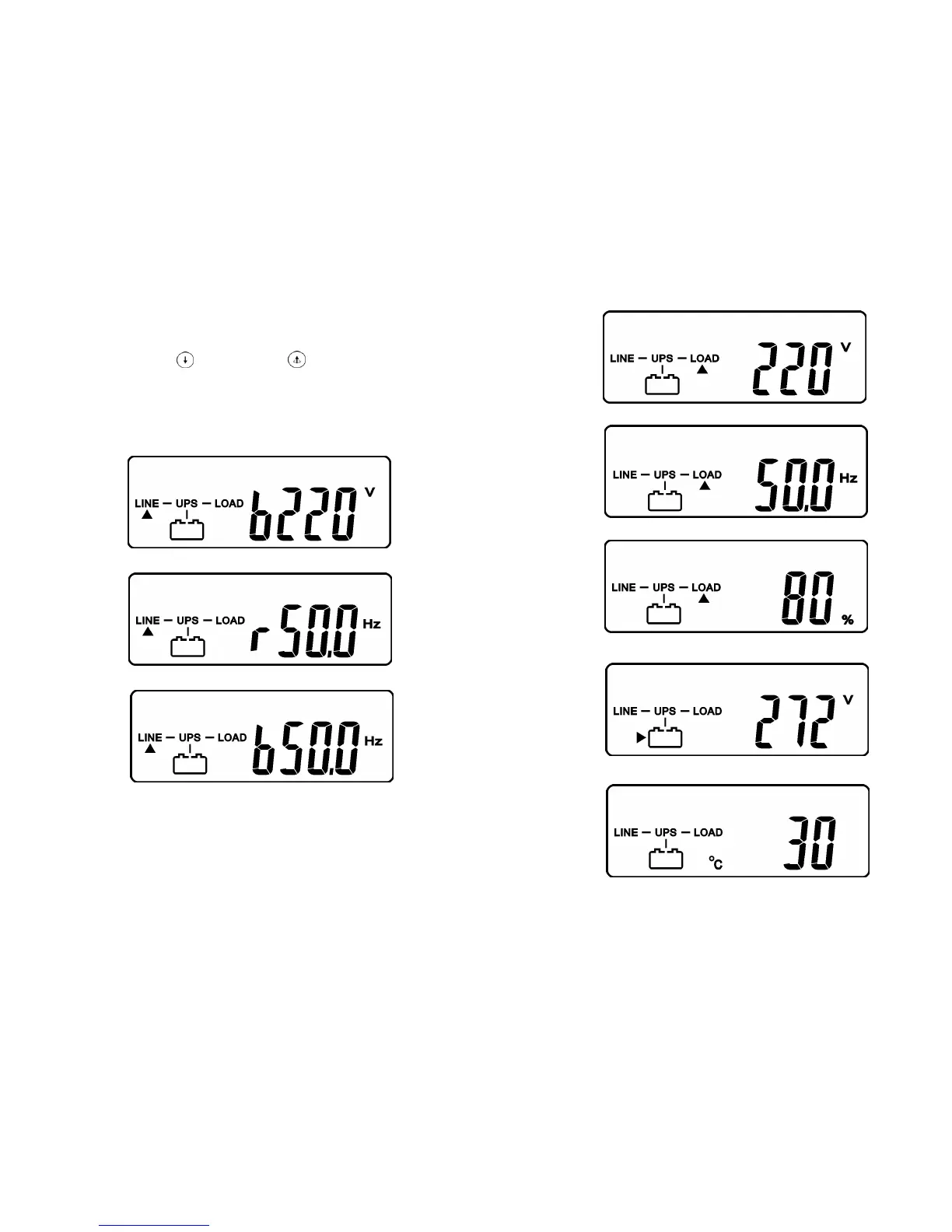
scroll down key pad, the LCD display will illustrate as Drawing C(Voltage from
Utility Input) ÆDrawing I1(Voltage from Bypass Input) Æ Drawing J(Frequency
from Utility Input) ÆDrawing K(Frequency from Bypass Input) ÆDrawing L(UPS
Output Voltage) ÆDrawing M(UPS Output Frequency) ÆDrawing N(UPS Output
Load %)ÆDrawing O(UPS Battery Voltage) ÆDrawing P(UPS Inner
Temperature).
I1
* It shows voltage comes from Bypass Input
J
* It shows frequency from Utility Input.
K
* It shows frequency from Bypass Input.
31
L
* It shows UPS output Voltage.
M
* It shows UPS output frequency.
N
* It shows UPS output load level(%)
O
* It shows Battery Voltage.
P
* It shows UPS Inner Temperature









 To Next Page