8
17
Next Page
18
Special Function Log in /out
19
Enter or Reconfirmed
20
Utility Input Normal LED
21
Bypass Input Normal LED
22
UPS under Redundancy Mode
23
UPS under ECO Mode
24
UPS Fault or Abnormal Warning LED
25
EPO
Emergency Power Off
26
Er05
Battery Weak or Dead
27
Er06
Output Short Circuit
28
Er10
Inverter Over-current
29
Er11
UPS Overheat
30
Er12
UPS Output Overloading
31
Er15
Wrong Procedure to Enter Maintenance Mode
32
Er24
CVCF mode with Bypass input
33
Er**
Other Error code
*The specified modes include Normal mode, ECO mode, CVCF mode, etc..
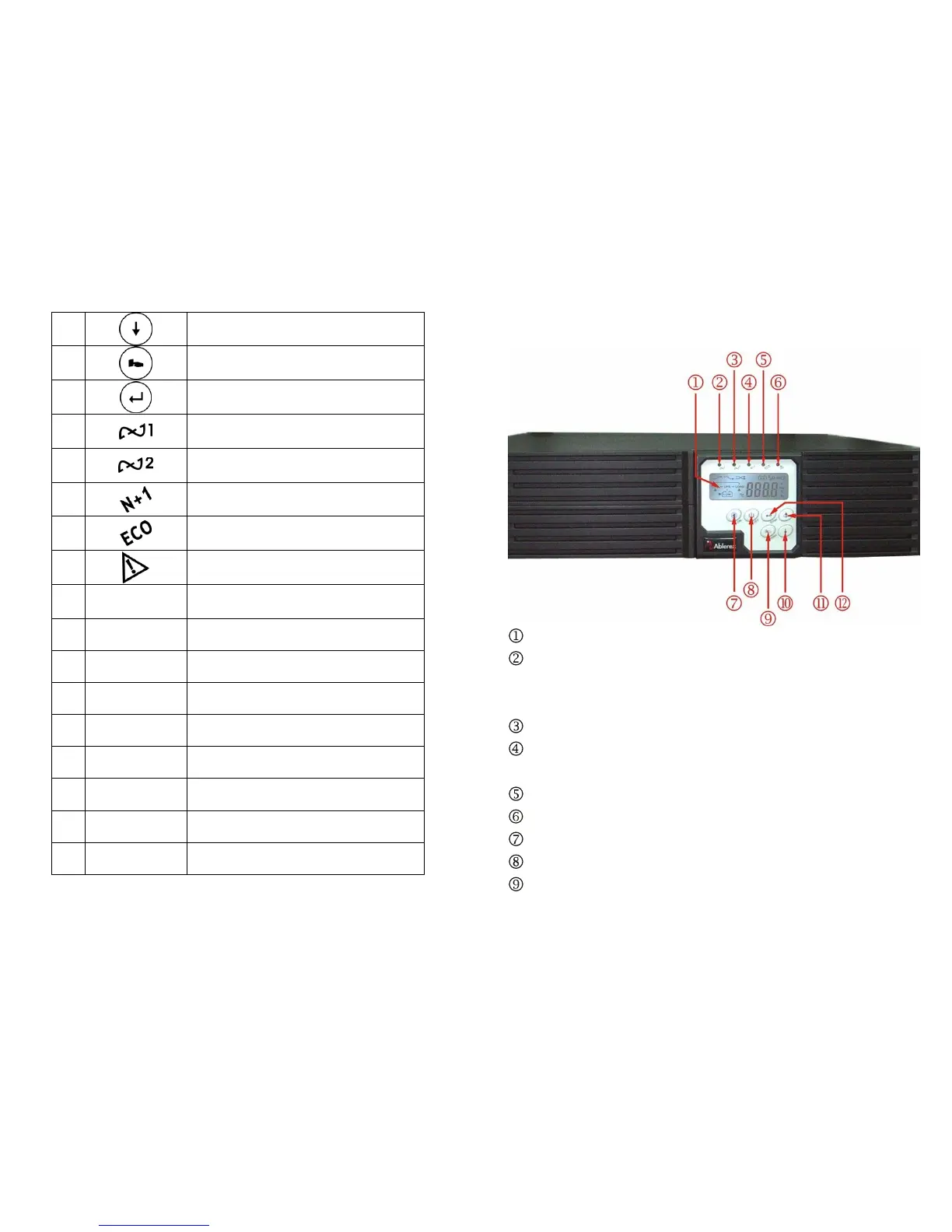
9
2.3. Panel explanation
2.3.1. Front Panel Function Explanations
LCD Display
Green LED steadily lights up to indicate that the Utility input voltage is within
the window; the LED flashes flickeringly to indicate that the Utility input
voltage is within the acceptable window.
Green LED lights up to indicate Bypass Input is normal.
Green LED lights up to indicate the UPS has the capability to run under
redundancy mode.
UPS is working under ECO (Economic, Line-interactive) mode.
UPS Fault or Abnormal
UPS ON/Alarm Silence
UPS OFF Switch
Special functions log in/out









 To Next Page