EasyManua.ls Logo

Abus TVAC26030 - 3 Connections and Functions; Connections; Assignment of Initial Password; Activation; Local

Abus TVAC26030
Print Icon
To Next Page IconTo Next Page
To Previous Page IconTo Previous Page
Loading...
7
3. Connections and functions
3.1 Connections
ATTENTION!
Before you start the installation, make sure that the power supply voltage and the rated
voltage of the Keyboard match.
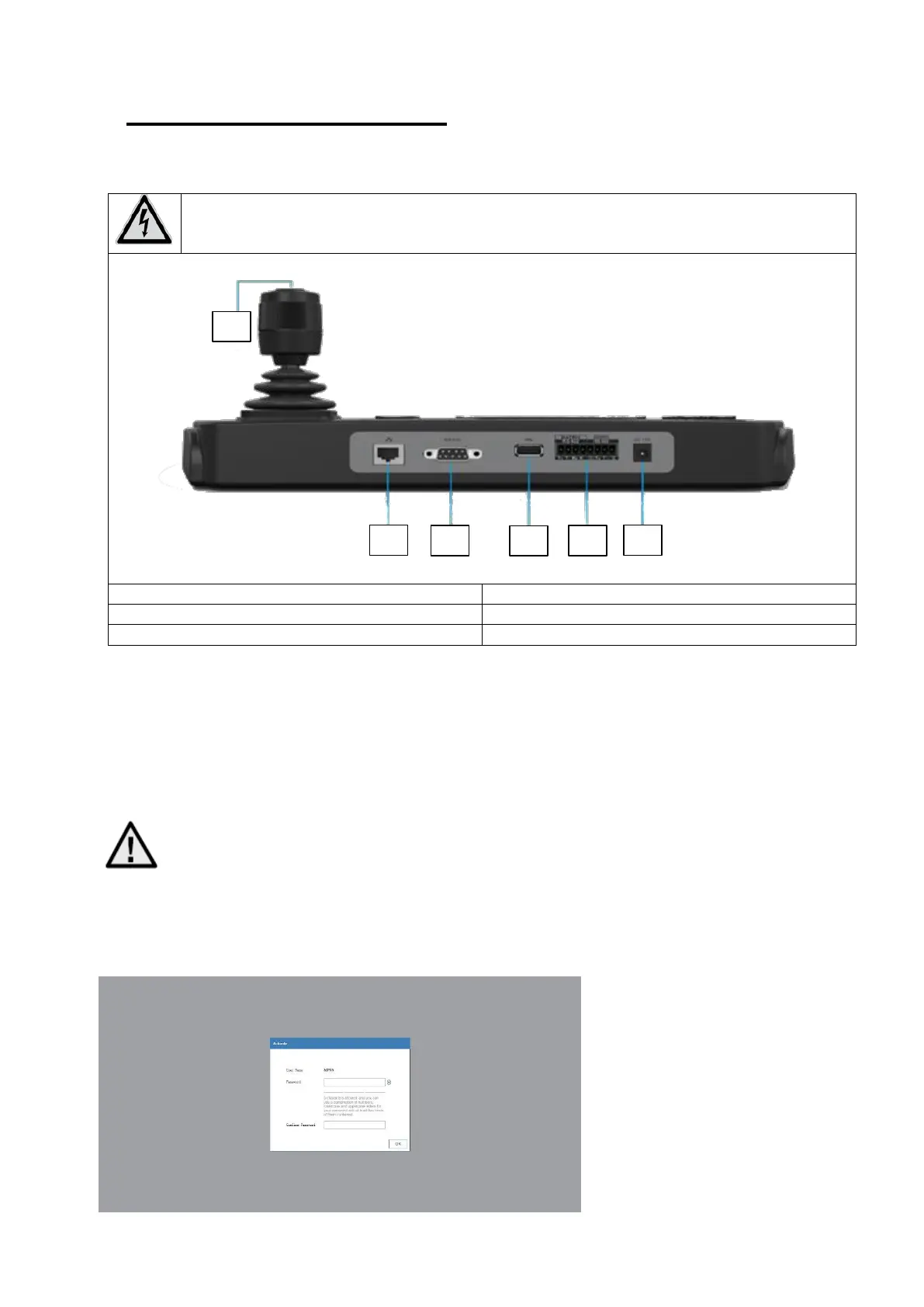
1. 4-axis joystick
2. network port
3. RS-232
4. USB 2.0
5. RS-422/RS485
6. power supply 12 VDC
3.2 Assignment of initial password / activation
3.2.1 Local:
After starting the device you will be asked to enter a password
Important!: Do not use special characters or umlauts when assigning passwords
3.2.2 Web:
Open the web interface of the control panel,
You will be prompted to enter a new password.
1
2
2
4
5
3
6

Related product manuals