11
Add potting mix and plant seeds into the Fabric Pot (BOX H), and set it inside of the grow
tent to finish the build.
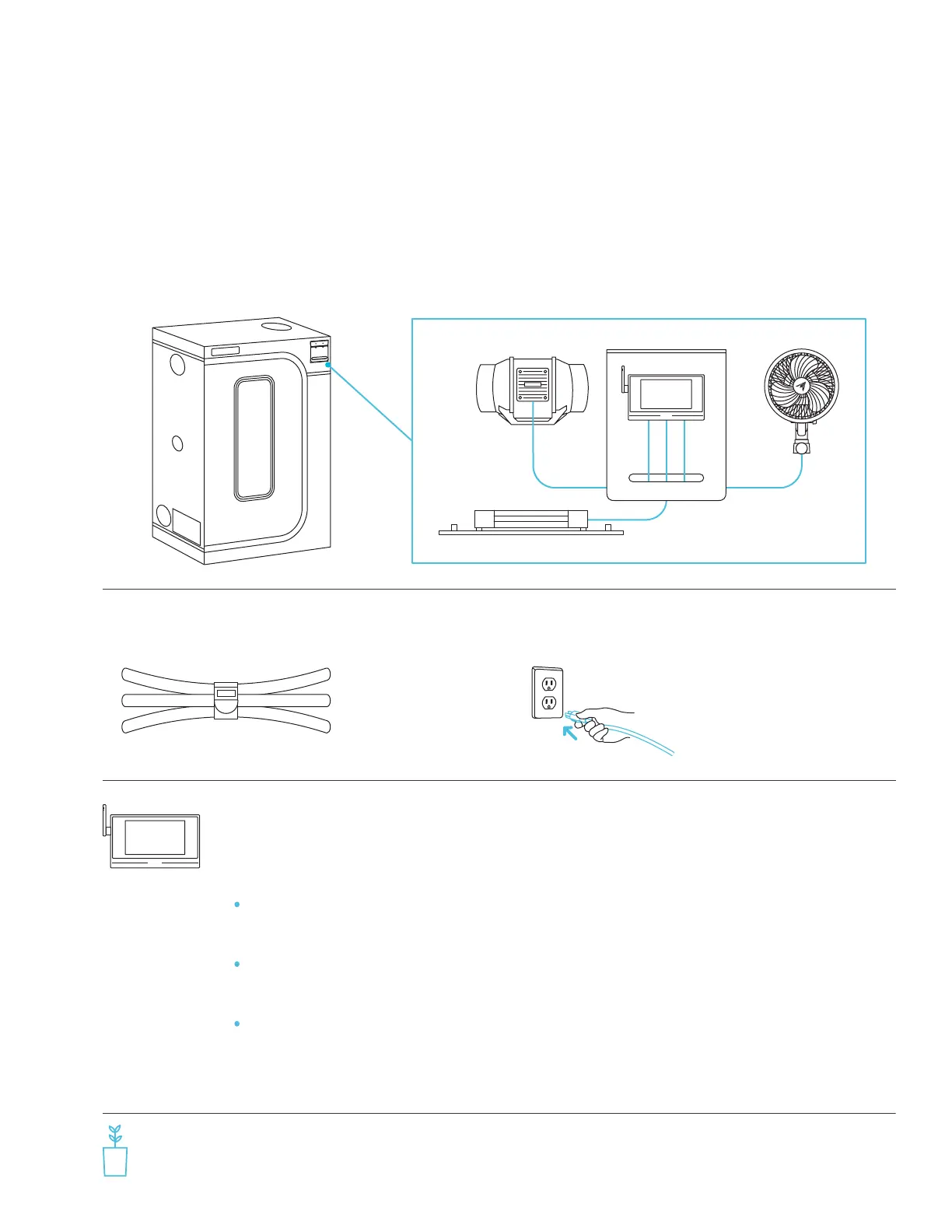
Use the Hook and Loop Ties (BOX I)
to manage the wires.
Plug all the electronic devices
into available AC outlets.
7 8
Mount the Grow Tent Controller (BOX B) onto the Controller Plate (BOX A).
Refer to the Controller Plate Setup section.
Plug the probe into the probe port. Plug the Inline Fan’s controller cable (BOX C)
into Port 1, the Grow Light’s controller cable (BOX D) into Port 2, and the Clip Fan’s
controller cable (BOX E) into Port 3. Plug the second Clip Fan’s controller cable (BOX
E) into Port 4 (AC-PKB44 and AC-PKB55 models only).
6
QUICK BUILD GUIDE
Set the Grow Tent Controller’s (BOX B) clock time to your local time.
Refer to the included CONTROLLER AI+ Quick Start Guide.
9
Program your controller to the following settings:
Download the AC Infinity app to access recipes for each grow stage and
more automations.
Port 1 – Set your Inline Fan to Min Level 2 in OFF Mode, Max
Level 5 in ON Mode, and 12:00 pm to 6:00 pm in Schedule Mode.
Port 2 – Set your Grow Light to Min Level 0 in OFF Mode, Max
Level 10 in ON Mode, and 6:00 pm to 12:00 pm in Schedule Mode.
Port 3 (and 4 if applicable) – Set your Oscillating Fan to Level 5 in ON Mode.



 To Next Page