Accent 1400 Hardware Manual for Dedicated Devices Page 27
Mounting a NuEye Module
If you purchased NuEye with your Accent 1400, the NuEye module is already mounted on the device. If
you purchased NuEye later, follow these instructions to attach the module to the device. You can attach
the module to a device with or without a frame.
Hint: You might find it easier to attach the module if you line up the bottom edge of the device with the
edge of a table or counter.
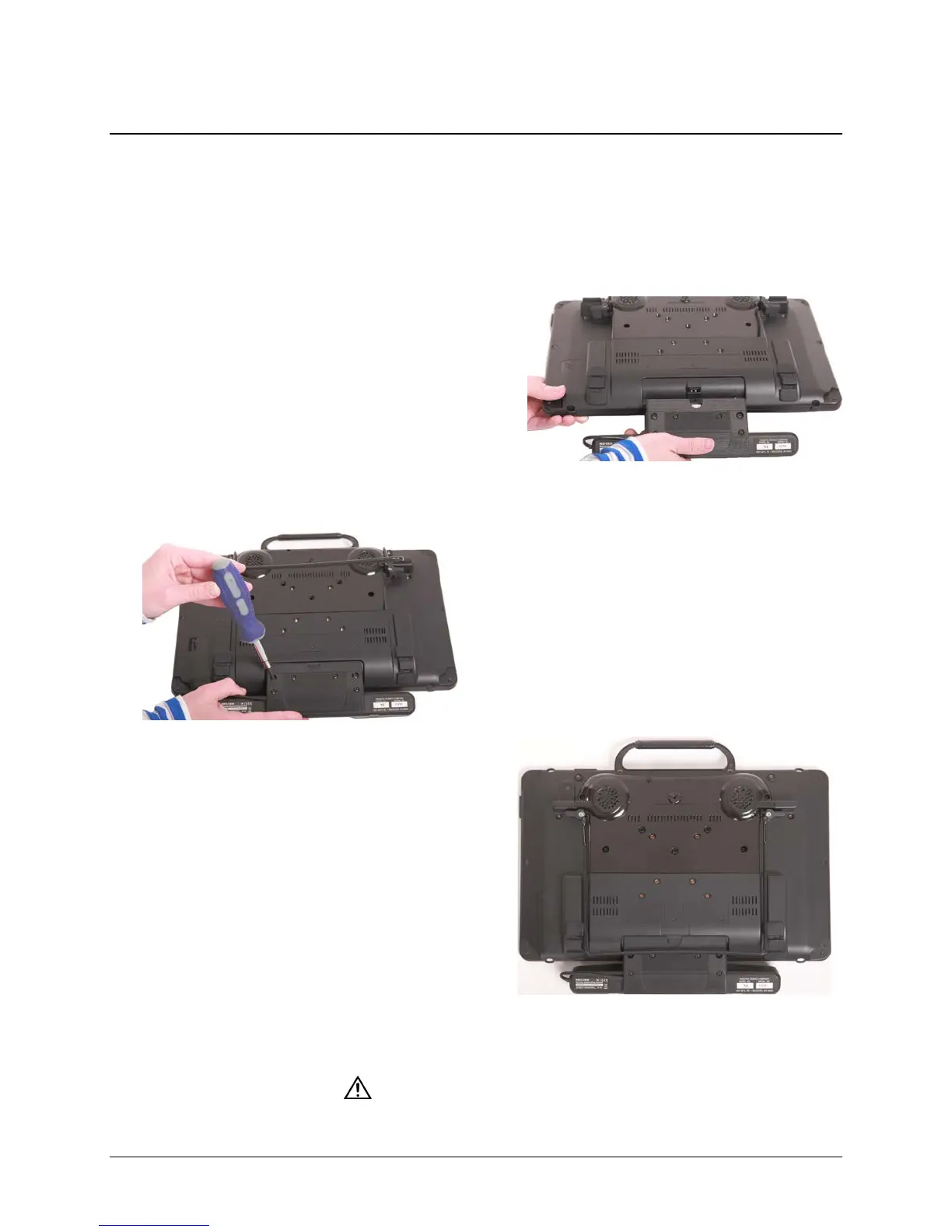
1. Place the device face-down on a flat surface. Be
careful not to scratch the display.
Important! If the device has a frame attached,
remove the two bottom screws that hold the
frame in place. Store or discard these screws.*
2. Line up the connector on the NuEye module with
the NuEye USB connector on the bottom edge of
the back of the device.
3. Slide the module into place, making the sure the
connectors are engaged completely.
4. Tighten the two screws to secure the module to
the device.
Note: The screws are already in the screw
holes. You only need to tighten them.
5. The NuEye module is ready to set up for use.
The NuEye Tracking System User’s Guide contains
detailed instructions on mounting the NuEye
module, positioning the device, calibration,
customizing settings, managing eyegaze profiles,
and cleaning the module.
Store the screws in a safe location or discard them.
Loose screws can be a choking hazard.



 To Next Page