Accent 1400 Hardware Manual for Dedicated Devices Page 31
Mounting the Freedom Switch
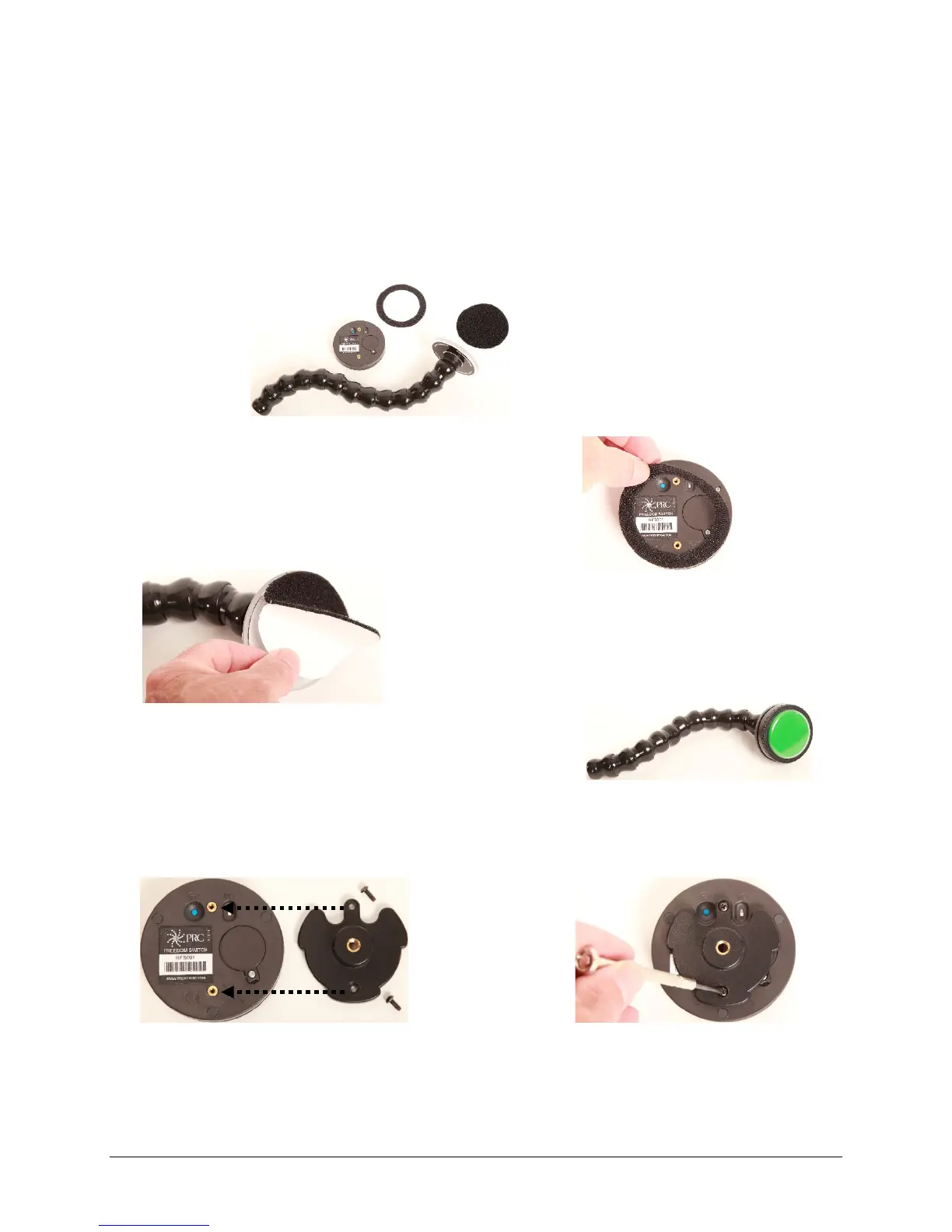
Freedom Switch includes two different mounting options: (1) A Velcro® “donut” and disc for attaching
the switch to a loc-line mount and (2) a mounting plate and screws for attaching the switch to a switch
mounting kit (SMW-1).
Note: The loc-line mount and switch mounting kit are not included with the switch. The switch mounting
kit (SMW-1) is available from the PRC website at Store/Prentrom.com under “Mounts and Brackets”.
To attach the switch to a loc-line mount:
1. Peel off the paper backing from the ring and press the
adhesive side firmly onto the bottom of the Freedom
Switch.
2. Peel off the paper backing from the
disc and press the adhesive side firmly
onto the switch mount.
3. Fasten the switch to the mount, making sure it is held
firmly in place.
To attach the switch to a switch mounting kit (SMW-1):
1. Line up the holes in the plate with the holes on the
switch.
2. Insert the screws in the holes and
tighten.
You will affix the ring to the bottom
of the Freedom Switch …
and affix the disc to
the switch mount.



 To Next Page