WinCEGeräte_Handbuch_Administration_v2 00_en 32 / 84
2.4.4.2 The configuration tool
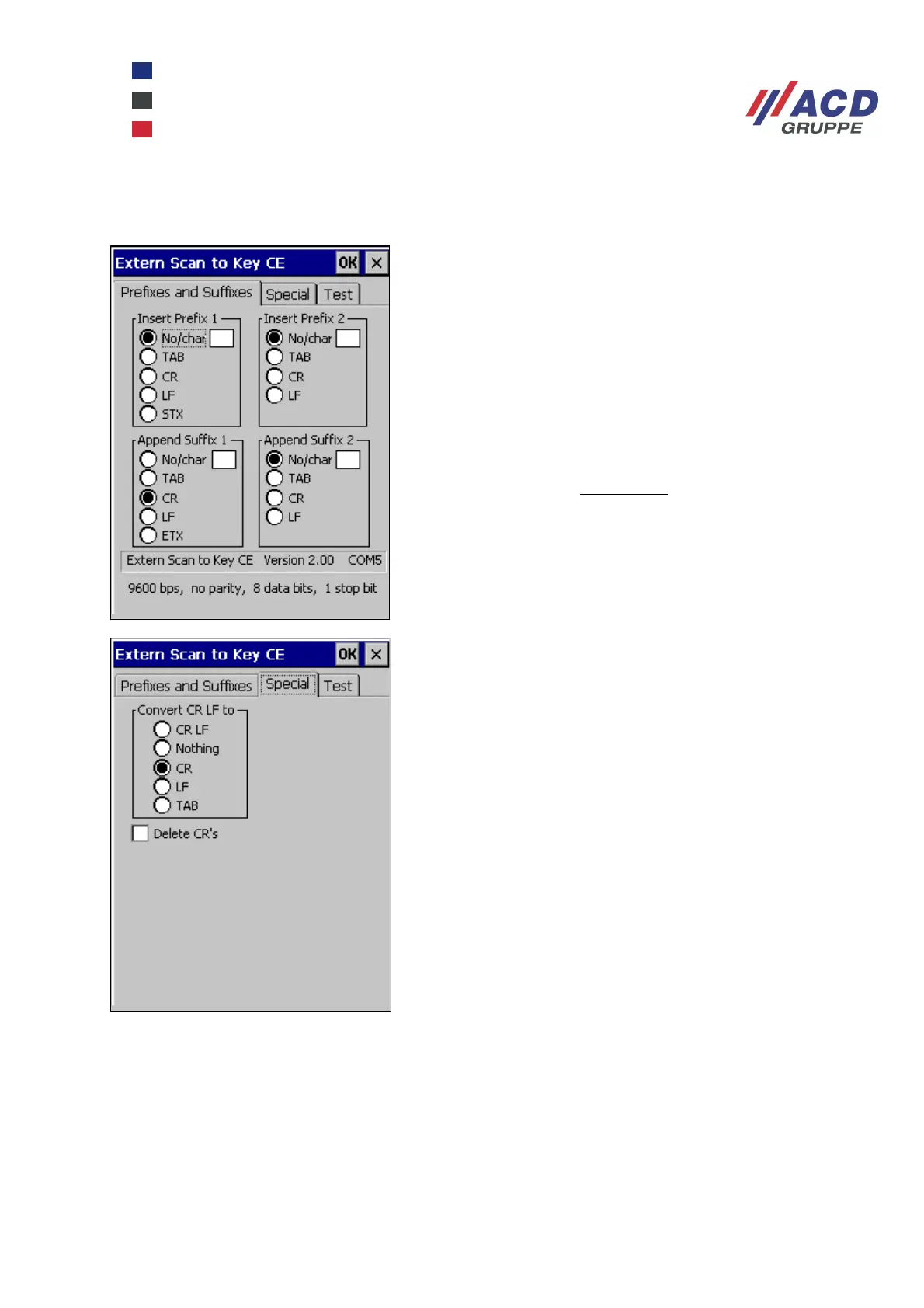
On this tab, you can define whether the scan data to be
inserted into the keyboard is prefixed with up to 2
characters and/or suffixed with up to 2 characters.
Characters that are configured by default are:
TAB ( 0x09 ) CR ( 0x0d ) LF ( 0x0a )
STX ( 0x02 ) ETX ( 0x03 )
The parameters "No/char" have a dual function:
If a visible character is to be used, it must be entered in
the edit field.
If the edit field is empty, no character is inserted.
This tab is used to set how the scan data is converted.
In the “Convert CR LF to” group, you can set how the
character pairs CR and LF should be converted in the
scanner data (into which characters):
CR LF All character pairs are maintained
Nothing All character pairs are deleted
CR Each character pair is replaced by CR
LF Each character pair is replaced by LF
TAB Each character pair is replaced by TAB
Enable “Delete CR’s” to delete all
CR characters in the scanner data.
More detailed information is available in the ExtScan2KeyCE_SoftwareDoku document.



 To Next Page