11Getting to know your smartphone
5 Indicator LED Indicates battery charge status, phone
connection status and any unread
messages.
6 Phone speaker Suitable for normal phone use.
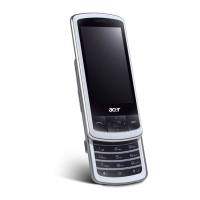
7 Touchscreen 400 x 240 pixel screen to display data,
phone content and enter information.
8 Navigation buttons/
selection button
4-way navigation control to move the
cursor. Press the center button to activate
the selected item.
9 Call button Activate phone/dial/view recently dialed
numbers/answer a call.
10 End button
Press to end a call; press and hold to apply
End Key settings. See page 49.
11 Embedded numeric
keypad
Enter numbers or text using XT9 character
recognition.
12 Microphone Internal microphone.
13 Stylus / reset button Use to enter information or select items on
the touch screen.
* The reset button is located within the
stylus holder.
14 Camera button Activate the camera or take a picture.
15 Camera A 3.2-megapixel camera for taking high-
resolution images.
16 Handsfree speaker Emits audio from your smartphone;
Suitable for handsfree use.
No. Item Description


 To Next Page