2. Product Introduction
2.1 Outline
MD2000-16H is a 19 inch 1RU (rack unit) product which can monitor up to 16 HDMI inputs of Video
and Audio (embedded).
The MD2000-16H can be used for the monitoring of HDMI video and embedded audio, as well as
checking logs in real time with the proprietary NMS.
2.2 Product Appearance
2.2.1 Front Panel
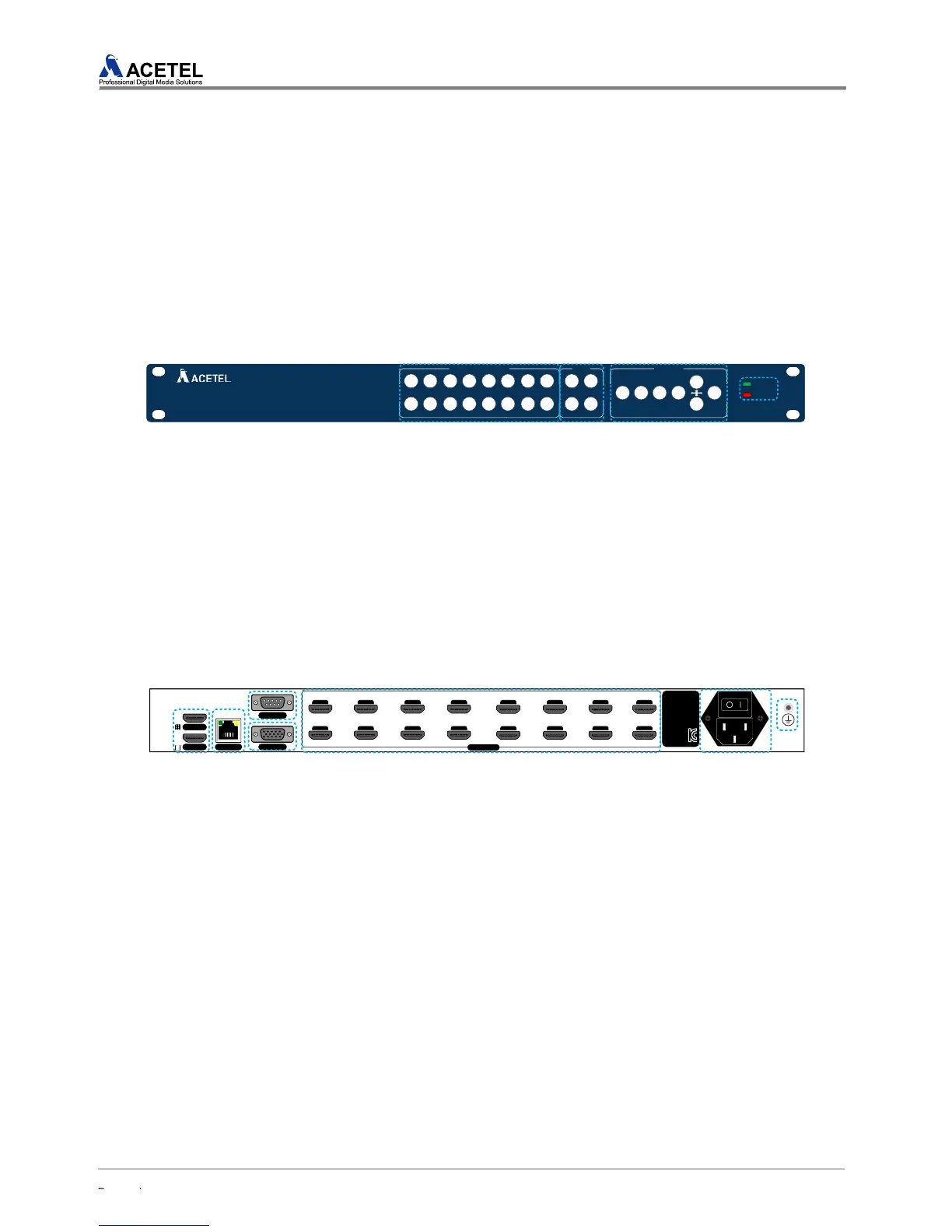
[Figure 1] MD2000-16D Front Panel
CHANNEL SLECTION (Input Selection Button)
Displays the full screen view of the respective channels
MODE (Layout Button)
Displays one of four preset screen layouts (4, 8, 9, 16 split)
MENU/ENTER/EXIT & Direction Button (Set Button)
Controls full functions of the Multiviewer, for Stand-Alone mode
POWER/ALARM LED
Indicates Power and Alarm status
2.2.2 Back Panel
[Figure 2] MD2016A Back Panel
HDMI output 1,2 : HDMI #1 displays split-screen layout and HDMI #2 outputs full screen
LAN port : Ethernet port for connecting with NMS or 3
rd
Party product
CONSOLE port : serial port for development control (internal use only)
VGA output : VGA output port
Input port : HDMI A type port for HDMI input
Power cord input : Power terminal, supports AC 100~240V
Ground Terminal : Ground terminal to grounding currents



 To Next Page