Copyright 2017 ACETEL Co., Ltd. All Right
Reserved
ANNEX 2. Product Menu Quick Guide
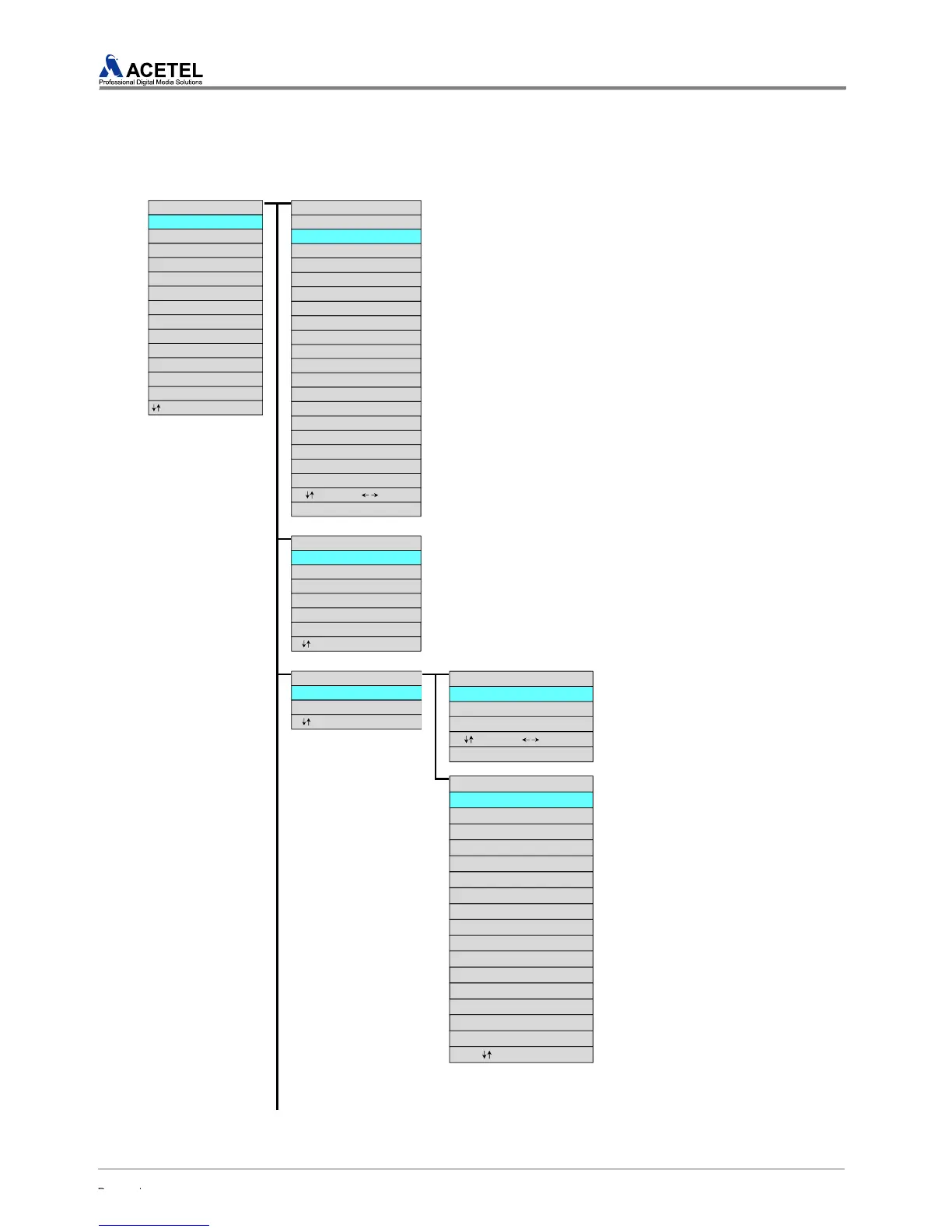
The composition of the MD2000-16H is as the following.
DISPLAY SETUP : Setup for the Output Display
[Refer to “4.1.1” on Page 23 for Details]
1. Button/menu for changing of the setup
① Move between menu : [Up/Down] on the front of the product
② Move between set values : [Right/Left ] on the front of the product
③ Change of a set value : [Up/Down] on the front of the product
④ Select & save of a set value : [ENTER] on the front of the product
⑤ Apply of the setup change : APPLY menu
⑥ Cancel of the setup change : CANCEL menu
2. Setup Item
① No. : Logical Number (Display Deployment Number)
② Source No. : Physical input port number
③ Audio Setup : Audio 1ST_ON and 1ST_OFF Select
CUSTOM LAYOUT : Customer Layout Setup
[Refer to “4.1.2” on Page 25 for Details]
1. Button/Menu for Setup Change
④ Move between menu : [Up/Down] on the front of the product
⑤ Select & save of a set value : [ENTER] on the front of the product
2. Set Item
① PRESET #1 (DVISION 6) : 6 split display
② PRESET #2 (DIVISION 12) : 12 split display
AUDIO SETUP : Audio Setup
[Refer to “4.1.3” on Page 26 for
Details]
1. Button/Menu for Setup Change
① Move between menu : [Up/Down] on
the front of the product
② Move between set values :
[Right/Left ] on the front of the
product
③ Change of a set value : [Up/Down] on
the front of the product
④ Select & save of a set value :
[ENTER] on the front of the product
⑤ Apply of the setup change : APPLY
menu
⑥ Cancel of the setup change :
CANCEL menu
2. Setup Item
① AUDIO LOSS INTERVAL : Audio
alarm interval setup (5~600seconds)
⑦ AUDIO GAIN CONTROL : Setup of
the gain for each audio input (-6, 0, 6,
12, 18dB)
2. Setup Selection
① AUDIO OUTPUT : AUDIO OUTPUT
ON/OFF
② AUDIO OUTPUT LOCK : AUDIO
LOCK ON/OFF
③ AUDIO OUTPUT CHANNEL : AUDIO
OUTPUT CHANNEL selection
④ AUDIO GROUP SELECT : AUDIO
GROUP selection
[MENU]
DISPLAY SETUP
CUSTOM LAYOUT
AUDIO SETUP
ALARM SETUP
OUTPUT RESOLUTION
SCREEN SETUP
NTP SETUP
CURRENT TIME SETUP
IP SETUP
UPDATE
INITIALIZATION
MISCELLANEOUS
DEVICE INFORMATION
: Move ENTER : Select EXIT : Return
[DISPLAY SETUP]
No Source No Audio Setup
1 : 1 1ST_ON
2: 2 1ST/2ND_ON
3 : 3 1ST/2ND_OFF
4 : 4 1ST_ON
5: 5 1ST_ON
6 : 6 1ST_ON
7: 7 1ST_ON
8 : 8 1ST_ON
9 : 9 1ST_ON
10 : 10 1ST_ON
11 : 11 1ST_ON
12 : 12 1ST_ON
APPLY
13 : 13 1ST_ON
14 : 14 1ST_ON
15 : 15 1ST_ON
16 : 16 1ST_ON
CANCEL
: Move(ADJUST) : Contents
ENTER : Select EXIT : Return
[CUSTOM LAYOUT]
PRESET #1 (DIVISION 6)
PRESET #2 (DIVISION 12)
PRESET #3 (NOT USED)
PRESET #4 (NOT USED)
PRESET #5 (NOT USED)
PRESET #6 (NOT USED)
: Move ENTER : Select EXIT : Return
[AUDIO SETUP]
AUDIO OUTPUT CONTROL
AUDIO GROUP SELECT
: Move ENTER : Select EXIT : Return
[AUDIO OUTPUTCONTROL]
AUDIO OUTPUT : ON
AUDIO OUTPUT LOCK : OFF
: Move(ADJUST) : Contents
ENTER : Select EXIT : Return
AUDIO OUTPUT CHANNEL : CH01
[AUDIO GROUP SELECT]
1 : GROUP 1
2 : GROUP 1
3 : GROUP 1
4 : GROUP 1
5 : GROUP 1
6 : GROUP 1
7 : GROUP 1
8 : GROUP 1
9 : GROUP 1
10 : GROUP 1
11 : GROUP 1
12 : GROUP 1
13 : GROUP 1
14 : GROUP 1
15 : GROUP 1
16 : GROUP 1
: Move ENTER : Select



 To Next Page