19-11-2013 manual 9
9. ADDING OF MEASUREMENTS
10. STORING THE DATA
Thanks to the zero pressure compensaon of the FlowFinder mk2®, it is possible to measure the air ow
at part of the diuser. Because the FlowFinder mk2® acvely compensates its own resistance, the ow
through the other (free) part of the diuser will not or hardly be inuenced.
As an example, the ow through a line diuser can be measured by moving the FF across the diuser
evenly aer every measurement, and adding each measured value.
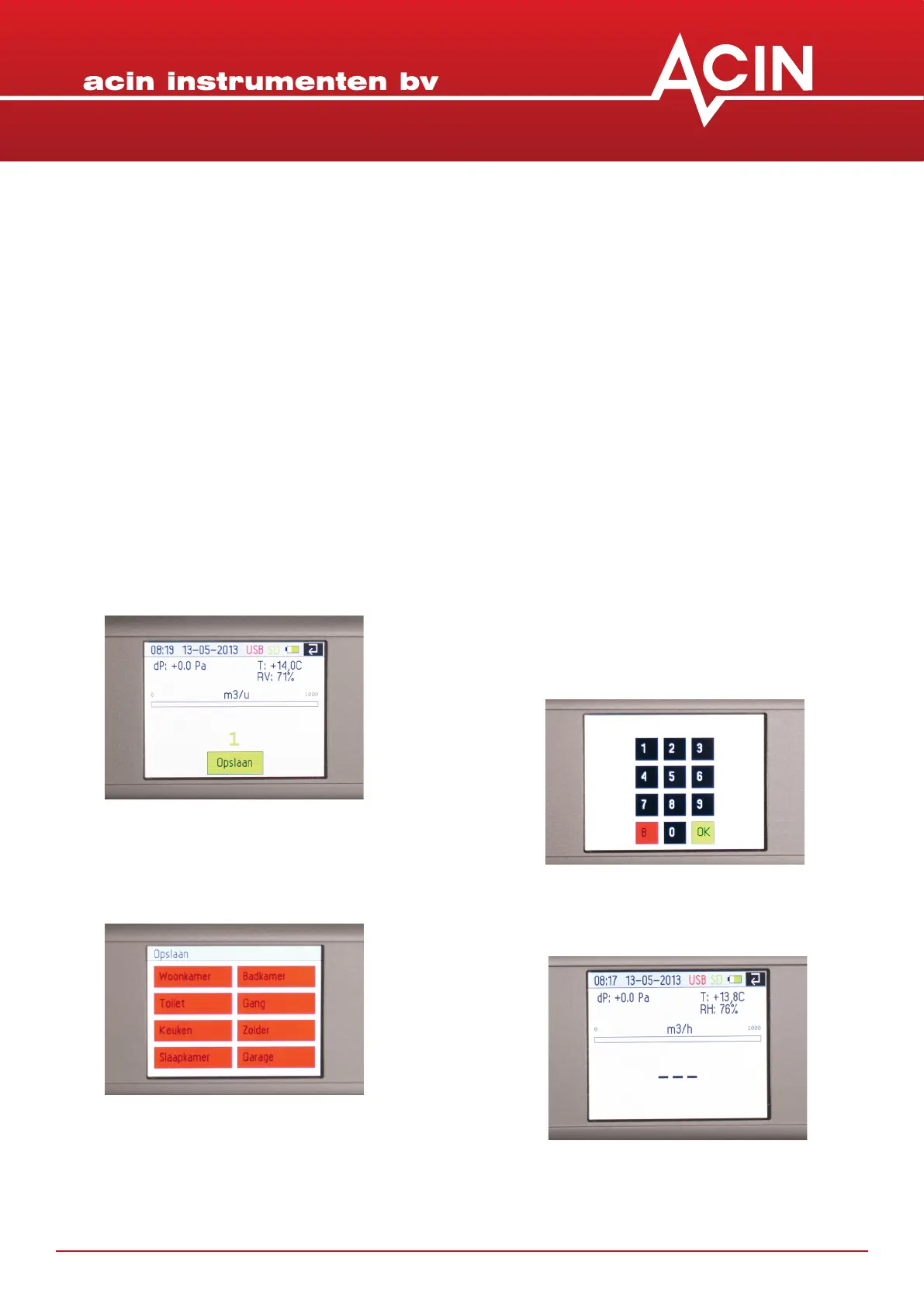
1. Execute a measurement in ‘Validate’
mode as described in chapter 8
2. Aer the measurement is ready the re-
sult will appear together with a buon
‘Store’
3. Touch ‘Store’
4. Now a screen with 8 buons will show.
The text in the buons can be dened
by the user.
5. Select one of the opons and a
numerical keypad will show
6. Here you can add a 4-digit numerical
idener to the record of this measure-
ment. This number
can be a house number or some num-
ber from a plan or some clever combi-
naon. You are free to
design your own data-id system.
7. Aer touching ‘ok’ the display will re-
turn to the measuring mode


 To Next Page