DVS-2500/5000/5000II
4.2 Control Panel
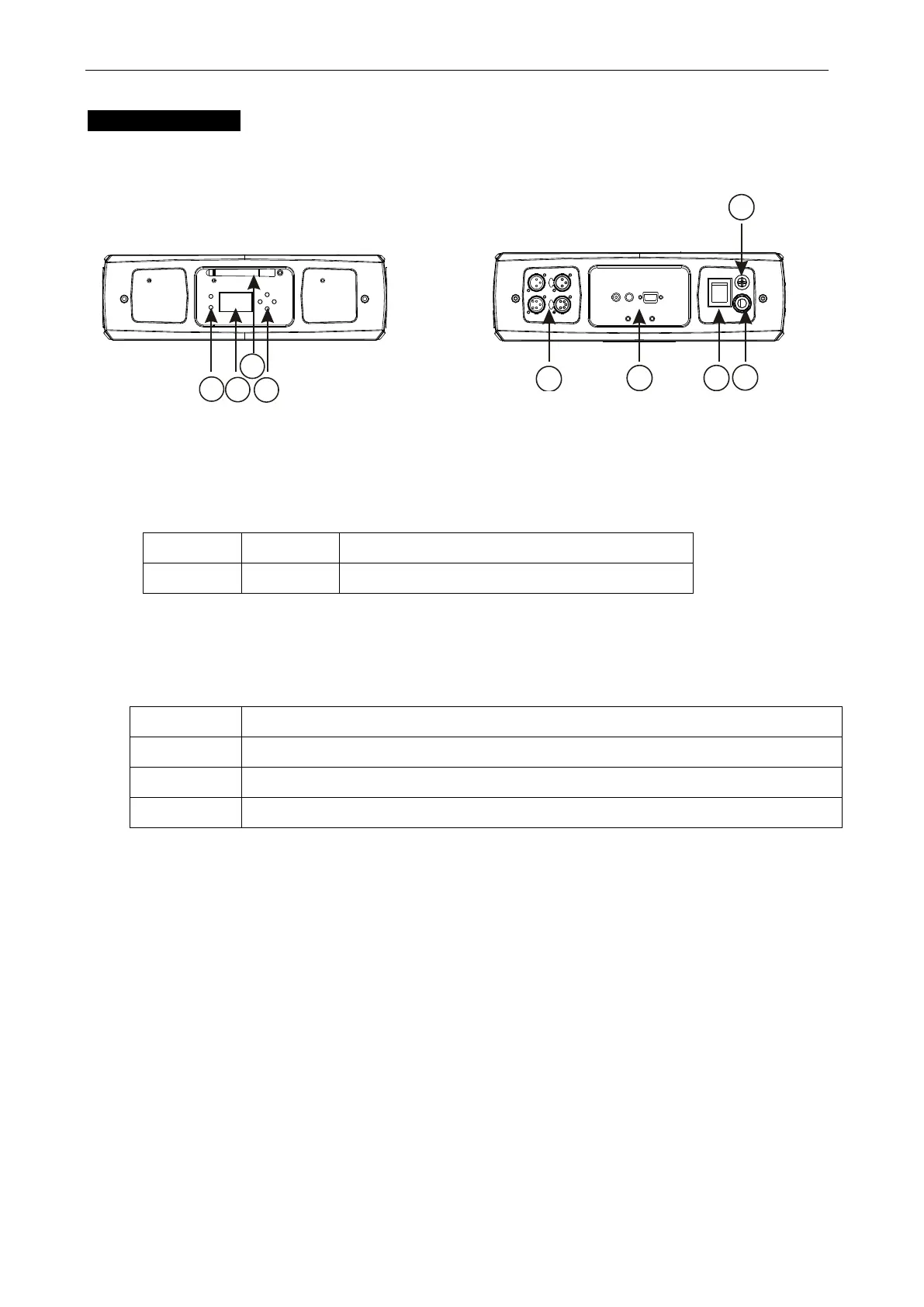
Front View Rear View
○
1 LCD Display: shows the various menus and the selected functions.
○
2 LED
○
3 Antenna
W-DMX wireless receiver receive signal from a wide range.
○
4 Button
Used to select the different menu items
To go up in the menu and to increase the values shown on the display
To go back in the menu and to lower the values shown on the display
Used to confirm your choice.
○
5 DMX input/output sockets:
For DMX 512 operation, use 3/5-pin XLR plug cable to link the units together
○
6 Video input sockets:
Composite video in (CVBS): (the length limit to 3 meters in normal operation.)
S-Video in (NTSC or PAL): (the length limit to 3 meters in normal operation.)
15-pin VGA in: (the length limit to 10 meters in normal operation.)
○
7 Power Switch:
Turns On/Off the power









 To Next Page