DVS-2500/5000/5000II
Change Lamp
WARNING
1. Turn off the power.
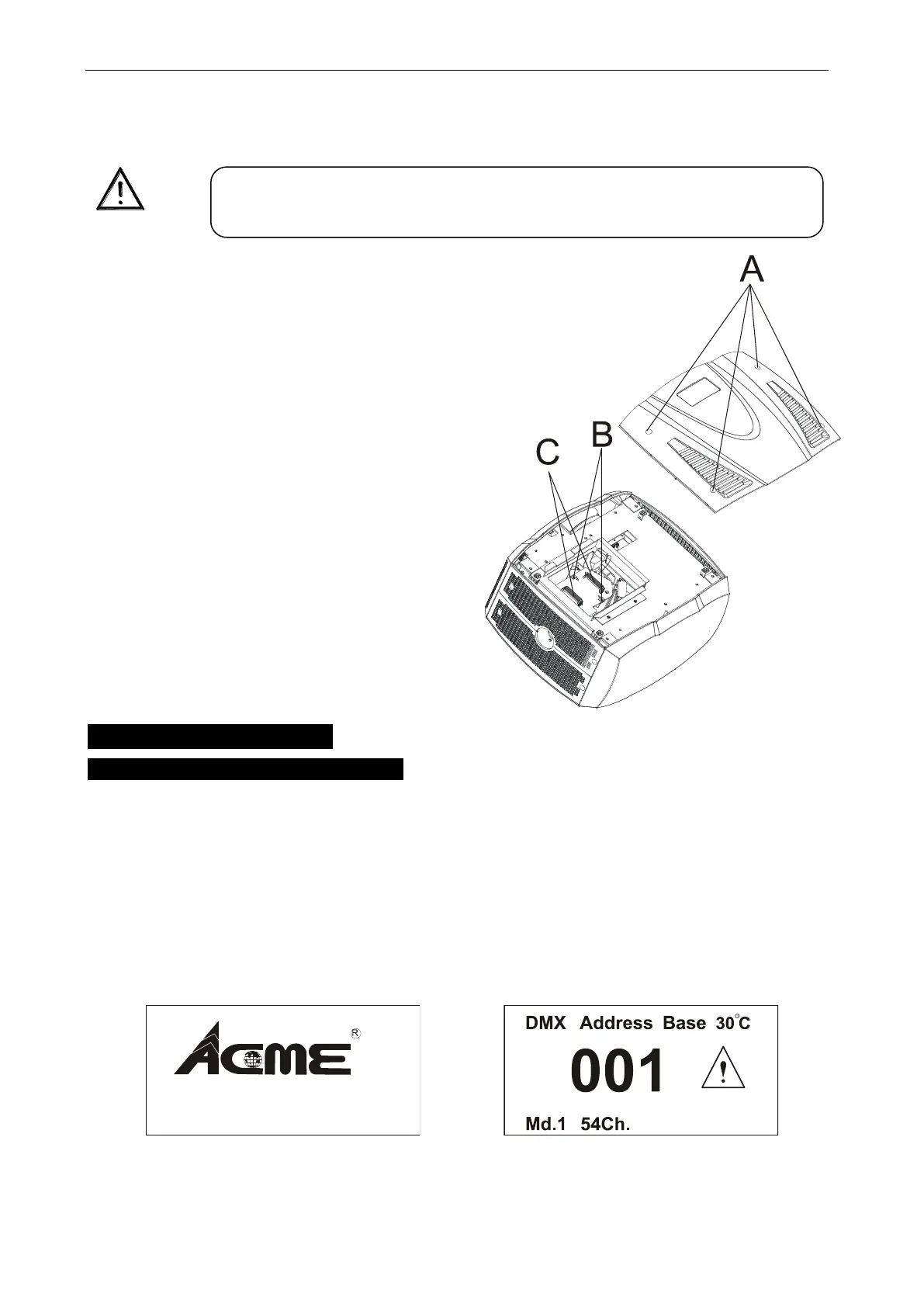
2. Unscrew the four screws (A), open the cover, and move it as
the sketch shown.
3. Unscrew the two screws (B), hold and pull the handle (C) to
remove the lamp. (If you want to change a
lamp, you must change the lamp-socket
together)
4. Inset a new lamp follow the groove.
5. Tighten the screws (B) to fix the lamp.
6. Put the cover back to the device and
Tighten the screws (A) to finish changing lamp.
6. How To Set The Unit
6.1 Display Status When Power On
Every time you turn on the unit, it will run built-in program to reset all motors to their home
position, the display will show as fig.4(DVS-2500), you may hear some noises for about 20
seconds. It will show warning sign if it goes wrong during resetting and you can press the
MENU button to view the error information. After that the unit will be ready to receive DMX
signal and the display will show as fig.5.
Fig.4 Fig.5
In case of replacement of the lamp or maintenance, do not open the
fixture within 15 minutes until the unit cools down after switching off.









 To Next Page