DVS-2500/5000/5000II
6.4. Memory SD card
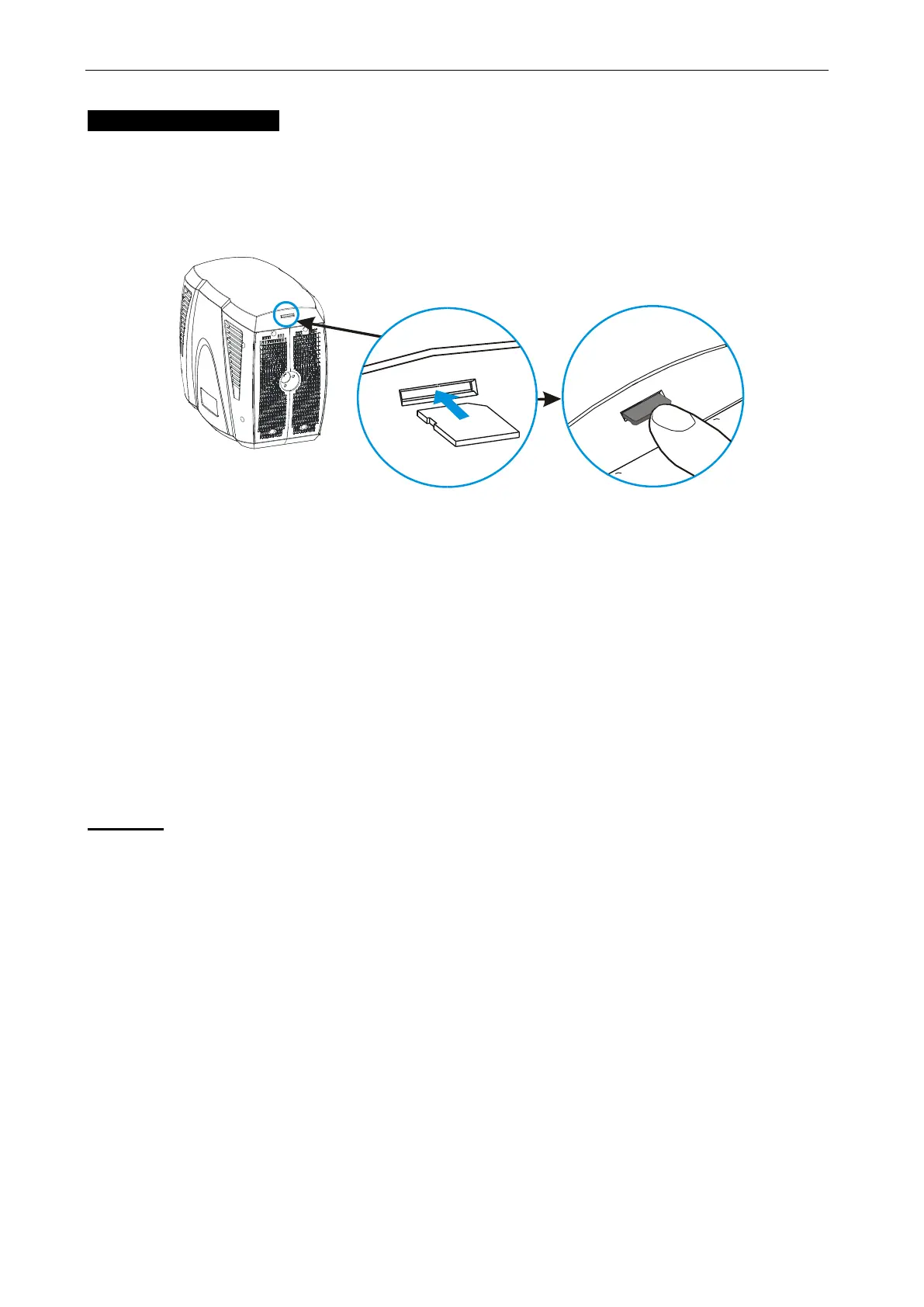
Insert the memory SD card
A memory SD card is included with this user manual. Please insert a compatible memory
card in the slot of the device. Ensure that the contact area is facing up. Push the card in.
You can hear a click when the card locks into place.
Remove the memory card
Important: Do not remove the memory card in the middle of an operation when the card is
being accessed. Removing the card in the middle of an operation may damage the memory
card as well as the device, and data stored on the card may be corrupted.
1. Power off the device, or put all of the channels’ value to “0”.
2. Press the memory card to release it from the slot.
3. Pull out the memory card.
Memory card files
Caution:
Make sure that use the right name when copy or cover the image/video files into memory
card.
Supported image file types: JPG (Image resolution is 720 x 480px)
Supported video file types: AVI, MJPEG
(From SD card: Video resolution is 720 x 480)
(From computer: Video resolution is 800 x 600)









 To Next Page