18
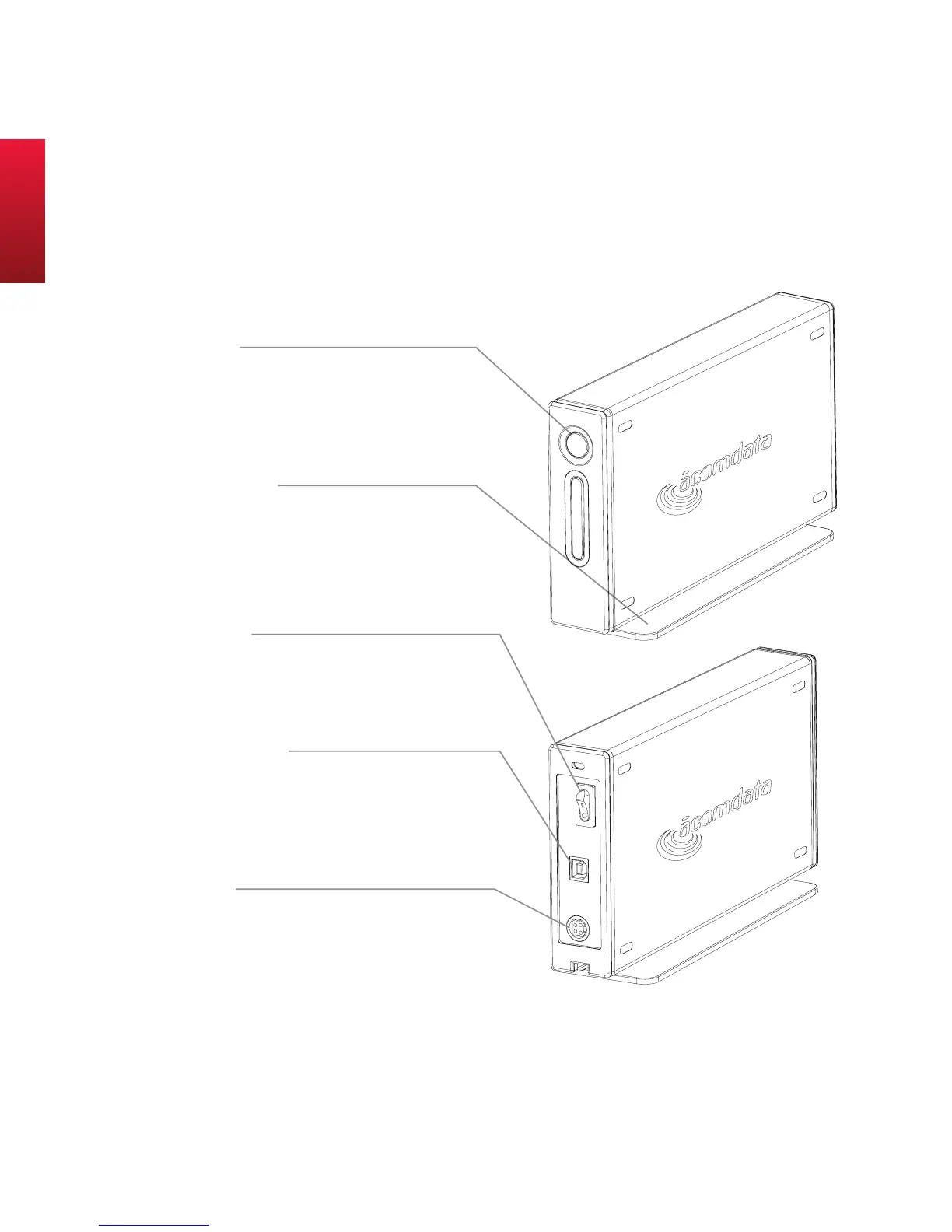
PushButton
lights uP blue when the DriVe is PowereD on.
FlAshes reD when reADing or writing DAtA.
Press to run A bAckuP oPerAtion. (requires
instAllAtion oF the suPPlieD soFtwAre.)
RemovaBle stand
cAn be remoVeD For horizontAl PlAcement or
stAcking oF DriVes.
PoweR switch
turn the DriVe on AnD oFF As neeDeD while Your
comPuter is running. see “how to ProPerlY turn
oFF AnD Disconnect the DriVe” For DetAils.
usB 2.0/1.1 PoRt
the suPPlieD usb cAble Plugs in here. the DriVe
hAs A tYPe b Port, AnD Your comPuter hAs A tYPe
A Port, which corresPonD to the connectors oF
the usb cAble.
PoweR PoRt
the Ac ADAPter Plugs in here. when connecting
the DriVe, tAke cAre to orient the connector
ProPerlY, As it will onlY go in one wAY.
ActuAl lAyout of
bAck pAnel mAy not be
exActly As shown.
E5 HybridDrive at a Glance



 To Next Page