18 / Chapter 3 Installation
Installing Boxed Processor
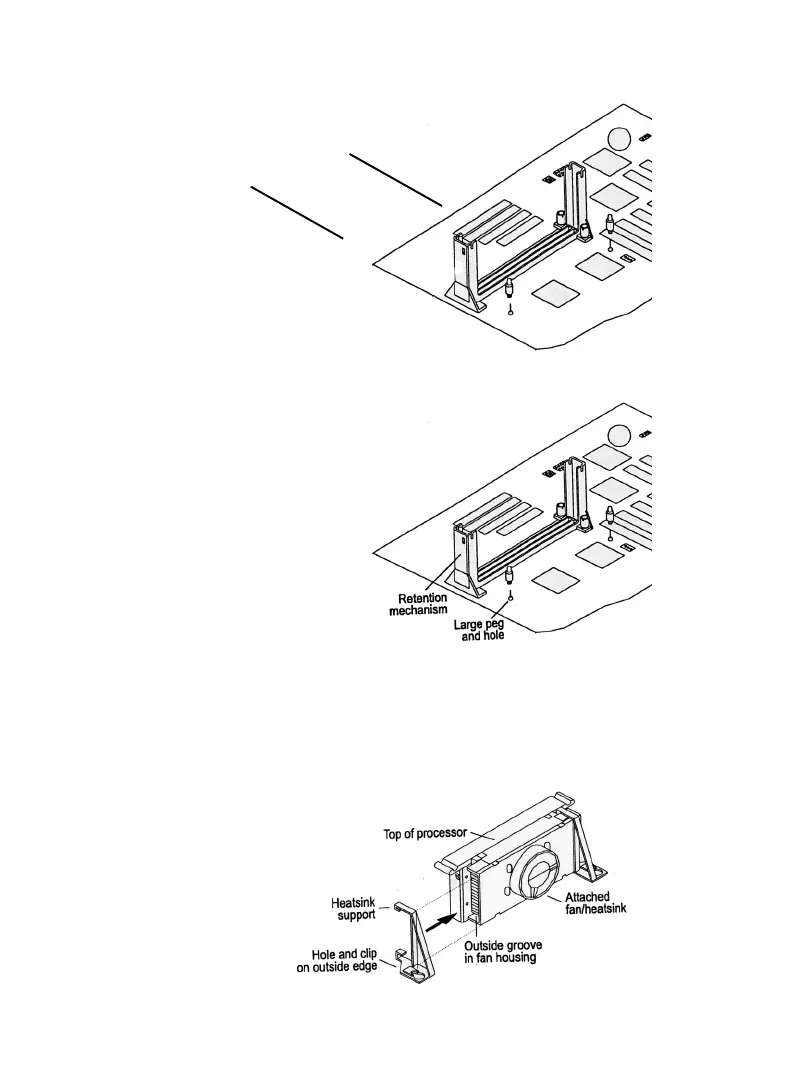
1. Mount the two black plastic pegs onto the system board. /these
pegs will be used to attach
the fan heatsink supports.
Notice that one hole and
the base of one peg are
larger than the other hole
and peg base. Push each peg
into its hole firmly until
you hear it “ Click” into
place.
2. Slide a black plastic heatsink support onto each outside edge of
the fan heatsink, making sure that the hole and clip are on the
outside edge of the support.(If the supports are reversed, the
holes will not line up with the pegs on the main board). Slide
each heatsink support toward the center of the processor until
the support is seated in the outside groove in the fan housing.
Captive nut
Hole



 To Next Page