Chapter3 Installation / 29
d. SMI Suspend LED
e. Reset Switch Lead (RST)
This 2-pin connector connects to the case-mounted reset switch
for rebooting your computer without having to turn off your
power switch. This is a preferred method of rebooting in order
to prolong the life of the system's power supply.
f. System Power LED (PANEL)
The system power LED lights when the system’s power is on
(same as above Power LED).
g. Speaker Connector (SPEAKER)
This 4-pin connector connects to the case-mounted speaker.
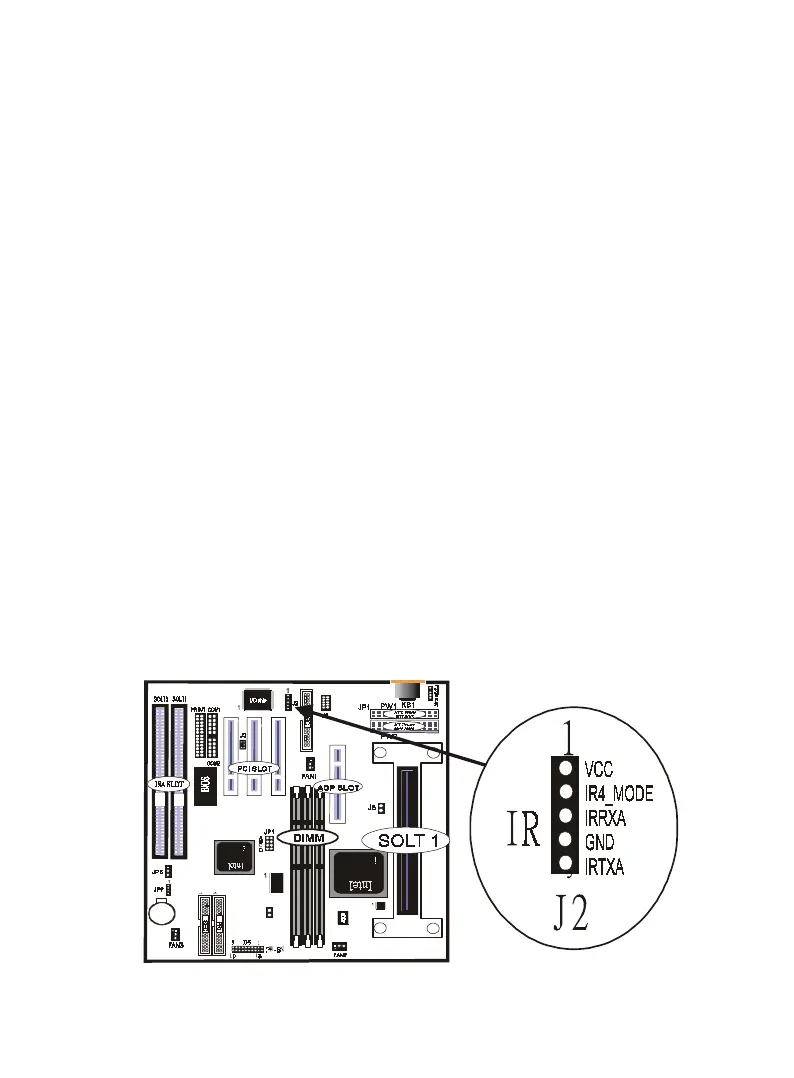
10.IrDA/Fast IR-Compliant infrared module connector (IR)
This connector supports the optional wireless transmitting and
receiving infrared module. This module mounts to a small open-
ing on system cases that support this feature. You must also
configure the setting through UART2 Use Infrared” in Chipset
Feature Setup to select whether UART2 is directed for use with
COM2 or IrDA. Use the five pins as shown on the Back View
and connect a ribbon cable from the module to the motherboard
according to the pin definitions.
11. ATX Power Switch (PW-BN)
The system power is controlled by a momentary switch con-
nected to this lead. Pushing the button once will switch the sys-
tem ON. The system power LED lights when the system's power
is on
JP8



 To Next Page