5 Connect the medical device
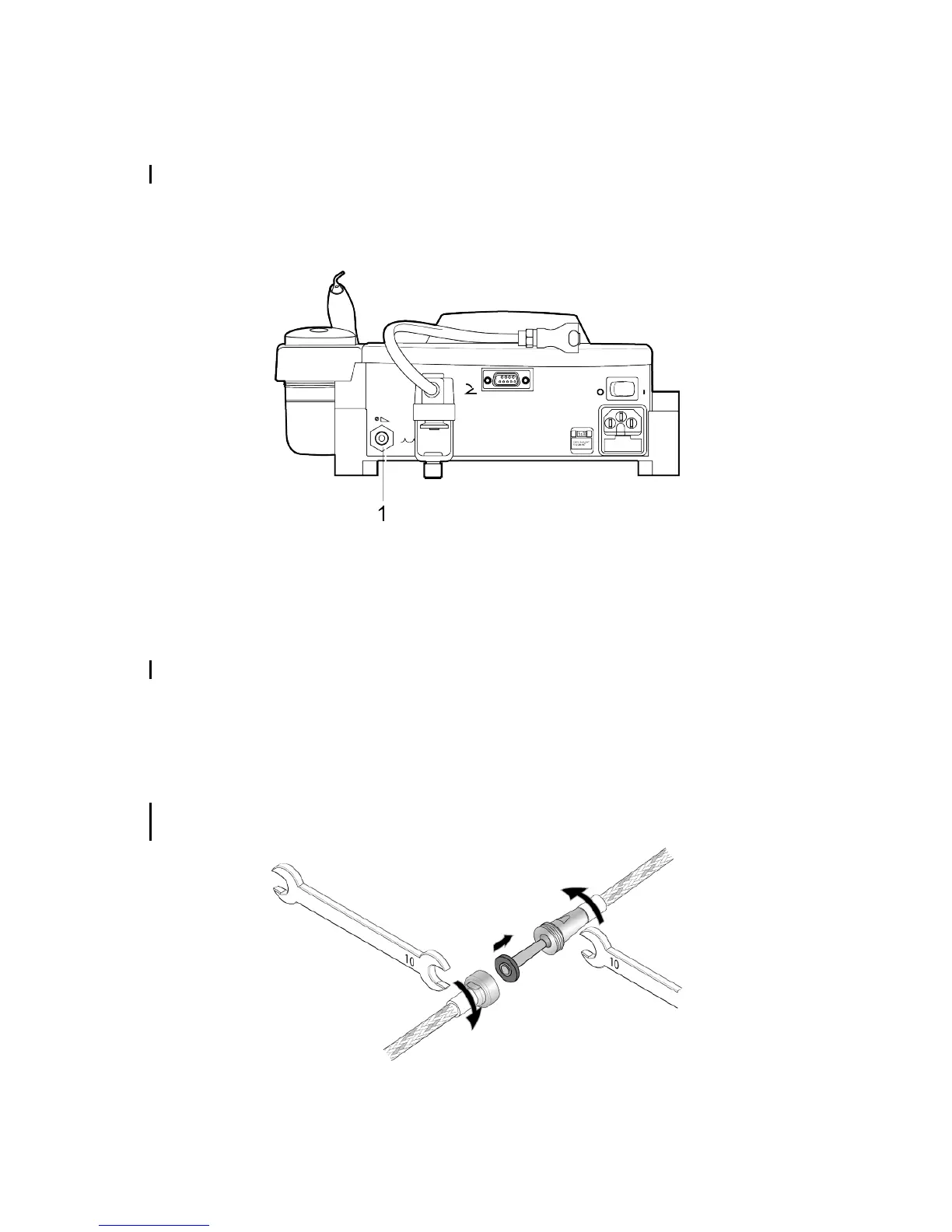
5.1 Connecting the medical device to the water system
Ask an approved dental installation technician to connect your medical device to the water system.
The water supply system pressure may vary throughout the day. The water supply system pressure must be adapted
to the values recommended for your medical device. It is very important to make sure that the maximum pressure
permitted for the medical device is never reached or exceeded. If in doubt, you are strongly advised to install or
arrange for installation of a water pressure limiting system.
1. Water supply connector
5.2 Connecting the medical device to the water system
The supply pipe connector is used to connect the medical device to the domestic water distribution system. The
connector is extended by a pipe to which you must attach a filter.The filter needs to be cleaned and replaced regularly
as specified in the chapter Clean the water filter cartridge. page 23.
The water supply must comply with the quality criteria compatible with the practice of dental treatments.
5.3 Installing a water filter
Water supplied by the system in place may not be of a quality suitable for dental treatments.In this case, you must
install a water filter on the medical device's water supply pipe.
Procure the relevant kit and the installation and maintenance instructions for water and air filters and cartridges
[J11330].
SATELEC, a company of Acteon group accepts no responsibility for damage caused by an installation provided
by a service provider that has not been approved by us.
User Manual|AIRMAX|J11401|V7|(03)|12/2017|ND07EN010G - Page 13/42















 To Next Page