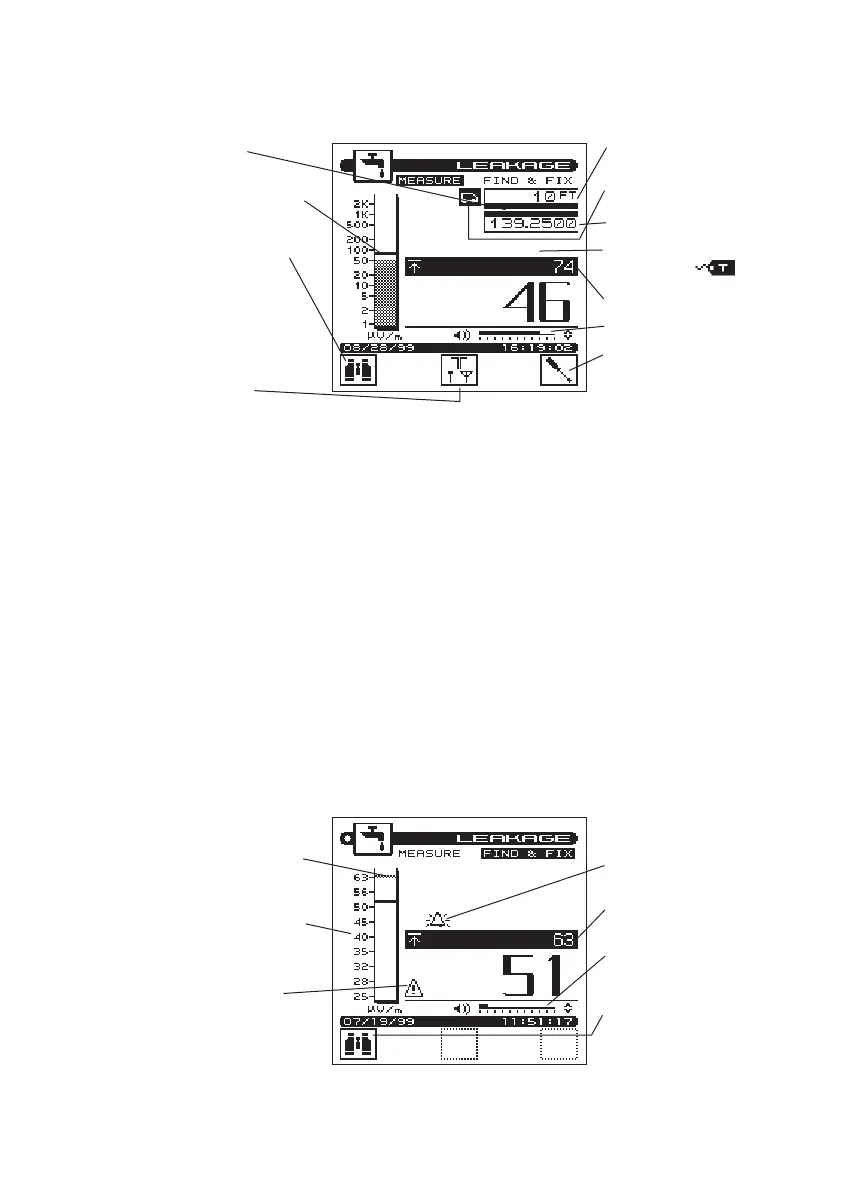
Find & Fix Mode: This feature allows
you to quickly scan for targeted leak
sources nearby. It assists in guiding
the technician toward the leak source
quickly and accurately. The Find & Fix
Mode is used monitoring leaks on
foot in the following situations.
• Zero-in on the source of a leak
• Drop-to-subscriber
• Inside the home applications
Procedure for obtaining the “Find and Fix”
mode:
a. Press the “SHIFT” key followed by
the Leakage key.
b.Check the screen for the correct
mode. If “Measure” is highlighted,
press the Left Soft key.
c. The word “Find and Fix” should be
highlighted on your screen.
3-7
Measurement Mode Screen
compensation factor
peak mark shows comparison
with current reading
toggles between
“Measurement Mode” and
“Find & Fix” Mode
antenna factor can switch
from vehicle mounted to
dipole to monopole
Current antenna factor
reference distance.
measurement frequency
tag icon identifies leak is from
your system
alarm volume
antenna compensation
adjusts to read correct cali-
brated leak level
Peak-Hold
Find & Fix Mode Screen
peak mark shows comparison
with current reading
toggles between
“Measurement Mode” and
“Find & Fix” Mode
graph will do an auto re-scale
in “Find & Fix” mode
alarm volume
warning that “Find & Fix”
mode is more sensitive but
less accurate than
“Measurement Mode”
alarm indication
Peak-Hold



 To Next Page