22
Operation Manual - (CP05 / CP10) Commercial Control Interface
Doc. No. 0525-031 Ver. 3 190308
DAYLIGHT SAVING TIME DISABLE
Display Progression
C. Mode of Operation
B. Setpoint
Main Menu 4/8
D. Clock / Scheduler
Clock
DST: ENABLE
Transition time: 60 min
Start: FIRST SUNDAY
in OCTOBER at 2.00
End: FIRST SUNDAY
in APRIL at 3.00
Clock
DST: ENABLE
Transition time: 60min
Start: FIRST SUNDAY
in OCTOBER at 2.00
End: FIRST SUNDAY
in APRIL at 3.00
Clock
DST: DISABLE
Transition time: _ ---
min
Start: --- --- ---
in --- --- --- at --- .00
End: --- --- ---
in --- --- --- at --- .00
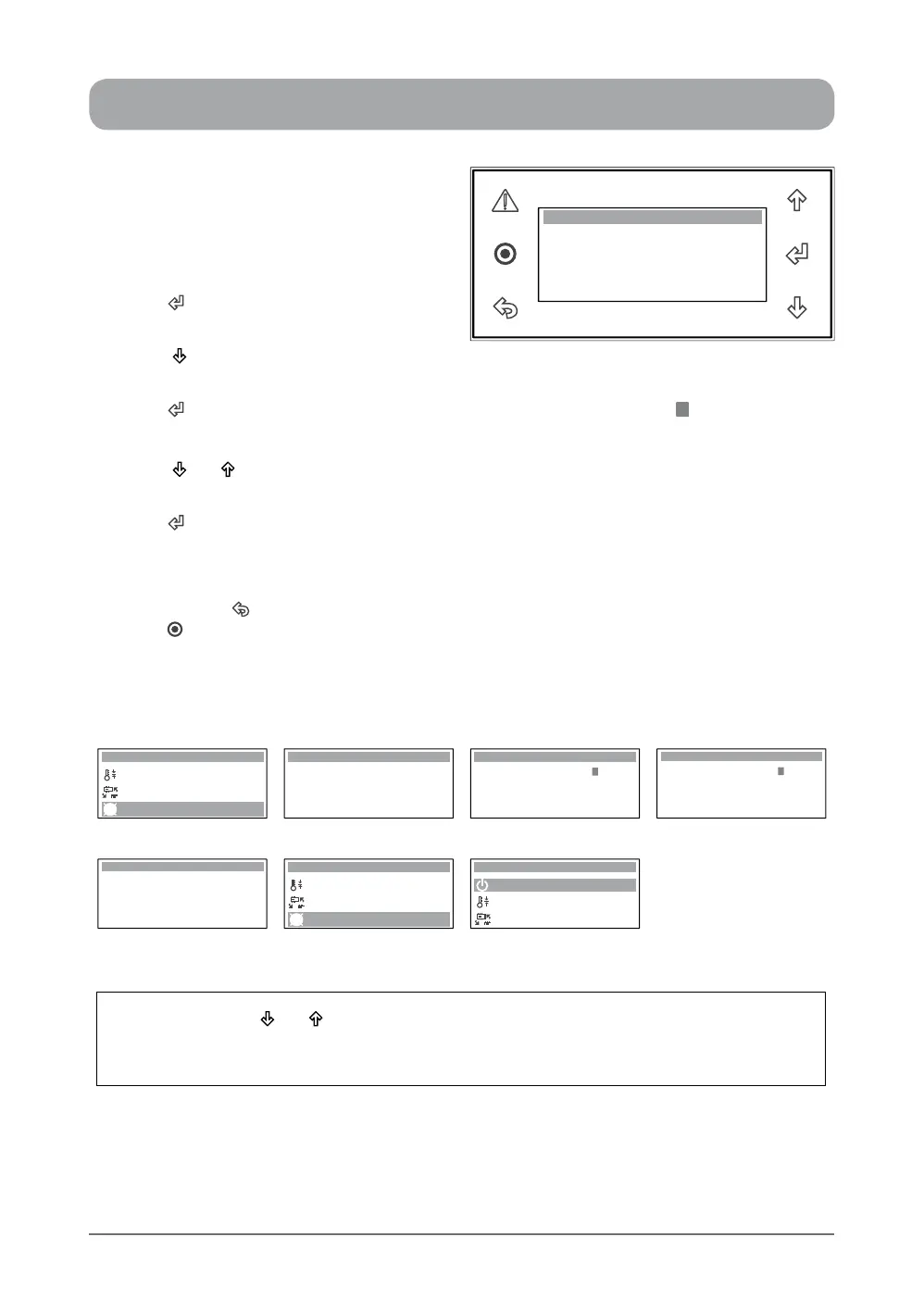
Step 1 Step 2 Step 3 Step 4 (DISABLE)
Clock
DST: DISABLE
Transition time: _ ---
min
Start: --- --- ---
in --- --- --- at --- .00
End: --- --- ---
in --- --- --- at --- .00
C. Mode of Operation
B. Setpoint
Main Menu 4/8
D. Clock / Scheduler
A. On / Off Unit
B. Setpoint
Main Menu 1/8
C. Mode of Operation
Step 5 Step 6
1. From the main menu, scroll down to D.
Clock / Scheduler menu following the
procedures from "Setting the Clock"
section.
2. Press “ ” Button to enter D. Clock/
Scheduler main menu.
3. Press “ ” Button to scroll down into
Daylight Saving Time sub-menu.
4. Press “ ” Button to enter Daylight Saving Time sub-menu and the cursor “ ” will appear on
"ENABLE" indicator.
5. Press “ ” or “ ” Button to select the "DISABLE" Daylight Saving Time function.
NOTE: The segment will change from "ENABLE" to "DISABLE".
6. Press “ ” Button to disable the Daylight Saving Time function. The cursor will disappear and
the "DISABLE" sub-menu screen will be displayed.
TO RETURN TO THE MAIN MENU
7. Keep pressing “ ” (Escape / Return) Button until you get to the Main Menu screen. Otherwise
press “ ” Button.
NOTES: 1. Use the “ ” or “ ” Button to toggle on the D. Clock / Scheduler sub-menu functions.
2. The programmed Day Light Saving Time parameters will be retained until next
time Day Light Saving Time is enabled.
Clock
DST: DISABLE
Transition time: - - - min
Start: - - - - - - - - -
End: - - - - - - - - -
in - - - - - - - - - at - - - .00
in - - - - - - - - - at - - - .00



 To Next Page