EasyManua.ls Logo

ACU-RITE 01036 - User Manual

ACU-RITE 01036
28 pages
Print Icon
To Next Page IconTo Next Page
Loading...
Instruction Manual
SAVE THIS MANUAL FOR FUTURE REFERENCE.
Questions? Contact Customer Support at
(844) 228-5465 or visit www.AcuRite.com.
CONTENTS
Unpacking Instructions ........... 2
Package Contents .................. 2
Product Registration ............... 2
Features & Benets: 5-in-1 ....... 3
Features: Display ................... 4
Back of Display ...................... 6
Setup .................................... 7
5-in-1 Sensor Setup ................ 7
Display Setup ........................ 8
Set the Time & Date ............... 9
Measurement Units ...............10
Set Language .......................10
Placement Guidelines ............11
5-in-1 Sensor Installation ........ 12
AcuRite Connect ...................13
Weather Underground ..........13
Using the Weather Center .....14
Weather Ticker .....................15
Programmable Alarms ...........17
Troubleshooting ....................19
Care & Maintenance ............ 22
Calibration .......................... 22
Specications ........................24
FCC Information ...................24
Customer Support ................ 25
Warranty............................. 25
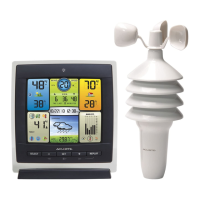
Professional Weather Center
model 01036


Questions and Answers

  • B
    Bradley Lee DDSSep 12, 2025
    Why AcuRite Connect data is different than the display’s data on my ACU-RITE 01036?
    • J
      Juan BowenSep 12, 2025
      If your ACU-RITE Connect data differs from the display's data, ensure the USB cable is securely connected to both the display and the PC's USB port. Restart the ACU-RITE Connect software. Try unplugging the USB cable from the PC for 1 minute, then plug it back in. The USB port may be malfunctioning, so try using another USB port.
  • J
    Johnny AndrewsSep 13, 2025
    What to do if the display screen is not working on ACU-RITE 01036 Weather Station?
    • A
      Adam BentleySep 13, 2025
      If the display screen on your ACU-RITE Weather Station isn't working, make sure the batteries are installed correctly and replace them if needed. If that doesn't work, reset the display by pressing the reset button on the back. Note that you'll need to enter the date and time after a reset.
  • J
    Joseph ClarkSep 16, 2025
    What to do if the USB connectivity is not working on ACU-RITE 01036 Weather Station?
    • J
      jenniferwilsonSep 16, 2025
      If the USB connectivity is not working on your ACU-RITE Weather Station, verify the display is in USB mode 3. Unplug the USB from the display to the computer for 20 seconds, and then plug it back in. Check that the batteries are installed correctly and replace them if needed. Reset the display by pressing the reset button on the back; remember to enter the date and time after resetting.
  • G
    garywallaceSep 18, 2025
    How to make Weather Ticker easier to read on ACU-RITE 01036 Weather Station?
    • D
      davistimothySep 18, 2025
      To improve the readability of the Weather Ticker on your ACU-RITE Weather Station, slow down the ticker speed.
  • B
    Beth MontgomeryNov 19, 2025
    How to fix no outdoor sensor reception on ACU-RITE Weather Station?
    • A
      Antonio MckinneyNov 20, 2025
      To address the issue of no outdoor sensor reception on your ACU-RITE Weather Station, relocate the display unit and/or the 5-in-1 sensor, ensuring they are within 330 ft (100 m) of each other. Keep both units at least 3 feet (.9 m) away from electronics that may cause interference, such as TVs, microwaves, or computers. Use standard alkaline batteries (or lithium batteries in the sensor when the temperature is below -4ºF/-20ºC), avoiding heavy-duty or rechargeable batteries. If you replace the batteries, allow up to 20 minutes for the display unit and sensor to synchronize. You can also synchronize the units by bringing them indoors, removing power, reinstalling batteries in the sensor first, then the display unit, and letting them sit close together for about 20 minutes to establish a str...
  • J
    John RoblesDec 1, 2025
    How to fix ACU-RITE 01036 Weather Station no outdoor sensor reception?
    • A
      allenwilliamDec 1, 2025
      If your ACU-RITE Weather Station isn't showing any outdoor sensor reception (no bars), try the following: * Relocate the display and/or the 5-in-1 sensor, ensuring they are within 330 ft (100 m) of each other. * Keep both units at least 3 feet (.9 m) away from electronics that might cause wireless interference, like TVs, microwaves, or computers. * Use standard alkaline batteries (or lithium batteries in the sensor if the temperature is below -4ºF/-20ºC). Avoid heavy-duty or rechargeable batteries. * Synchronize the units by bringing both the sensor and display indoors, removing power adapter/batteries from each, reinstalling batteries in the outdoor sensor, reinstalling power adapter/batteries in the display, and letting them sit within a couple of feet of each other for about 20...

Summary

Product Features and Benefits

Setup and Configuration

5-in-1 Sensor Setup Guide

Instructions for setting up the 5-in-1 sensor, including battery installation and A-B-C switch configuration.

Display Unit Setup and Power

Guide for setting up the display unit, including power connection, MAC address, and backup batteries.

Installation and Placement

5-in-1 Sensor Installation Guidelines

Detailed instructions for physically mounting and installing the 5-in-1 sensor outdoors.

AcuRite Connect and Data

Alarms and Notifications

Setting Programmable Weather Alarms

Details on setting up customizable alarms for various weather conditions like temperature, humidity, and wind.

Troubleshooting Guide

Sensor Reception and Temperature Issues

Solutions for common problems like no outdoor sensor reception and flashing/dashed temperature readings.

Forecast, Ticker, and Rainfall Problems

Troubleshooting steps for inaccurate forecasts, ticker messages, and no rainfall readings.

Connectivity and Display Screen Issues

Resolving issues related to USB connectivity, display screen problems, and data discrepancies.

Care, Maintenance, and Calibration

ACU-RITE 01036 Specifications

General IconGeneral
Display TypeLCD
Indoor Temperature Range32°F to 122°F (0°C to 50°C)
Outdoor Temperature Range-40°F to 158°F (-40°C to 70°C)
Power SourceBattery and AC adapter
FeaturesWeather forecast
Wireless Transmission Range330 ft (100 m) depending on home construction materials
Humidity Range1% to 99% RH

Related product manuals