100S Reference Manual
19
OPERATION
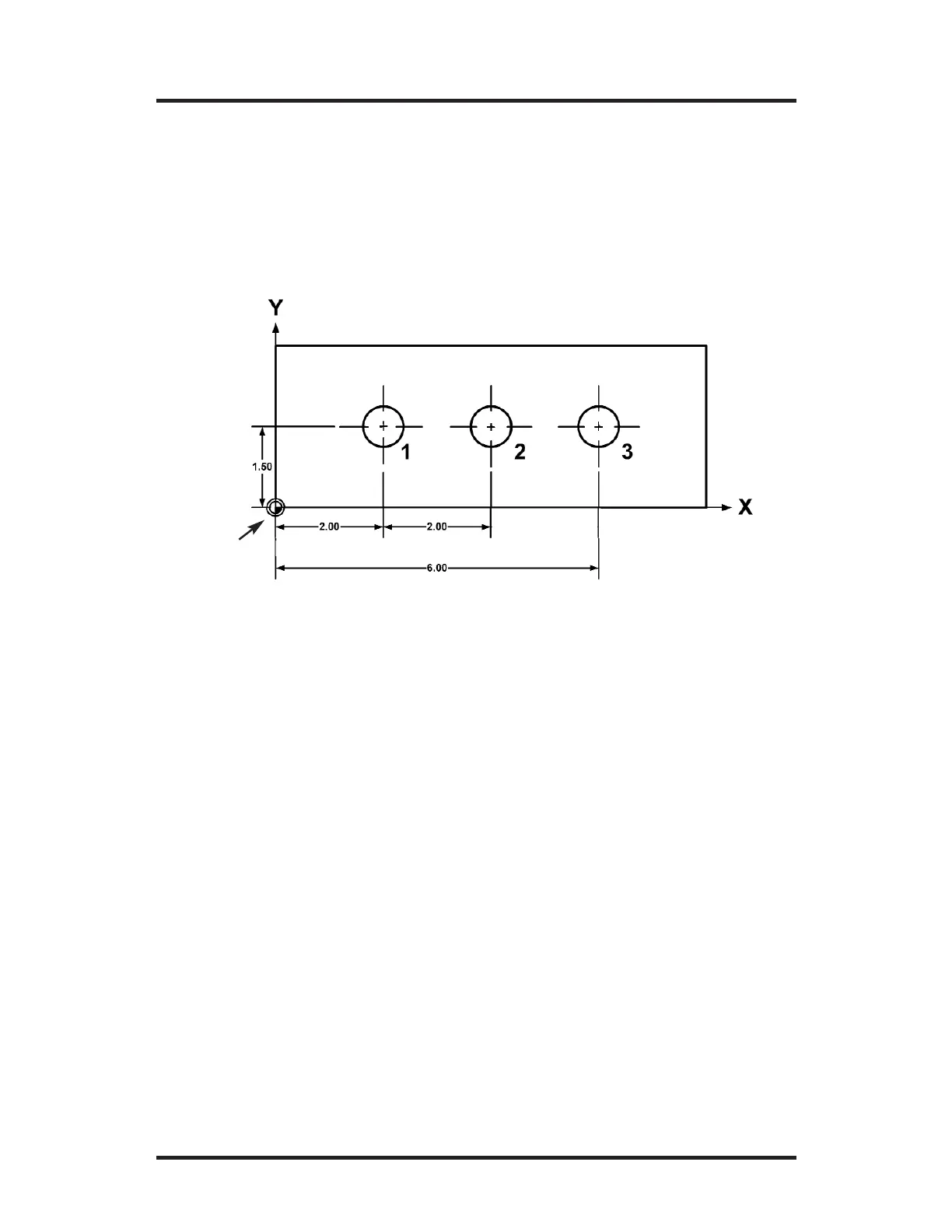
Example: Incremental & Absolute Position Presets
Hole 1 is an absolute dimension because it’s measured from datum. Hole
2 is an incremental dimension (measured from one hole to the next). Hole
3 is an absolute dimension from datum.
1. Press the
ABS/INCR key until ABS is selected on the DRO dis-
play. Also check that the system is in the “inches” mode (the MM
LED should not be lit up).
2. For Hole 1, move the table until X = 2.00” and Y = 1.5”.
Drill Hole 1.
3. Now press the
ABS/INCR key so that INCR is selected on the
DRO display.
4. Press the
X key and ensure the INCR led is lit. Enter 2 as the
incremental distance from Hole 1 to Hole 2, and then press
ENTER.
Two inches is the incremental preset distance.
5. Move the table until X = 0.000” and Y = 0.000”. Drill Hole 2.
6. Press the
X key and ensure the ABS led is lit by pressing the
ABS/INCR key. Then enter the ABS dimension 6.0 for Hole 3, then
press ENTER.
7. Move the table until X = 0.000” and Y = 0.000”. Drill Hole 3.
Datum
4. Repeat the step above for another axis or press ENTER to return
to the DRO display.
To reach the preset position, move the table until the display for each
preset axis reads “0.”



 To Next Page