Problem Possible Solution
No outdoor sensor
reception
no bars
• Relocate the display unit and/or the 3-in-1 sensor.
The units must be within 330ft (100m) of each
other.
• Make sure both units are placed at least 3 feet
(.9m) away from electronics that may interfere
with the wireless communication (such as TVs,
microwaves, computers, etc).
• Use standard alkaline batteries (or lithium
batteries in sensor when temperature is below
-4ºF/-20ºC). Do not use heavy duty or
rechargeable batteries. NOTE: It may take up to
20 minutes for display unit and sensor to
synchronize after batteries are replaced.
• Synchronize the units:
1. Bring both the sensor and display unit indoors
and remove batteries from each.
2. Reinstall batteries in outdoor sensor.
3. Reinstall batteries in display unit.
4. Let the units sit within a couple feet of each
other for about 20 minutes to gain a strong
connection.
Outdoor
temperature
is flashing or
showing dashes
Flashing of the outdoor temperature may be an
indication of wireless interference.
• Make sure the A-B-C switch in the battery
compartments of both the display unit and sensor
are switched to the same letter. You may choose
A, B or C; but both units must match to sync up.
Sometimes changing to a different channel can
help.
Inaccurate forecast
• Weather Forecast icon predicts conditions for the
next 12 to 24 hours, not current conditions.
• Has Learning Mode icon disappeared from the
display unit? Learning Mode must complete
before forecast and pressure will be accurate.
• Allow unit to run continuously for 33 days.
Battery removal or resetting the display unit will
restart Learning Mode. After 14 days, forecast
should be fairly accurate, however Learning
Mode calibrates for a total of 33 days.
Troubleshooting
12
9
Placement for Maximum Accuracy
AcuRite sensors are sensitive to surrounding environmental conditions. Proper
placement of both the display unit and the sensor are critical to the accuracy
and performance of this product.
Important Placement Guidelines
Display unit and sensor must be within 330ft (100m) of each other.
MAXIMIZE WIRELESS RANGE
Place units away from large metallic items, thick walls, metal surfaces, or other
objects that may limit wireless communication.
PREVENT WIRELESS INTERFERENCE
Place both units at least 3ft (.9m) away from electronic devices (TV, computer,
microwave, radio, etc.).
LOCATE AWAY FROM HEAT SOURCES
Position sensor away from heaters, air conditioners, chimneys, exhaust vents,
asphalt and concrete (surfaces that radiate heat).
LOCATE AWAY FROM HUMIDITY SOURCES
Avoid installing the sensor near pools, spas, or other bodies of water. Water
sources may impact humidity accuracy.
LOCATE AWAY FROM SPRINKLER HEADS
DO NOT install the sensor where it will be sprayed by a sprinkler system. This
may force water inside the sensor.
LOCATE AWAY FROM WIND OBSTRUCTIONS
DO NOT mount the sensor with obstructions around it.
Consider a location that is a wide open area, with few
structures around to ensure accurate wind speed
measurement.
Visit us online to view installation photos and
video, or learn more about AcuRite technology:
www.AcuRite.com/3in1
Display Unit Placement
Place the display unit in a dry area free of dirt and dust. To
ensure accurate temperature measurement, place out of direct
sunlight and away from heat sources or vents. Display unit stands
upright for tabletop use or is wall-mountable.
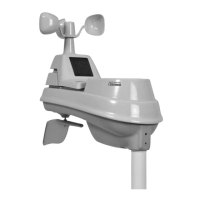
3-in-1 Sensor Placement
The 3-in-1 sensor is designed to remain outdoors all year long.
Choose an open location with no obstructions above or around
the sensor for the most accurate measurements.
View Video


 To Next Page