21
CONNECT YOUR PRODUCT
POWER
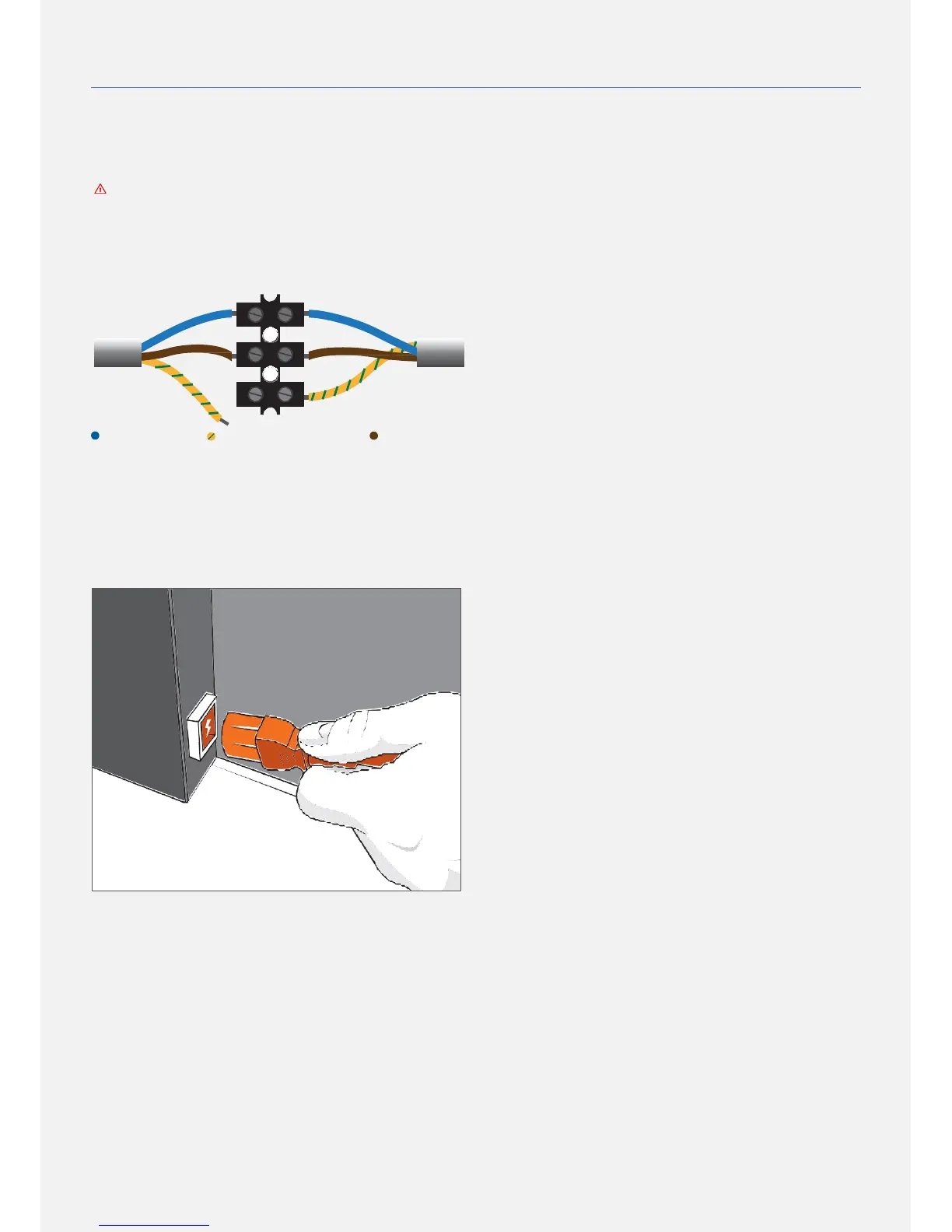
LUSTER TERMINAL AND OPEN ENDED POWER CORD
This type of electrical connections has to be performed
by a skilled technician only following local electrical and
safety regulations. Make sure that each product's
electrical component such as screen, heating foil and
lighting, have its own main circuit. Avoid connecting
them to the same mains circuit.
blue - Neutral yellow/green - Earth brown- Live
POWER CABLE
Insert the power cable into the AC socket of the product.
Make sure the power cable is securely and fully inserted.
Make sure that the power plug in the wall socket is
accessible at all times. When disconnecting the power
cable, always pull the plug, never the cable.
SCREEN EXTERNAL POWER ADAPTER (Optional)
The product should only be operated using the provided
power adapter and its power cord. Insert the DC Plug of
the external power adapter into the POWER INPUT socket
of your product. Make sure that the DC Plug is securely and
fully inserted. Insert the power cable into the MAINS socket
of the external power adapter. Make sure the power cable
is securely and fully inserted on both sides. Make sure that
the power plug in the wall socket is accessible at all times.
When disconnecting the power cable, always pull the plug,
never the cable.


 To Next Page