32
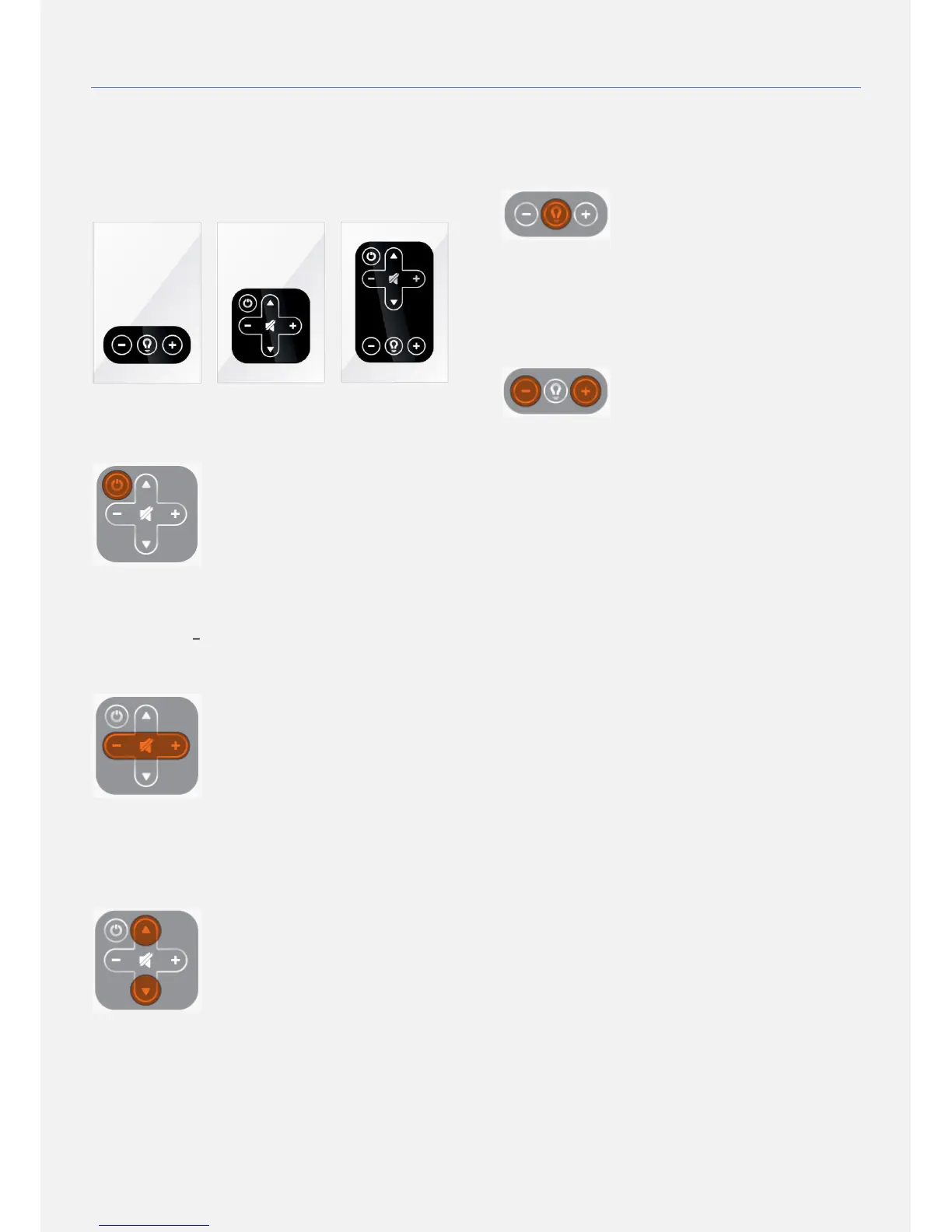
USING YOUR TOUCHPAD (OPTIONAL)
Integrated into the glass or mirror surface the touch
keypad provides a totally waterproof and vandalism-
resistant interface solution to control the basic functions of
the screen and a set top box. There are 3 different
touchpad designs based on your type of product
and functionality.
SCREEN ON/OFF
Use the power key to toggle screen power between ON
and STANDBY mode.
ADJUST THE VOLUME AND MUTE
In order to adjust the sound volume of the screen please
use the (+) and ( ) keys. The mute key will toggle between
mute mode (no sound) and un-mute mode (restores last
volume level).
SET-TOP-BOX CHANNEL UP/DOWN
Once your product is equipped with ad notam' s set-top-
box (Optional) use the up and down keys to control the
channels.
LIGHTING ON/OFF
Once your product is equipped with a lighting dimmer use
the lighting key to toggle screen power between ON and
OFF mode.
LIGHTING DIM UP/DOWN
Once your product is equipped with a lighting dimmer use
the lighting (+) and (-) keys to set the lighting brightness. A
short touch will change the brightness in one step while a
long touch will change the brightness continuously till your
release.


 To Next Page