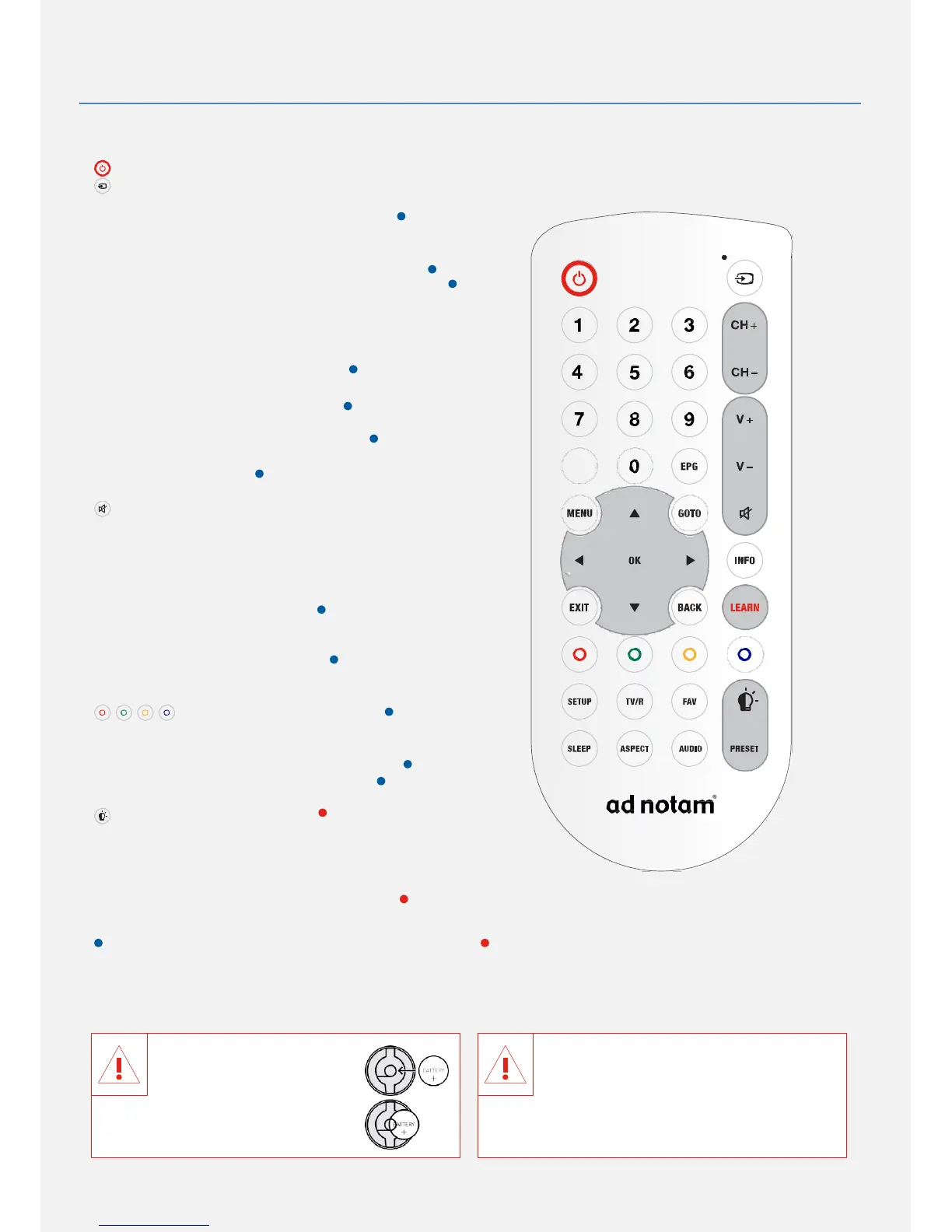
USING YOUR WATERPROOF IR REMOTE CONTROL
Switching on / off – in ready operation
Select signal input
Digits 0 – 9 Select TV program directly
In the menu: enter numbers
CH + Switch between TV channels up
CH – Switch between TV channels down
V + Increase volume
V – Decrease volume
TXT
Open / close teletext
EPG Electronic program guide
(only DTV channels)
MENU Open / close OSD menu
In the menu: cursor up
GOTO
GOTO
Mute, sound on / off
In the menu: cursor left, decrease values
OK OK – confirm selection
In the menu: cursor right, increase values
INFO Channel information /
Operation guide
EXIT
EXIT
In the menu: cursor down
BACK Previous channel
LEARN Learn individual commands
In the menu: color buttons
SETUP OSD menu of the DFU monitor system
TV/R Switch between TV and radio
FAV
Open / close favorites list
Dimmer on / off
SLEEP Sleeptimer
ASPECT Aspect ratio
AUDIO Select audio mode and audio track
PRESET Scene 1 on the Dimmer RCU
functions used for ad notam Set Top Box solutions functions used for ad notam lighting solutions
BATTERIES
Please replace the batteries if your remote signal is weak. Make sure that battery is inserted with the right +/– polarity
marking. The battery cover needs to be completely closed in order to preserve the remote\s waterproof capabilities.
Observe that the contact clip
(+) is connected correctly to
the plus pole of the battery.
If the contact clip is
positioned under the battery,
Risk of swallowing batteries! The
WATERPROOF IR remote control
contains a coin-type battery, which can
be swallowed. Keep the battery out of
reach of children at all times! Dispose of batteries


 To Next Page