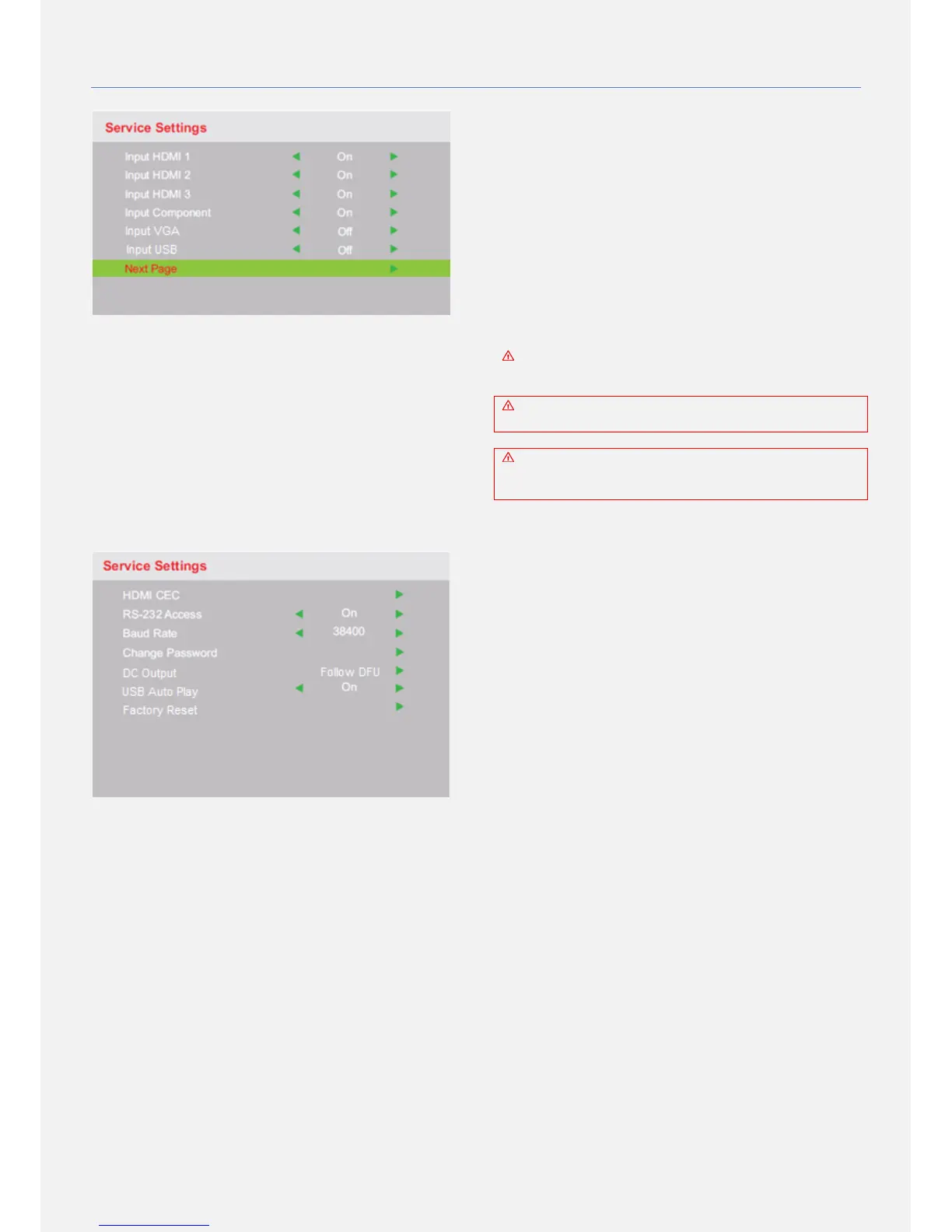
INPUT HDMI 1
INPUT HDMI 2
INPUT HDMI 3
INPUT COMPONENT
INPUT VGA
INPUT USB
Enables or disables the selected input port. Once an
input port is set OFF it will not be accessible in the
INPUT SOURCE list activated by the source key. Please
notice that if the USB input port is set OFF it will not
affect the software update functionality as it is always
possible.
HDMI CEC
(De)activate the HDMI CEC functionality of the screen.
Watch the device list of connected compatible devices and
(de)activate the auto standby function.
RS232 ACCESS
(De)activate the RS-232 functionality. With RS-232
communication the screen can be integrated with external
systems like home automation control system, building
management control systems or hospitality TV systems. For
more information regarding the RS232 protocol for this
product please visit our website at: www.ad-notam.com.
BAUD RATE
Set the screen's RS232 communication baud rate to your
preferred value, choose from 9600, 19200 or38400. By
default the baud rate is 38400.
CHANGE PASSWORD
Use this feature to change the password allowing access to
the SERVICE SETTINGS menu pages.
DC OUTPUT
Use this feature to feed DC power to SINGLE external
playout devices (DTB, IPTV, etc.).
Select Follow DFU to provide 5V or 12V to your external
playout device.
Uses on screen display (OSD) menu, (SERVICE
SETTINGS), in order to (de)activate this port.
The DC OUT port is designed to be used with SINGLE
playout device. Never connect more than one device.
The DC OUT port will feed 5VDC - 12VDC device
having 2A MAX. Never connect a device that uses
power that differs from the above specifications.
USB AUTO PLAY
Use this feature to play your movie automatically when
restarting the screen.
FACTORY RESET
This will restore all screen settings to the factory default
settings.


 To Next Page