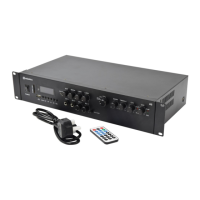
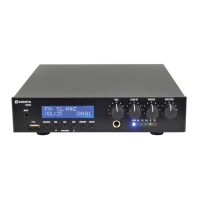
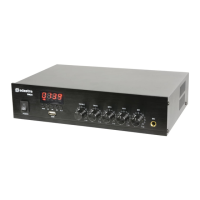
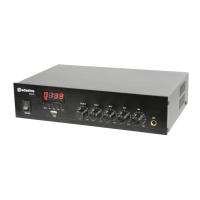
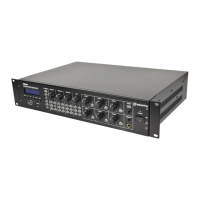
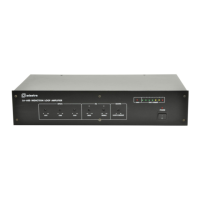
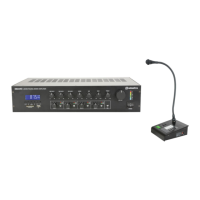
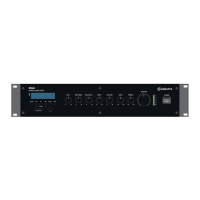
The Adastra A22 is a Class-D compact music amplifier designed to provide a flexible background music and public address solution. It features a robust set of input and output options, along with an integrated media player, making it suitable for various sound system applications.
Function Description:
The A22 serves as a central hub for audio playback and amplification. It accepts multiple audio sources, including a microphone for announcements, three auxiliary line inputs for external devices, and an integrated media player that supports USB, microSD, FM radio, and Bluetooth connectivity. The amplifier then processes and amplifies these signals, outputting them to two speaker channels and a line-out for further equipment.
Important Technical Specifications:
- Power Supply: 230Vac, 50Hz (IEC)
- Output Impedance: 4 - 8 Ohms (each channel)
- Output Power (8 Ohms): 2 x 25W RMS / 2 x 40W max. (@ 1kHz 10% THD)
- Output Power (4 Ohms): 2 x 35W RMS / 2 x 55W max. (@ 1kHz 10% THD)
- Inputs:
- Aux 1: 3.5mm stereo jack (front panel)
- Aux 2: L+R RCA (rear panel)
- Aux 3: L+R RCA (rear panel)
- Mic: 6.3mm mono jack (front panel)
- Controls: Mic Volume, Treble, Bass, Music Volume
- Audio Source: USB/microSD player, FM tuner, Bluetooth
- Antenna Connection: F-type (FM tuner)
- Dimensions: 215 x 180 x 43mm
- Weight: 820g
Usage Features:
The A22 offers a user-friendly interface with controls on both the front panel and a supplied infra-red remote control.
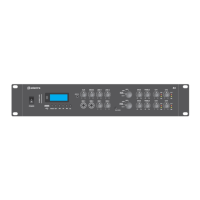
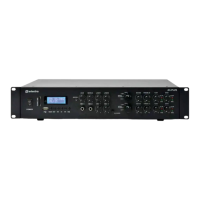
Front Panel Controls:
- Power On/Off Switch (1): Toggles the amplifier's power.
- Media Player (2): Integrated section for managing audio playback from various sources.
- Microphone Input (3): 6.3mm mono jack for connecting a wired microphone.
- MIC VOLUME Control (4): Adjusts the microphone input level.
- Music TREBLE EQ Control (5): Adjusts the high frequencies of the music and line inputs.
- Music BASS EQ Control (6): Adjusts the low frequencies of the music and line inputs.
- AUX 1 Input (7): 3.5mm stereo jack for connecting portable audio devices.
- Music VOLUME Control (8): Adjusts the overall output level of the media player and line inputs.
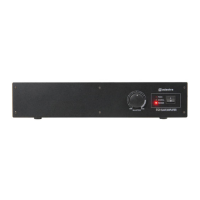
Rear Panel Connections:
- LINE OUT Output (9): L+R RCA connectors for linking to additional equipment.
- AUX 2 Input (10): L+R RCA connectors for external stereo audio sources.
- AUX 3 Input (11): L+R RCA connectors for external stereo audio sources.
- FM Antenna Connection (12): F-type connector for an external FM antenna.
- CH 1 Speaker Out (13): Screw terminals for connecting the first speaker channel.
- CH 2 Speaker Out (14): Screw terminals for connecting the second speaker channel.
- IEC Mains Power Inlet (15): For connecting to the 230Vac mains supply.
The media player section includes a LED display and several buttons:
- MODE: Selects between AUX1, AUX2, AUX3, USB/microSD playback, FM radio, and Bluetooth modes.
- REPEAT: Cycles through repeat modes (single track, folder, random, all tracks).
- EQ: Selects various equalizer presets (Pop, Classical, Rock, Jazz, Normal).
- REC: Records audio to USB or SD (from AUX or FM modes).
- Previous/Next Track: Navigates tracks or FM channels.
- Play/Pause: Controls playback.
- USB Port: For USB flash drives.
- microSD Slot: For microSD cards.
Remote Control Features:
The handheld remote control duplicates many front panel functions and adds:
- Power On/Standby: Toggles amplifier power.
- Volume Up/Down: Adjusts media player volume.
- Direct Track/Channel Access: Numeric keypad for direct selection.
Speaker Connection Guidelines:
- Connect negative speaker terminals to the negative screw terminal and positive speaker terminals to the positive screw terminal.
- Ensure the combined impedance of speakers per channel is no lower than 4Ω.
- For 4Ω speakers, connect only one per channel.
- For 8Ω speakers, connect one or two in parallel per channel (two 8Ω speakers in parallel present a 4Ω load).
- Do not connect more than two 8Ω speakers in parallel per channel to avoid damage.
- The amplifier delivers maximum power at 4Ω; higher impedances (e.g., 8Ω) will result in lower output power.
Placement Options:
The A22 is versatile in its placement:
- Under Counter Mounting: Using the supplied brackets with tabs facing upwards.
- Wall Mounting: Can be mounted directly against a wall.
- Free Standing: On any flat surface.
- 1U Rack-mounting: Two units can be mounted side-by-side in a 19" rack (requires removing self-adhesive feet and orienting one bracket forward on each unit).
Operation:
- Always turn down MIC VOLUME and Music VOLUME before powering on.
- Gradually increase MIC VOLUME when using a microphone, avoiding feedback by not pointing the microphone at speakers.
- Adjust TREBLE and BASS EQ controls to fine-tune the tonal character of music and line inputs.
- TREBLE: Clockwise boosts high frequencies, anticlockwise reduces them. Adjust to prevent screeching feedback or to clarify muffled sound.
- BASS: Clockwise boosts low frequencies, anticlockwise reduces them. Adjust to prevent howling feedback or boomy/distorted sound, or to add warmth.
- Avoid overdriving the amplifier by keeping volume and EQ levels balanced to prevent distorted output and potential damage to speakers or the amplifier.
- Turn down all volume controls before powering off to prevent loud noises.
Bluetooth Connection:
- Press the media player MODE button until "BLUE" is displayed.
- Open Bluetooth settings on your smart device.
- Scan for "A22" and select it to pair.
- Play audio from the paired device.
- Connection will resume if the device goes out of range and returns, or if Bluetooth mode is re-selected after changing modes. Re-pairing may be needed if Bluetooth is disabled or paired to another device.
Maintenance Features:
- Cleaning: The manual does not specify cleaning instructions, but general electronic device care suggests keeping it free from dust and moisture.
- Fuse Holder (15): The IEC mains inlet includes a fuse holder (F3.15A 250V), allowing for user replacement of the fuse if necessary.
- Memory Device Formatting: USB and microSD devices must be formatted to FAT32 and contain standard MP3 audio files for playback.
- Disposal: The product bears the "Crossed Wheelie Bin" symbol, indicating it is Electrical and Electronic Equipment and should not be disposed of with household waste but according to local council guidelines.

 Need help?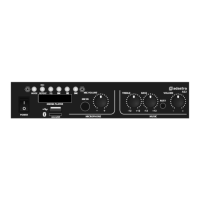

 To Next Page
 General