IRIS-4 Technical Reference Manual.docx 12/01/2023 page 43
Via SMS
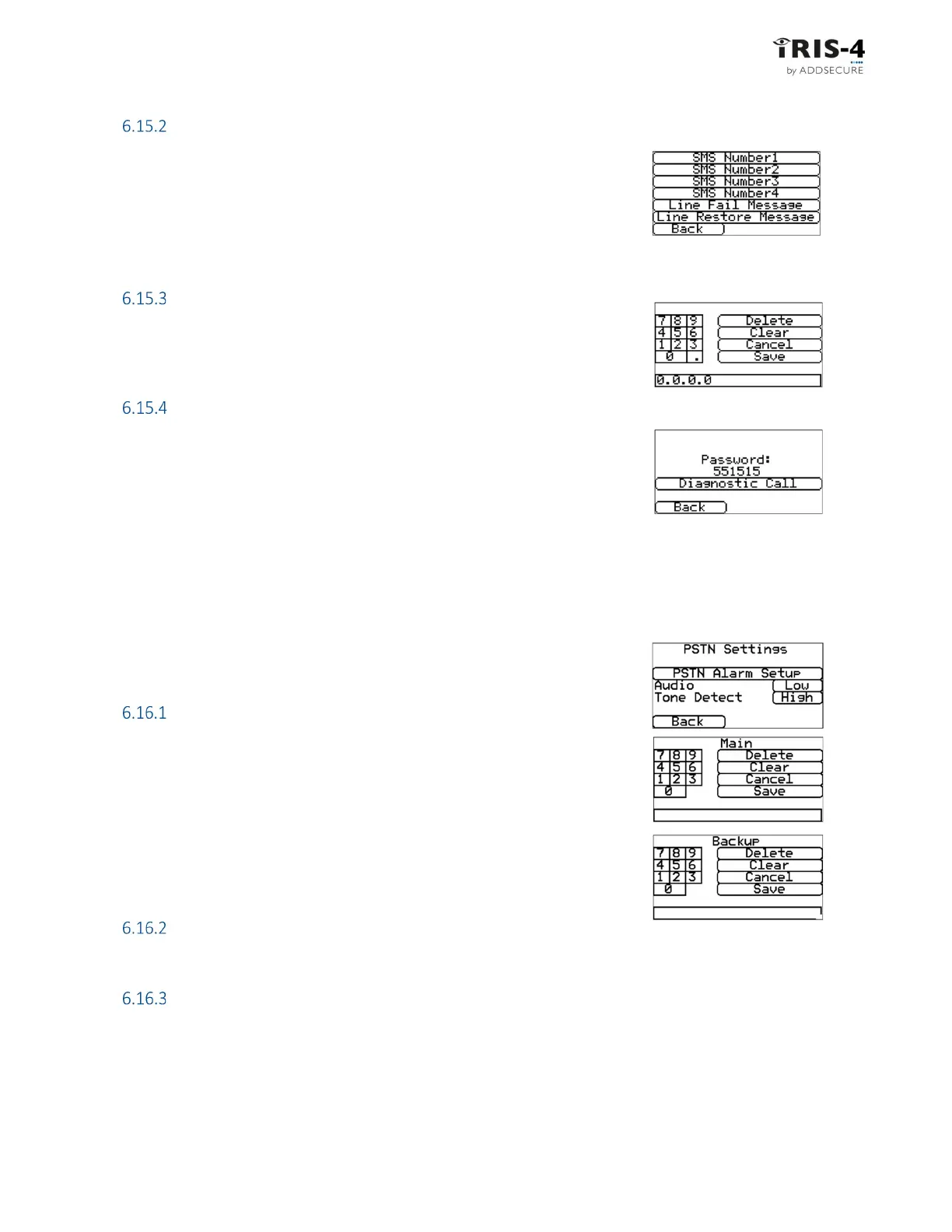
The terminal can send SMS messages via the cellular network to indicate
communication or line faults.
There are 4 SMS phone numbers that can be set up as destinations for these
SMS messages.
Click on the relevant option and enter the phone numbers, then click «Save», then «Back».
Diagnostic call IP address
This menu allows the IP address of the PC/laptop running the IRIS Toolbox
software to be entered so outbound TCP/IP diagnostic calls for remote
diagnostics can be made.
Diagnostic call
This option lets you make diagnostics calls back to the IP address entered above
for remote diagnostics to the IRIS Toolbox software.
The first time this is used, the one-time password for this remote connection
will be displayed. Take note of this password, as it may need to be passed on to
the operator of the IRIS Toolbox software.
Click «Diagnostic Call» once the password has been passed onto the operator and they are ready to receive
the call.
6.16 PSTN Settings
If PSTN was selected, the PSTN Settings menus lets you adjust how alarms are
handled over a PSTN connection.
PSTN Alarm Setup
This lets you change the phone numbers of a main and backup receiver the
terminal will use to send alarms overa PSTN line.
Audio
Sets the audio level of alarms sent over PSTN and the expected level of alarms received over PSTN.
Tone Detect
This lets you adjust the audio level of tones received over PSTN.



 To Next Page