DMX OPERATOR-I
PAGE 2 OF 7
192 CH DMX CONTROLLER USER’S MANUAL
GENERAL DESCRIPTIONS
This digital DMX controller features as 192 DMX channels. 12 scanners assigned with 16 channels each. Totally
30 banks each composed of 8 programmable scenes. 6 editable chases and every single chase can store/run
240 scenes. 8 faders adjusting channel output level. Unit can be set on MANUAL RUN, or AUTO RUN or MUSIC
RUN via the built-in microphone, or MIDI RUN to external MIDI signal. The speed and fade time for the running
fixture(s) are also settable. The unit uses DMX512 signal to control fixtures.
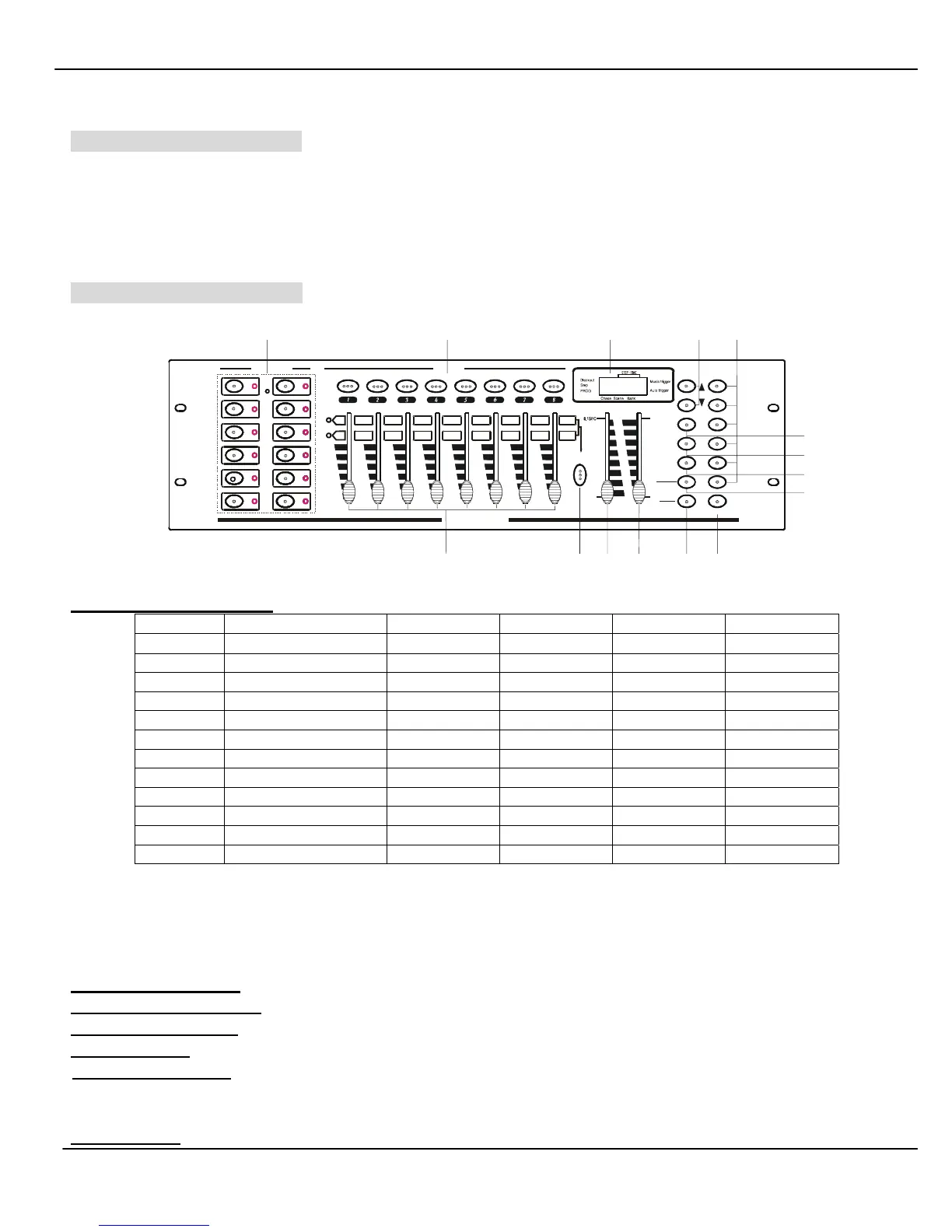
CONTROLS & FUNCTIONS
17
Page A
Chase 1
Chase 2
Chase 3
Chase 4
Chase 5
Chase 6
BLACKOUTFA DE TI MESPEED
Program
Mi di / Add
Aut o / Del
Musi c
Bank-copy
Tapsync
Di spl ay
BANK
30S
010 MIN
2
1
345678
10
9
11 12 13 14 15 16
Page B
8
9
10
11
12
2
3
4
5
6
Pa g e
Se l e c t
DMX OPERATOR
SCANNERS SCENES
8888
15 14
13
12
11
10
9 8 7
6
5
4
3
2 1
1. SCANNER buttons(1-12)
Scanners Channel Fade control LED Fade control LED
1 1-16
OFF OFF ON ON
2 17-32 OFF OFF ON ON
3 33-48 OFF OFF ON ON
4 49-64 OFF OFF ON ON
5 65-80 OFF OFF ON ON
6 81-96 OFF OFF ON ON
7 97-112 OFF OFF ON ON
8 113-128 OFF OFF ON ON
9 129-144 OFF OFF ON ON
10 145-160 OFF OFF ON ON
11 10-176 OFF OFF ON ON
12 177-192 OFF OFF ON ON
Press desired SCANNER button, corresponding LED will lit, and assigned 16 channels’ output levels
are ready to be adjusted. When scenes are running, if channel slider is positioned all the way down,
channel output level is controlled by programmed setting, if channel slider is not positioned all the
way down, channel output level is controlled by the channel slider.
2. SCENE buttons(1-8): Press to select or deselect a scene.
3. CHANNEL sliders(1-8): Adjust the channel output level from 0 to 255, or intensity from 0% to 100%.
4. Page Select button: Press to switch between pageA(contains CH1-CH8) and pageB(contains CH9-CH16).
5. SPEED slider: Adjust running speed of scenes(or steps) in range of 0.1sec to 10minutes/scene (or step).
6. FADE TIME slider: Adjust fade time in range of 0-30s. Fade time is the amount of time assigned to
behave the changing between two scenes(or steps). Such as the time it takes for a light beam to move
from one position to another position, or for dimmer to fade in or fade out.
7. LCD display:



 To Next Page