DMX OPERATOR-I
PAGE 3 OF 7
a) First digit displays the current chase#.
b) Second digit displays the current scene’s number.
c) Third and fourth digits display the current bank’s number.
d) The last 3 digits may also display the value of channel output level or number of step or
fade time value or speed value in specific mode.
e) In AUTO RUN mode, a lit LED (next to “Auto Trigger”) indicates the operation.
f) In MUSIC RUN mode, a lit LED (next to “Music Trigger”) indicates the operation.
g) In BLACKOUT mode, a blinking LED (next to “Blackout”) indicates the operation.
h) In PROGRAM mode, a blinking LED (next to “PROG”) indicates the operation.
8. BANK ▲ (or ▼) button: Scroll through Bank1 to Bank30 at one bank per pressing.
9. Chase button: Press to select or deselect a chase.
10.Program button: Press and hold Program button till corresponding LED blinks will enter PROGRAM
mode. Press and hold PROGRAM button till corresponding LED extinguishes will exit PROGRAM mode.
11.Midi/Add button: Activate/Exit MIDI operation. Or execute other functions by proper operation.
12.Auto/Del button: Activate/Exit AUTO RUN mode. Or execute other functions by proper operation.
13.Music/Bank-copy: Activate/exit MUSIC RUN mode. Or execute other functions by proper operation.
14.Tapsync/Display button: In AUTO RUN mode, set the running speed of scene. Or change value type in
LCD display in specific mode.
15.BLACKOUT button: Turn off all channel outputs.
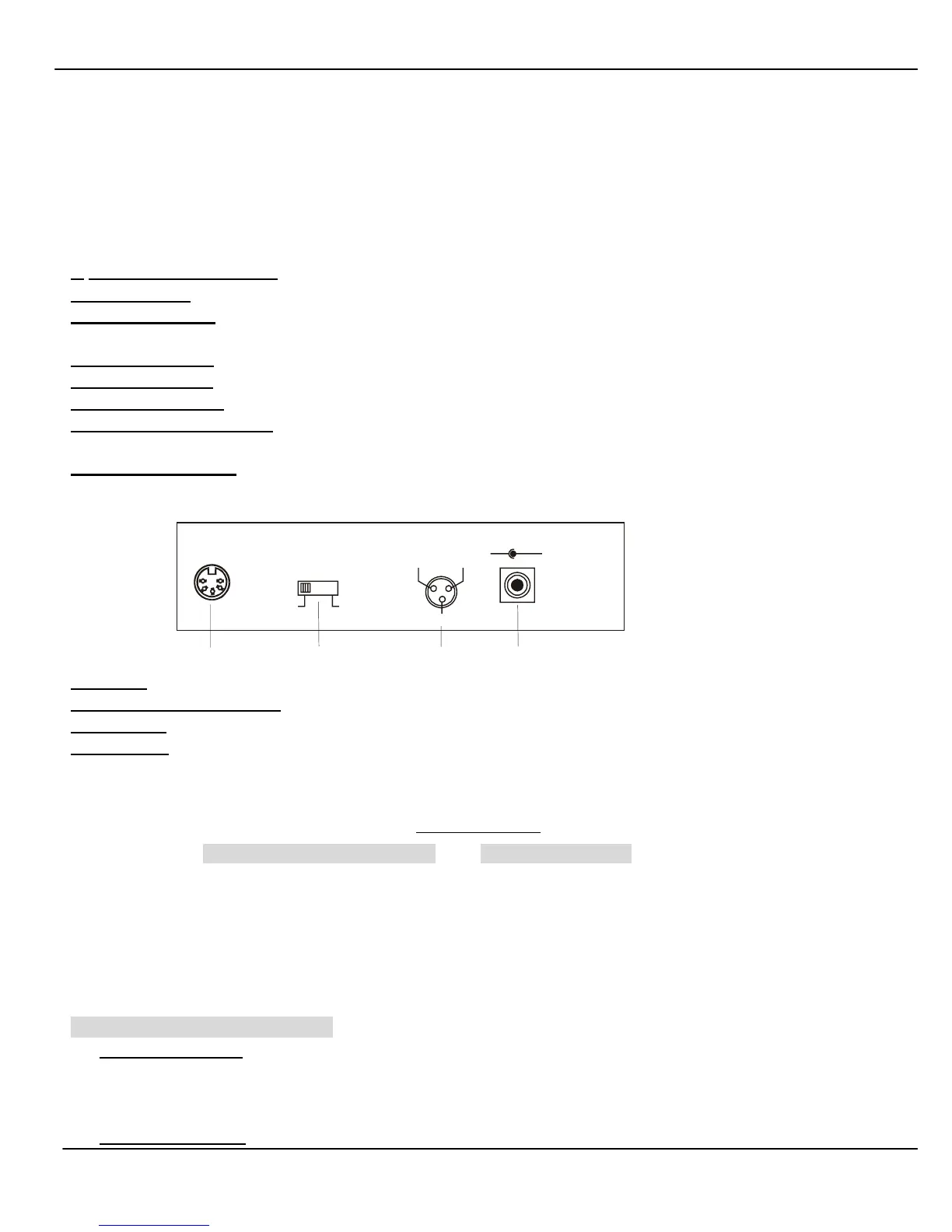
MIDI IN
DMX POLARITY
SEL ECT
21
+ 9V~ 12V,300mA min.
3
1= Ground
2= D ata -
3= DATA+
1= Ground
2= D ata +
3= DATA-
DMX OUT DC INPUT
-
+
16
17
18
19
16.MIDI IN: Use to receive MIDI control signal.
17.DMX POLARITY SELECT: Select the polarity of DMX output.
18.DMX OUT: connect to the first fixture controlled and output DMX control signal.
19.DC INPUT: Attach to the AC-DC adapter.
IMPORTANT
For operation of EDIT SCANNER/SCENE/BANK and MAKE/EDIT CHASE, first enter PROGRAM mode by
pressing and hold Program button till appropriate LED blinks, which indicates it is in PROGRAM mode. To
store the setting and exit PROGRAM mode, press and hold Program button till the appropriate LED
extinguishes.
For easy programming, SPEED and FADE TIME should be set to minimum levels. For SPEED slider, it
should be all the way up. For FADE TIME slider, it should be all the way down.
EDIT SCANNER/SCENE/BANK
1.
COPY A SCANNER
I. If a scanner (A) is set, press and hold the corresponding SCANNER (A) button (LED should lit).
II. At the same time, press another SCANNER (B) button (LED should lit), then release all buttons.
2. POGRAM A SCENE



 To Next Page