111
7
User Interfaces
JavaScript can create dialogs for simple yes/no questions and text entry, but you probably will need to
create more complex dialogs for your scripts. InDesign scripting can add dialogs and populate them with
common user-interface controls, like pop-up lists, text-entry fields, and numeric-entry fields. If you want
your script to collect and act on information entered by you or any other user of your script, use the
dialog object.
This chapter shows how to work with InDesign dialog scripting. The sample scripts in this chapter are
presented in order of complexity, starting with very simple scripts and building toward more complex
operations.
N
OTE: InDesign scripts written in JavaScript also can include user interfaces created using the Adobe
ScriptUI component. This chapter includes some ScriptUI scripting tutorials; for more information, see
Adobe CS5 JavaScript Tools Guide.
We assume you already read Adobe InDesign CS5 Scripting Tutorial and know how to create and run a script.
Dialog Overview
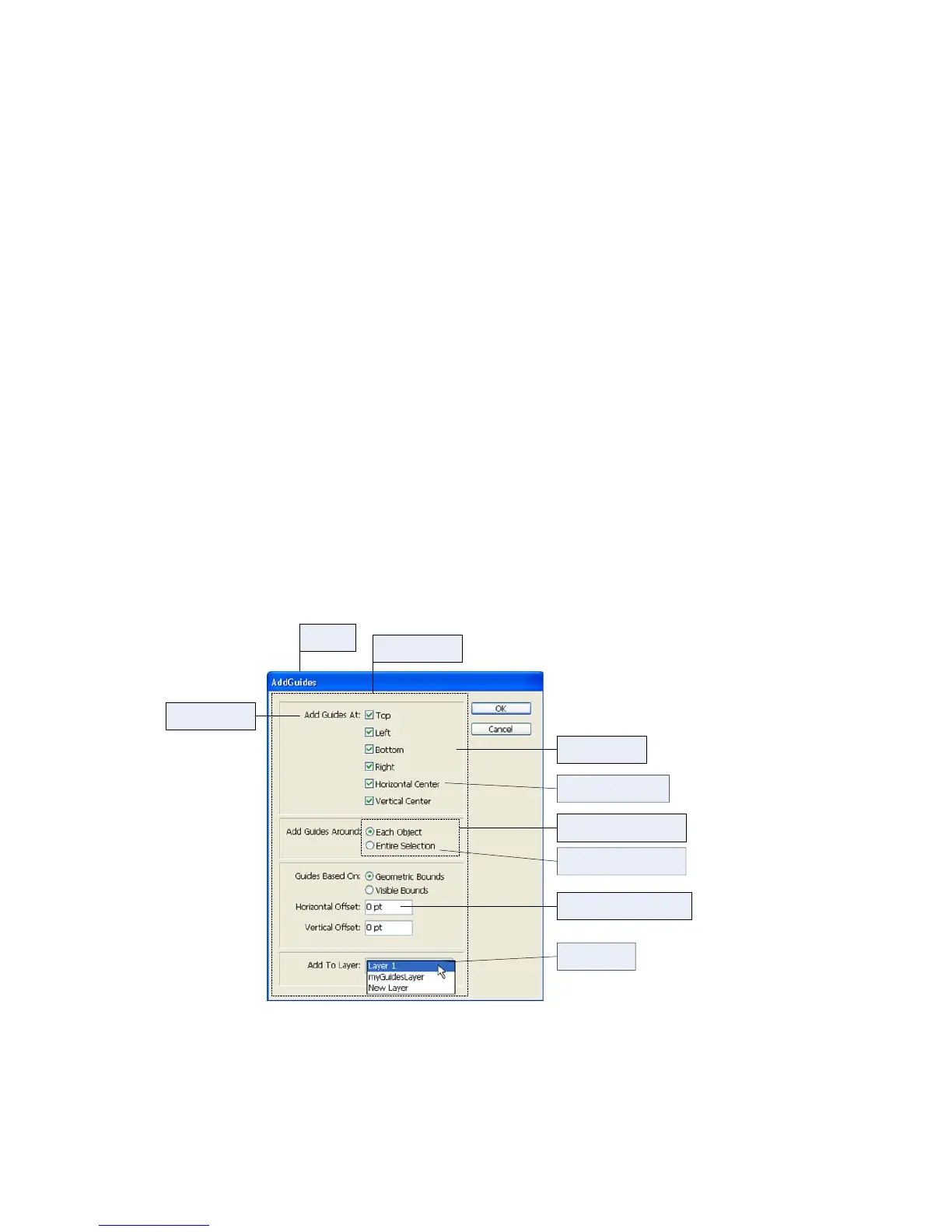
An InDesign dialog box is an object like any other InDesign scripting object. The dialog box can contain
several different types of elements (known collectively as “widgets”), as shown in the following figure. The
elements of the figure are described in the table following the figure.



 To Next Page