Version 15.0 AF-5000 Series Pilot Guide 116
EFIS Data Logs
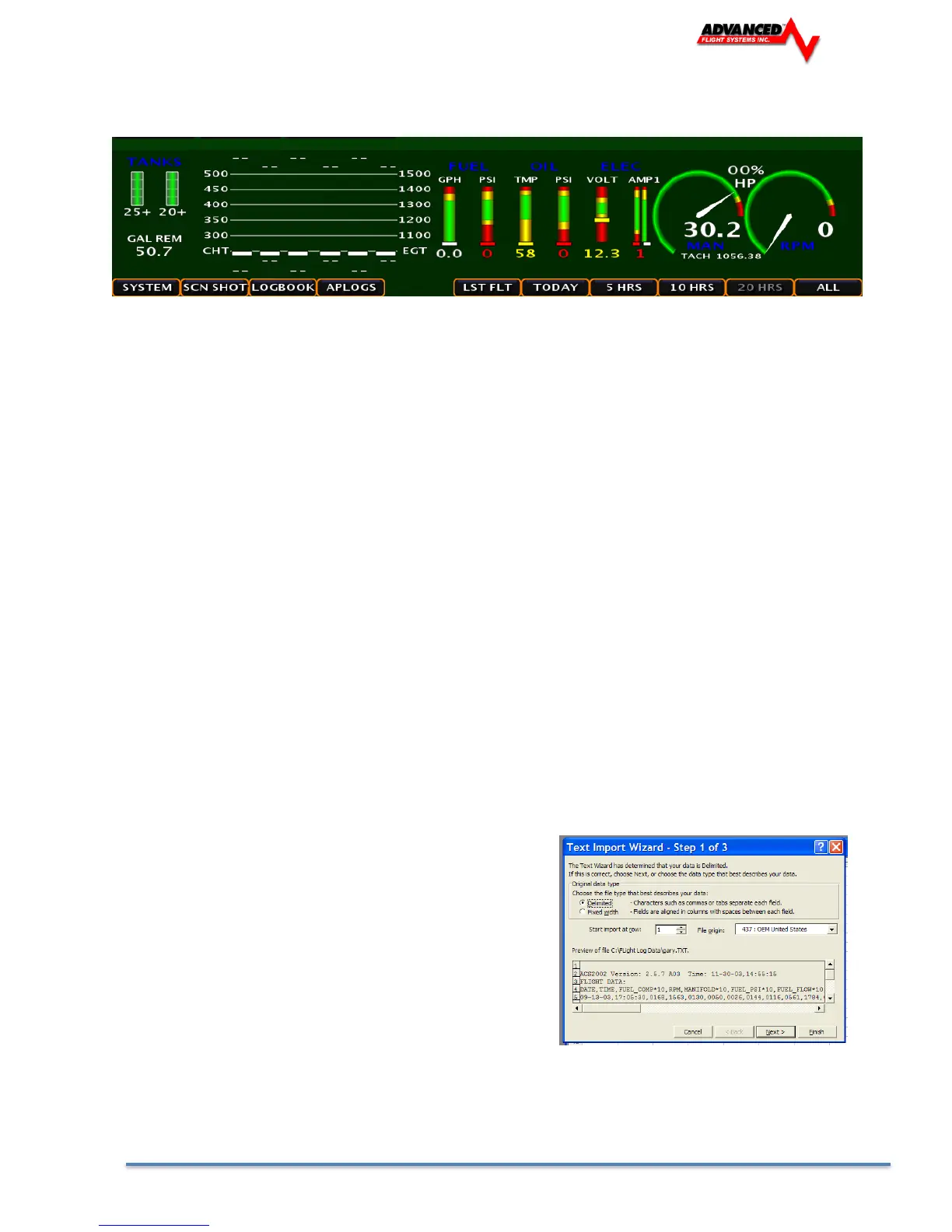
The EFIS data logs can be downloaded using the USB or SD data card from the SET > LOGS Menu.
SYSTEM System diagnostic file
SCN SHOT Screen Captures (Press and Hold the button below the joystick to capture the screen
LOGBOOK Logbook Files
APLOGS Autopilot diagnostic file
Flight Data
LST FLT Flight and Engine data from last flight (1 hz)
TODAY Flight and Engine data from todays flights (1 hz)
5 HRS Flight and Engine data from last 5 hours (1 hz)
10 HRS Flight and Engine data from last 10 hours (1 hz)
20 HRS Flight and Engine data from last 20 hours (1 hz)
ALL Flight and Engine data all saved data (1 hz)
Importing Flight Data to Excel
Once the data is saved onto a card, it can be imported into Microsoft Excel by the following procedure:
1. From Excel select File Open
2. Change the file type to All Files (*.*)
3. Open the SD drive folder
4. Select the *.ALD file to open. The data files are stored
using the following name:
ymmddhhm.ALD where
y year
mm month
dd date
hh hour
m minute
5. The Text Import Wizard should start and press Next
6. Select the Delimiters – Check Tab & Comma and then press Finish



 To Next Page