EasyManua.ls Logo

Advanced Instruments 4250 - User Manual

Advanced Instruments 4250
81 pages
Print Icon
To Next Page IconTo Next Page
Loading...
3255SM Rev24 041017
Advanced
®
Osmometer Model 3250
Advanced
®
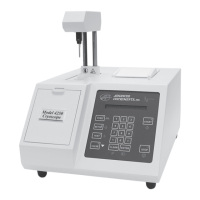
Cryoscope Model 4250
Service Manual

Questions and Answers

  • L
    Linda WillisAug 14, 2025
    How to troubleshoot a 'Block Probe Failure' on Advanced Instruments Medical Equipment?
    • H
      Haley GreenAug 14, 2025
      A 'Block Probe Failure' on your Advanced Instruments Medical Equipment usually indicates that the block probe has shorted. Check the block probe resistance (2,300 ohms ±300 at room temp.).
  • A
    Amanda HarrisAug 17, 2025
    What to do if Advanced Instruments 4250 loses power abruptly?
    • P
      Patrick SalinasAug 17, 2025
      If your Advanced Instruments Medical Equipment experiences an abrupt loss of power, ensure the power cord is firmly plugged into both the wall outlet and the socket on the back of the instrument. If the issue continues, temporarily unplug the power cord and test the outlet with a known working lamp or small appliance. Also, measure the AC voltage supplied at the power outlet. Check the fuses visually or with a continuity checker, and replace blown or incorrect-value fuses with time delay (T) fuses, referring to the instrument serial number label for the correct value. If a replacement fuse also blows, contact our product service department.
  • S
    Stanley SchwartzAug 21, 2025
    Why does my Advanced Instruments Medical Equipment say 'Recalibration Needed'?
    • T
      Thomas HartmanAug 21, 2025
      The 'Recalibration Needed' error on your Advanced Instruments Medical Equipment indicates that the calibration data has been lost from memory due to a battery back-up failure, installation of a new processor board, corruption of system memory, or new probe bin numbers. Recalibrate the instrument. If the error persists after successful calibration, replace the processor board.
  • M
    mcdowellsaraAug 25, 2025
    What to do if Advanced Instruments 4250 displays a blank screen or blinking cursor?
    • J
      jamesfloresAug 25, 2025
      If the display on your Advanced Instruments Medical Equipment is blank or has a blinking cursor, it may be due to a voltage drop. Turn the power off and on. If the problem persists, replace the application board.
  • K
    Krystal WatsonAug 27, 2025
    What to do if Advanced Instruments Medical Equipment shows 'Calibration Out of Range; Repeat'?
    • R
      Richard DavisAug 27, 2025
      The 'Calibration Out of Range; Repeat' message on your Advanced Instruments Medical Equipment means the tested samples did not repeat well enough for calibration. Recalibrate the instrument. Also, check the freeze pulse, sample size and quality, and probe alignment.
  • A
    Ashley JohnsonAug 30, 2025
    What does 'A/D Init Failure' mean on Advanced Instruments 4250 Medical Equipment and how to fix it?
    • B
      Brittany PowersAug 30, 2025
      The 'A/D Init Failure' message on your Advanced Instruments Medical Equipment indicates that one or both A/D converters lost initialization. Turn the power off and on. If the problem persists, replace the application board. You can also try resetting the baudrate in the SETUP menu.
  • L
    Leah MartinezSep 3, 2025
    What causes a 'Cooling System Error' in Advanced Instruments Medical Equipment and how to resolve it?
    • L
      Loretta PhelpsSep 3, 2025
      A 'Cooling System Error' on your Advanced Instruments Medical Equipment suggests the cooling assembly may not be functioning properly. Check the cooling assembly and ensure there is heat transfer fluid in the cooling well. Verify the control signal using LED D16. You might also let the unit warm up and try Power On Diagnostics again.
  • R
    Richard ParsonsSep 6, 2025
    What does it mean if my Advanced Instruments 4250 Medical Equipment says 'Test Cancelled'?
    • C
      Christopher SmithSep 6, 2025
      If your Advanced Instruments Medical Equipment displays 'Test Cancelled', it means the STOP button was pressed during the test. Retest with a fresh sample.
  • L
    Lori WebsterSep 9, 2025
    What does 'RAM Failure' mean on Advanced Instruments Medical Equipment?
    • G
      Glenn BaileySep 10, 2025
      A 'RAM Failure' message on your Advanced Instruments Medical Equipment indicates that the main board has failed. Replace the processor board.

Summary

1. Introduction

Model 3250 Osmometer Specifications

Details technical specifications for the Model 3250 Osmometer.

Model 3250 Osmometer Specifications (Suffix D and Higher)

Technical specs for Model 3250 Osmometer, serial suffix D and higher.

Model 4250 Cryoscope Specifications (Suffix A - C)

Details technical specifications for the Model 4250 Cryoscope.

Model 4250 Cryoscope Specifications (Suffix D and Higher)

Technical specs for Model 4250 Cryoscope, serial suffix D and higher.

Service Assistance

Provides contact information and procedures for technical support and service.

Safety and Regulatory Information

Outlines crucial safety precautions and regulatory compliance for instrument operation.

General Cautions

Lists general warnings and precautions for safe instrument use.

Service and Maintenance Cautions

Specific safety warnings for performing service and maintenance.

Hazardous Material Cautions

Warnings and guidelines for handling hazardous materials related to the instrument.

2. General Overview

3. Calibration

3250;4250 Circuit Description

Design Changes

Replacement Parts

3. Maintenance

Cleaning and Maintenance

Instructions for cleaning the instrument and its components.

Probe & Stir;Freeze Wire Alignment

Instructions for aligning the probe and stir/freeze wire for accurate measurements.

4. Troubleshooting

Freeze Buzz Amplitude

Guide to checking and adjusting the freeze amplitude setting.

Stir Driver Noise

Identifies and addresses issues related to stir driver noise and signal quality.

Head Sensor Adjustment

Procedure for adjusting the head position sensors for proper operation.

A;D Tests

Procedures for performing analog-to-digital tests on probes and cooling assembly.

Stir Amplitude

Procedure for checking and adjusting the stir amplitude.

Instrument Software Updates

Information and procedures for updating the instrument's software.

Troubleshooting Table

Comprehensive table listing symptoms, explanations, and suggested actions for common problems.

5. Replacement Instructions

Advanced Instruments 4250 Specifications

General IconGeneral
Measurement PrincipleFreezing Point Depression
Measurement Time90 seconds
DisplayLCD
TypeOsmometer
Measurement Range0-4000 mOsm/kg H2O
Resolution1 mOsm/kg H2O
Accuracy±2 mOsm/kg H2O
Operating Temperature15-30°C
CalibrationAutomatic
Data OutputRS-232
Power Requirements100-240 VAC, 50/60 Hz
Cooling MethodThermoelectric

Related product manuals