Need help?
Do you have a question about the Advanced Instruments ARTEL PCS and is the answer not in the manual?
Connect power and USB cables for the PCS instrument to the computer.
Connect power and serial cables for PCS2/PCS3 instruments.
Steps to install a replacement EEPROM card for ArtelWare compatibility.
Set PCS2/PCS3 instruments to 'Link to Computer' mode for ArtelWare.
Guidelines for cleaning vials to ensure accurate calibration results.
Proper storage conditions for the QualAssure Kit and solutions.
Procedures for using, disposing of, and handling QualAssure solutions.
Instructions for handling and protecting PCS Calibrator Kit components.
Understanding system status indicated by the PCS instrument's light bar.
How to use the scanner to identify consumables during operations.
Using the touch bar to control the PCS instrument lid.
Steps within the 'Get Started' bar to add a new PCS instrument.
Entering essential information for a new PCS instrument.
Choosing between scheduled or ad-hoc calibration for the instrument.
Steps to perform instrument calibration using calibrator kit vials.
Adding a new pipette as a device in ArtelWare via the 'Add Device' screen.
Browsing and selecting pipette models from the ArtelWare catalog.
Defining the name and description for a new calibration plan.
Setting replicates, tolerance source, and evaluation criteria.
Choosing the type of schedule to create (e.g., Pipette Calibration, Operator Training).
Defining frequency and due date rules for recurring schedules.
Selecting pipettes, operators, or instruments for a schedule.
Specifying the initial due date for a newly created schedule.
Starting pipette calibration from the Home screen's 'Pipettes' or 'Calibrate Pipette' options.
Choosing the PCS instrument and calibration method.
Measuring dispensed volumes without creating a formal calibration plan.
Performing calibration without affecting future due dates.
Configuring the calibration type and reason for uploading external data.
Browsing and uploading calibration files from external sources.
How ArtelWare creates and displays reports from uploaded external data.
Setting the name and description for an operator training plan.
Defining replicates, tolerance source, and evaluation criteria for training.
Naming and specifying the type for an operator training schedule.
Linking specific operators and training plans to a schedule.
Starting a trainer-led training session for an operator.
Entering operator credentials and selecting instrument/pipette for training.
Starting an operator self-assessment session.
Choosing the PCS instrument and pipette for self-assessment.
Setting up a balance as a new instrument in ArtelWare.
Verifying connection and retrieving the serial number for a balance.
Procedures for adding, managing, and printing labels for pipettes.
Managing user permissions, accounts, and calibration schedules.
How to filter the Home screen view for calibration items.
Using the Help button to access topic-specific information and the full User Guide.
The Artel Pipette Calibration System (PCS) is a sophisticated instrument designed for accurate and reliable pipette calibration and operator training. It integrates with ArtelWare software to streamline the calibration process, manage data, and ensure compliance with quality standards. The system supports various pipette types, including single and multichannel pipettes, dispensers, and burettes, and can also be used with automated liquid handling robots.
The primary function of the PCS is to perform precise volume measurements for pipette calibration and verification. It utilizes Artel's proprietary ratiometric photometry technology, which measures the absorbance of two dyes in a solution to determine dispensed volume. This method offers high accuracy and traceability, crucial for laboratories requiring stringent quality control. The PCS can be configured for both scheduled and ad hoc calibrations, allowing for flexibility in managing pipette maintenance. It also facilitates operator training and assessment, ensuring that personnel are proficient in pipetting techniques.
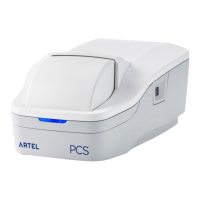
The PCS instrument features a user-friendly design with a status light bar, an integrated barcode scanner, and a touch bar. The status light bar provides visual cues about the instrument's connection status and operational state. Solid illumination indicates an idle, connected state, while fast pulsing signifies an active reading or communication with the software. Slow pulsing indicates a disconnected state or an error.
The integrated barcode scanner is a key feature for efficient workflow during calibrations and operator trainings. It activates automatically when needed, prompting the user to scan consumables such as vials and QualAssure solutions. For optimal scanning, items should be positioned between 2 and 5 inches (5 to 13 cm) from the scan window. This automation reduces manual data entry errors and speeds up the process.
A touch bar on the instrument allows users to close the PCS lid after dispensing solutions or replacing vials, as instructed by the ArtelWare software. This interactive element guides the user through the calibration steps, making the process intuitive.
Connecting the PCS instrument to a computer is straightforward, requiring power and a USB cable. For PCS2/PCS3 instruments, serial cables are used. Upon initial connection, Microsoft Windows automatically installs necessary drivers for the barcode scanner and the PCS instrument.
ArtelWare software provides a comprehensive interface for managing the PCS. Users can add and configure PCS instruments, including older PCS2/PCS3 models that may require an EEPROM card replacement. The software guides users through setting up instruments in "Link to Computer" mode, which is essential for communication between the PCS and ArtelWare.
Adding pipettes to the system involves selecting the appropriate pipette type from a catalog of over 2000 models, entering a unique Pipette ID for traceability, and assigning a location and owner. This structured approach ensures that all pipettes are properly documented and tracked.
Calibration plans can be created within ArtelWare to define specific calibration procedures, including the number of replicates and target volumes. Users can choose tolerance sources such as manufacturer specifications, ISO specifications, or user-defined limits. The software also allows for the creation of various schedules, including pipette calibration, ALH verification, operator training, instrument calibration, and external pipette calibration, with customizable repetition options.
Performing pipette calibrations with the PCS involves selecting the pipette, choosing a calibration type (scheduled, ad hoc, or quick check), and following on-screen instructions to scan and insert calibrator kit vials. The software guides the user through each step, ensuring proper execution.
The system also supports unscheduled volume measurements, allowing users to quickly measure dispensed volumes without requiring a full calibration plan. While these measurements are not recorded in the system database, they provide immediate feedback on pipette performance.
Proper storage and handling of PCS consumables are vital for accurate results. QualAssure Kits should be stored at room temperature (15 °C to 25 °C) in the dark. If solutions freeze, they must be allowed to equilibrate and be mixed gently before use. It's crucial to transfer QualAssure solutions to an aliquot container for pipetting and dispose of any unused solution, never returning it to the original bottles. All QualAssure bottles and aliquot containers should be tightly capped when not in use.
Vial cleaning is an important maintenance step. Vials should be free of fingerprints and smudges. They can be cleaned by holding them by the cap and wiping the lower portion with a lint-free wipe. For visible smudges, HPLC-grade isopropyl alcohol on a lint-free wipe is recommended.
For PCS2/PCS3 instruments, components of the PCS Calibrator Kit should not be exposed to light. Calibrator vials need to be equilibrated within the vial block for 15 minutes before use, as these instruments lack an integrated infrared temperature sensor.
ArtelWare also facilitates the uploading of external calibration records, allowing laboratories to integrate data from third-party services or instruments. This feature ensures a comprehensive record of pipette calibration history within the ArtelWare system.
Operator training is a key aspect of maintenance, ensuring that users are proficient in pipetting. ArtelWare allows for the creation of training plans and schedules, supporting both trainer-led and self-assessment trainings. First-time operators are required to change their initial password for security.
The system also supports adding and configuring balances, particularly those using the SICS protocol, for calibrating large volume pipettes. This expands the range of pipettes that can be managed within ArtelWare.
For troubleshooting and support, ArtelWare includes a comprehensive help system accessible via a dedicated help button, providing topic-specific guidance and a full user guide. This ensures that users can quickly find answers to their questions and maximize the utility of their Artel systems.
 General
| Application | Pipette calibration and performance verification |
|---|---|
| Calibration | Traceable to international standards |
| Data Analysis | Automated data analysis and reporting |
| Data Storage | Internal storage with export capabilities |
| Display | Integrated touchscreen display |
| Power Supply | 100-240 VAC, 50/60 Hz |
| Operating Temperature | 15°C to 30°C |

 To Next Page