Installation and Operation Manual S400 series 12
An alarm can be cancelled and inhibited for 3 minutes by pressing on any key on the keypad.
After this period, a new alarm may be triggered when the measurement sensor once again
exceeds the programmed thresholds.
Several devices interconnected on the bus, can be used to relay a sensor alarm to other
compatible displays present on the network. Example: a boat speed alarm can be viewed on all
"MULTI" displays present on board.
The Depth and Boat speed data can be monitored by configuring high and low alarm
thresholds.
The Battery voltage data can be monitored by configuring the low threshold alarm.
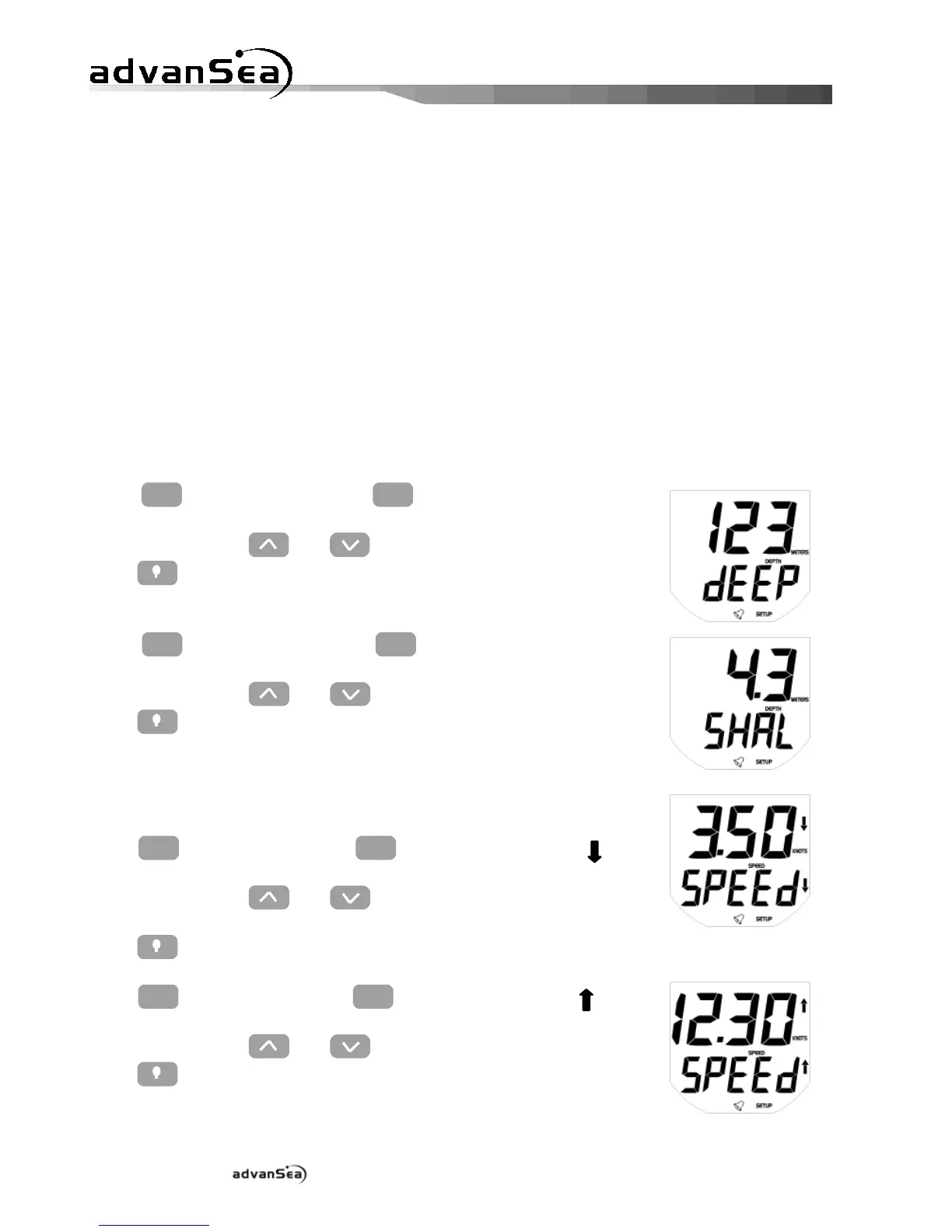
2.3.1. Setting the depth alarm thresholds
Press
to display the "dEEP" high
threshold page for the sounder, then adjust the required value of the
threshold using the and keys.
Press to exit setup mode, or time out after 10 seconds.
Press
to display the "SHAL" low
threshold page for the sounder, then adjust the required value of the
threshold using the and keys.
Press to exit setup mode, or time out after 10 seconds.
2.3.2. Setting the speed alarm thresholds
Press
to display the "SPEEd " low
threshold page for the speed, then adjust the required value of the
threshold using the and keys.
Press to exit setup mode, or time out after 10 seconds.
Press
to display the "SPEEd " high
threshold page for the speed, then adjust the required value of the
threshold using the and keys.
Press to exit setup mode, or time out after 10 seconds.


 To Next Page