14
V. Menu Navigation
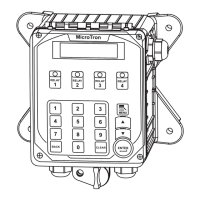
To access the menus press the Set Up / Run key on the front panel. This takes you to the Home menu.
box on the screen. Once you have stepped through the sub menus to reach a point at which a value or
selection is made a Pop-up window will appear prompting you to enter a desired value or selection.
NOTE: When entering new numeric values, enter all available digits (characters).
1. Home Menu
From the HOME menu select the desired menu.
The menu name explains what parameters can be
programmed in the menu.
SET POINTS - Setting control set points for conductivity, temperature, pH and ORP.
CALIBRATION - Calibrating conductivity, temperature, pH and ORP if present.
TIMERS - Menu for selecting type and settings for all present feed timers.
CUSTOMIZE
ALARMS - View current alarms.
DAY/TIME - Menu for setting date and time.
CONFIGURE
switch, contrast, temperature scale.
HISTORY - Allows for view history on board in a graph form.
WATER METER
RELAYS
2. Set Points
conductivity systems will also have an additional menu step for programming the sampling method desired
from continuous, timed or sample and hold.
SET POINTS - For setting the relay set points for the
available analog probe readings such as conductivity,
pH, ORP, or temperature.
NOTE: In the Setpoint pop-up screen the direction (Rising or Falling) of the setpoint can also be set. Rising
setpoints will activate the control relay when the particular probe reading rises above the setpoint and will
activated when the probe reading falls below the setpoint and stays on until the probe reading comes back
>HOME SETUP<
SETPOINTS DATE/TIME
CALIBRATION CONFIGURE
TIMERS HISTORY
CUSTOMIZE WATER METER
ALARMS RELAYS
>SYSTEM 1 SET POINTS<
SYSTEM COND mA OUT
SYSTEM TEMP mA IN
SYSTEM pH AUX INPUTS
SYSTEM ORP


 To Next Page