Section II - Product Use
21
How to Install a Battery Pack (all-in-one type)
1. To replace an all-in-one type cartridge…
(1) Check for all-in-one type cartridge
- Check the expiration date on the sealing film of an all-in-one
cartridge.
- An expired all-in-one cartridge cannot be used in an emergency.
- If the protection film or the case of an all-in-one cartridge is
damaged, you should exchange it for a new one.
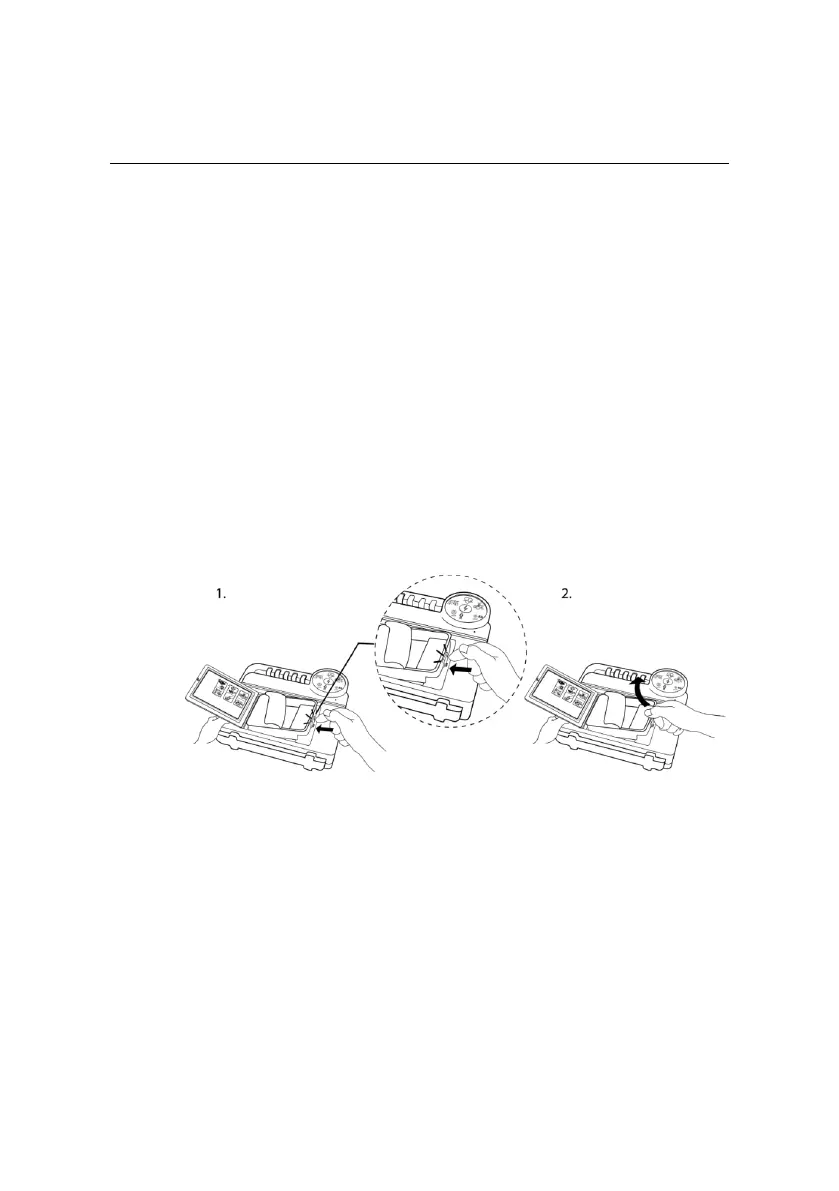
(2) How to replace an expired all-in-one type cartridge
- After removing the sealing film of electrode pads, push the inner
lock and pull up, then the cartridge will be separated from the
body.
(3) The way to install a new all-in-one cartridge.
- Use the all-in-one cartridge provided by NANOOMTECH only.
- As seen in the picture below, insert it from top to bottom with
the sealing film side upward.
- Push it until a click sound is heard.


 To Next Page