Section II - Product Use
35
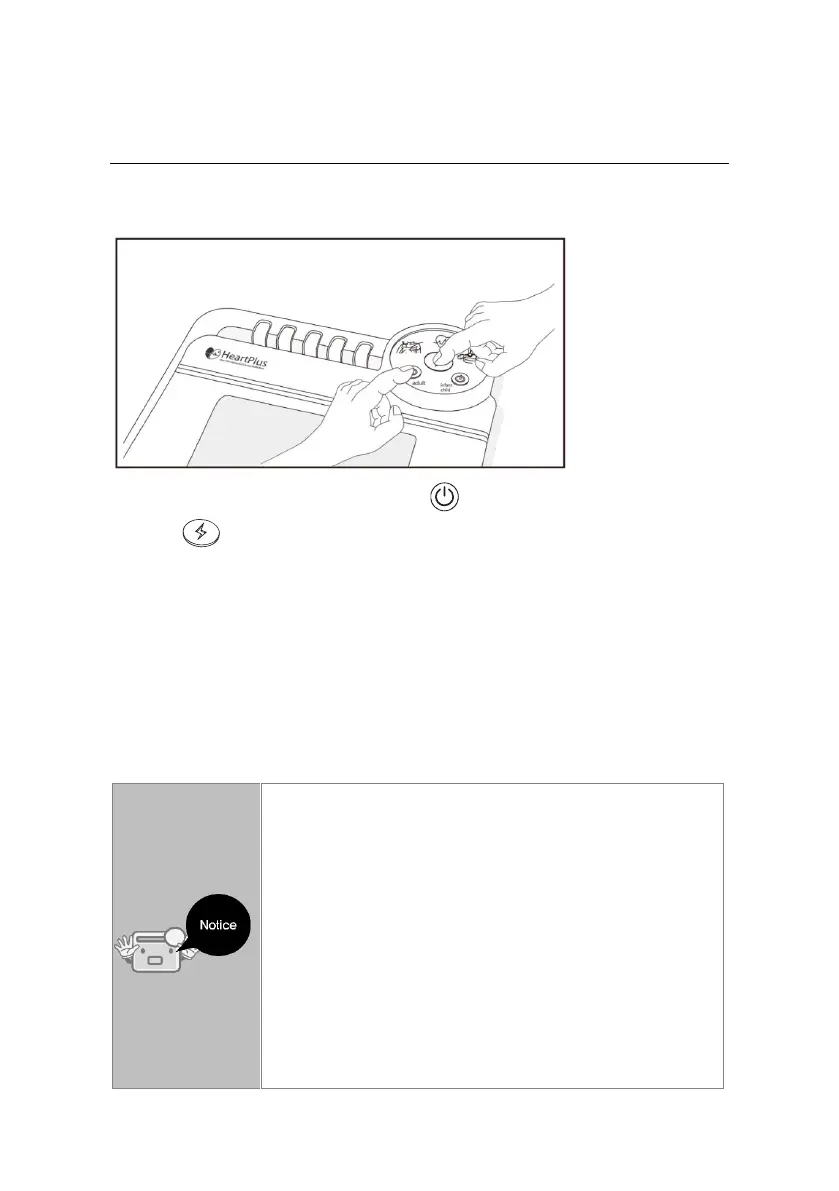
PC Communication
1. Make sure the equipment power is off.
2. Push both Adult power button ( ) and the defibrillation shock
button ( ) at the same time for one second.
3. Electrode pads attachment, ECG analysis, and CPR lamps are lit
together.
4. For USB connection: Plug USB cable into the USB connecting terminal
on the right side of the main body.
Electrode pad attachment, ECG analysis, and CPR lamps are lit together.
Find the recorded data using the data management program NT-MPR.
Make sure the power is OFF.
Once HeartPlus™ is used on site, the surrounding
sound is automatically recorded and it is kept until a
user deletes it.
After making a backup of the recorded surrounding
data delete it so that a user can obtain the storage
capacity for next recording.
If you don’t delete the saved data, the record will not
be done when you operate the equipment.
(The voice record is possible only when there is no
voice Data around the equipment.)


 To Next Page