33
This Scalar operation uses a Scalar value of 1.8 and an offset value of 32. Applying this Operation results in the
following math expression.
CoolantTemp F = (CoolantTemp*1.8) + 32
This is a simple unit conversion for converting degrees C to degrees F.
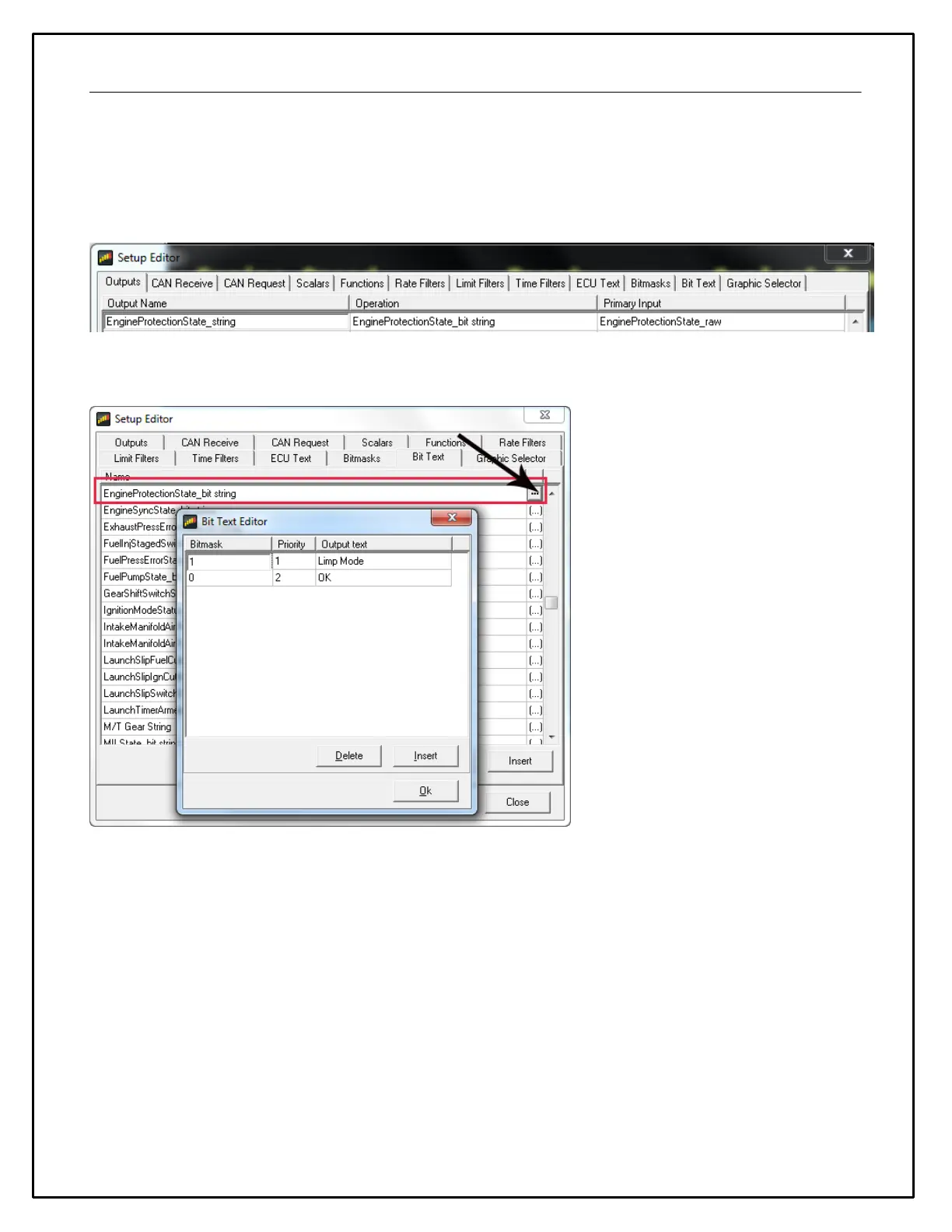
The next example uses EngineProtectionState_raw as the Primary Input. This input has two possible values with
are 0 or 1. A Bit text operation is used to convert these values into text texts that can be displayed on the dash.
Shown above, the Bit text operation performs the following transformation:
If EngineProtectionState_raw = 1, EngineProtectionState_text = Limp Mode
If EngineProtectionState_raw = 0, EngineProtectionState_text = OK
CAN Receive
The Dash is a CAN display dash. The CAN receive tab of the Setup Editor must be defined for proper functionality.
The steps involved in defining a CAN message structure from scratch is outside the scope of this manual. However,
the system includes a robust CAN .dbc import feature that greatly simplifies the process.



 To Next Page