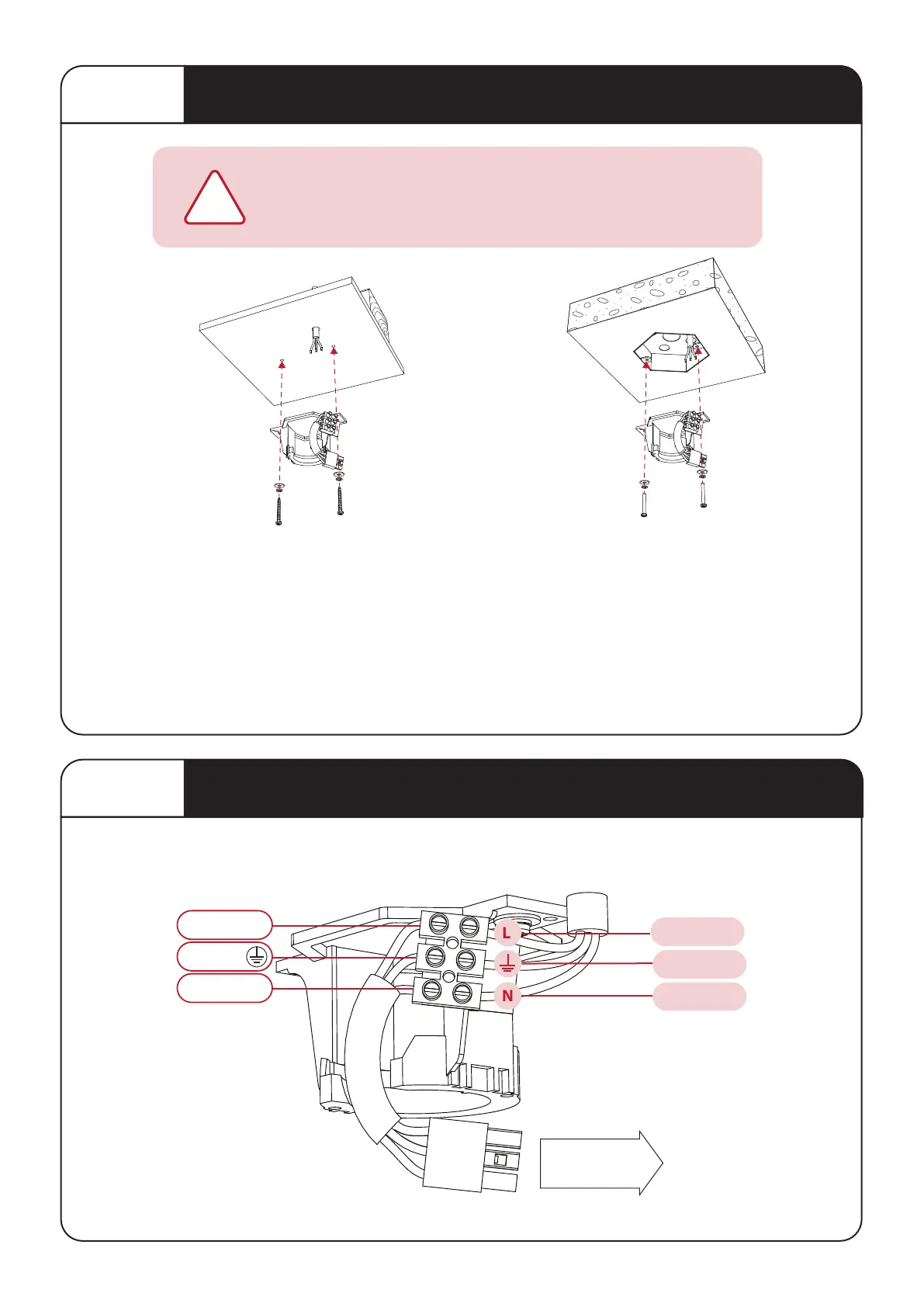
STEP 1
Mounting Hanger Bracket to Ceiling
Before commencing installaon, turn off electricity
supply at the main power box. Disconnect power by
removing fuse or turning off circuit breaker.
!
Install hanger bracket to ceiling joist or Mounng Box embedded in concrete using the screws and washer
provided. Ensure ceiling joists are sound and of adequate size and strength to support a 35Kg (77lbs) load. If a
mber frame is to be added it must be securely nailed or screwed between two beams.Proper care must be
taken when mounng to concrete ceilings. For safe mounng these ceilings may require plasc plugs / anchors
and stronger screws.
WARNING: MOUNT ONLY TO AN OUTLET BOX MARKED ACCEPTABLE FOR FAN SUPPORT.
This fan is to be installed so that the blades are more than 2.3m above the floor
OPTION A:
Ceiling Joist
OPTION B:
Embedded
Mounng Box
STEP 2
Connecting Mains Power to Terminal Block
FROM HOUSE
(Mains Power)
TO RECEIVER
GREEN
BROWN
L
NEUTRAL
LIVE
L
LIVE
BLUE
N
LIVE
GROUND
N
L
4



 To Next Page